
只删除输入元素的一个边框,而不影响其他边框。
只删除输入元素的一个边框,而不影响其他边框。
提问于 2013-09-22 14:57:44
下面的脚本(也位于http://jsbin.com/enOxEya/1/)的目的是移除正确的边框。
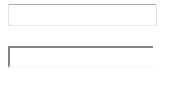
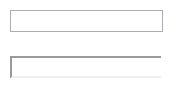
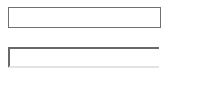
然而,对于FF、Chrome和IE,它的左边框和顶部边框都是粗体。
此外,对于FF,它移除底部的边框,对于Chrome和IE,它会遮住底部的边框。
见每个浏览器的图像(所有浏览器都是最新的)
来自FF的结果
铬的结果
IE的结果
将边框样式“无”仅用于顶部、底部和左侧边框,也会对所有浏览器产生意外的结果。
如何在不影响其他三个边界的情况下移除单个边界(即正确的边界)?
<!DOCTYPE html>
<html>
    <head>
        <title>Boarders</title>
        <style type='text/css'>
            #input2 {border-right-style:none}
        </style>
    </head>
    <body>
        <input id="input1" />
        <br />
        <br />
        <input id="input2" />
    </body>
</html>回答 2
Stack Overflow用户
回答已采纳
发布于 2013-09-22 15:14:20
试试这个,效果很好
只需替换
<style type='text/css'>
            #input2 {border-right-style:none}
        </style>
有了这个
<style type='text/css'>
            #input2 {border-style: solid none solid solid}
        </style>
希望这能帮到你。
Stack Overflow用户
发布于 2013-09-22 15:16:33
试试这个:
DEMO
<!DOCTYPE html>
<html>
<head>
<title>Boarders</title>
<style type='text/css'>
#input2 {
    border: 1px solid #ABADB3;
    border-right: 0;
}
</style>
</head>
<body>
<input id="input1" />
<br />
<br />
<input id="input2" />
</body>
</html>页面原文内容由Stack Overflow提供。腾讯云小微IT领域专用引擎提供翻译支持
原文链接:
https://stackoverflow.com/questions/18945156
复制相关文章
相似问题
腾讯云开发者

Copyright © 2013 - 2026 Tencent Cloud. All Rights Reserved. 腾讯云 版权所有
深圳市腾讯计算机系统有限公司 ICP备案/许可证号:粤B2-20090059  粤公网安备44030502008569号
腾讯云计算(北京)有限责任公司 京ICP证150476号 | 京ICP备11018762号