
Slidify:代码对齐
我对两列幻灯片中的代码对齐有问题。
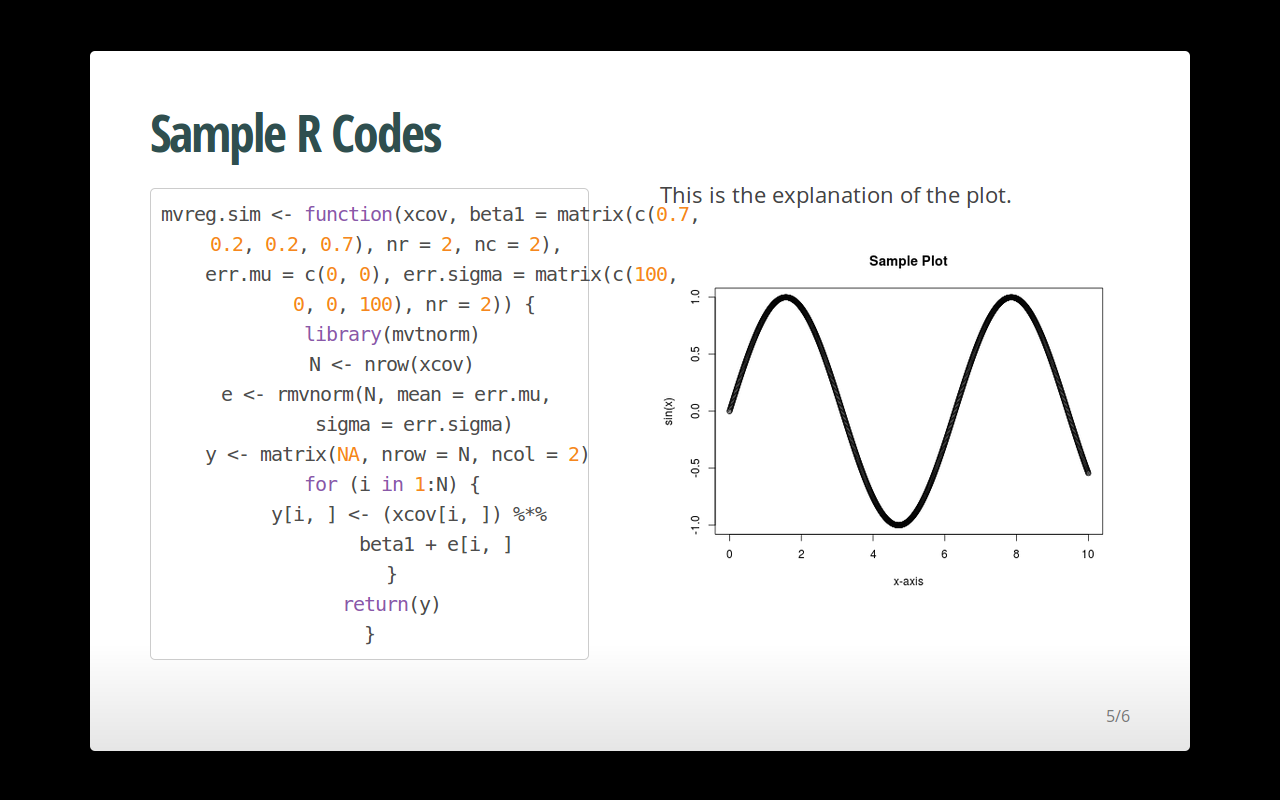
这是我这张幻灯片的代码,
--- &twocol

## Sample R Codes

*** =left

```{r, echo=FALSE}
选项(width=30)
```{r, fig.height=5.5,highlight=TRUE, fig.show='hide',tidy=TRUE}mvreg.sim <-函数(xcov,beta1=matrix(c(0.7,0.2,0.2,0.7),
nr = 2, nc = 2), err.mu=c(0,0), err.sigma=matrix(c(100,0,0,100), nr=2)){图书馆(Mvtnorm)
N <- nrow(xcov)
E <- rmvnorm范数(N,平均值= err.mu,σ= err.sigma)
Y <-矩阵(NA,nrow = N,ncol = 2)
(I in 1:N){
y[i,] <- (xcov[i,])%*%beta1 + e[i,]}
返回(Y)
}
*** =right

This is the explanation of the plot.

```{r, fig.height=5.5,highlight=TRUE,echo=FALSE}
X <- seq(0,10,by = 0.01)
Y <- x
图(x,sin(y),xlab =‘x-轴’,ylab = 'sin(x)',main =‘样本图’)
我是个新手,对html知之甚少。我使用tidy=TRUE和options(width=60)来控制框内代码的宽度,但是对齐方式受到了影响。我要把对齐设置为正确的。任何帮助都是非常感谢的。
回答 1
Stack Overflow用户
发布于 2013-09-21 12:50:36
问题在于,Slidify中心中的默认两列布局对齐了左列(我将在下一个版本中修复它)。这是使用的两列模板。
---
layout: slide
---
{{{ slide.content }}}
<div style='float:left;width:48%;' class='centered'>
  {{{ slide.left.html }}}
</div>
<div style='float:right;width:48%;'>
  {{{ slide.right.html }}}
</div>最简单的修复方法是将上面的布局保存为twocol.html目录下的assets/layouts,然后删除class = "centered"。自定义布局自动覆盖系统布局。只需确保您在assets/layouts中删除该文件,因为这是Slidify查找自定义布局的位置。
https://stackoverflow.com/questions/18932773
复制相似问题
腾讯云开发者

Copyright © 2013 - 2026 Tencent Cloud. All Rights Reserved. 腾讯云 版权所有
深圳市腾讯计算机系统有限公司 ICP备案/许可证号:粤B2-20090059  粤公网安备44030502008569号
腾讯云计算(北京)有限责任公司 京ICP证150476号 | 京ICP备11018762号