
需要简化批处理脚本,以减少内存利用率
我有一个批处理脚本,它启动一个启动文件,等待所有子程序加载,并检查Chrome浏览器是否关闭,如果“是”,那么它关闭所有其他程序形成的进程。
如果Chrome浏览器没有关闭,它会一直循环到关闭为止。
发现的问题是它在循环中使用了find命令,从而导致了大量内存的使用。(我发现很少有在CMD.exe下运行的“查找”和“任务列表”命令)附带的屏幕截图。
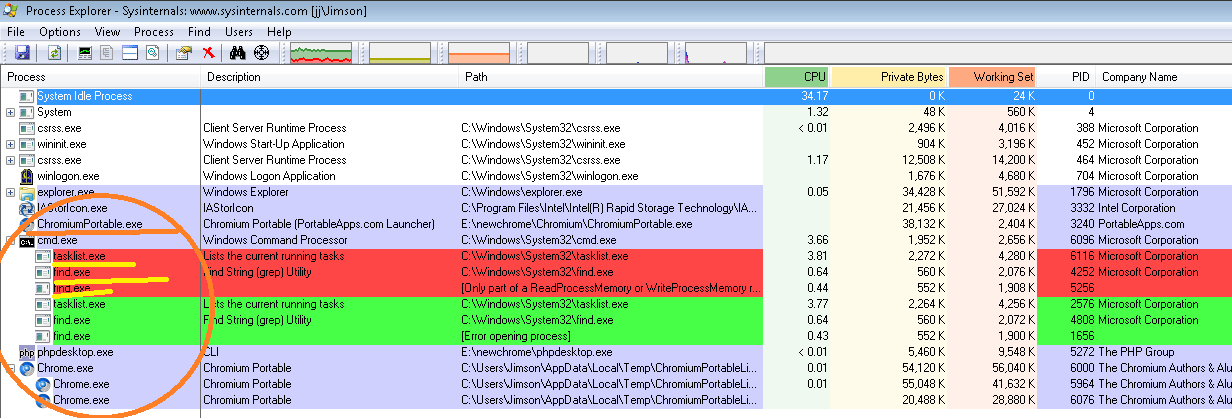
。这是基于可以找到的,请建议我以最简单的方式使用相同的代码,从而使它使用更少的内存。提前谢谢。
目的(我选择了PHP-桌面的(铬)版本,用于自定义的php文件编程。当(浏览器)关闭时,所有其他PHP和便携铬文件都未关闭在任务列表中。为此,我考虑运行一个批处理程序,它开始检查浏览器状态,一旦关闭,所有其他子程序都强制关闭。)
        @echo off
        SETLOCAL

    REM Main FILE to be loded and wait for 25 Sec so that sub programs will load
        start Launcher.exe
        timeout /t 25 /nobreak > NUL

    REM Check Browser is closed if closed then goes to ITSOut if not runs untill its closed

        :MAIN
        tasklist | FIND "Chrome.exe" 2>NUL | find /I /N "Chrome.exe">NUL
        if "%ERRORLEVEL%"=="0" GOTO :MAIN
        if "%ERRORLEVEL%"=="1" GOTO :ITSout

    REM Checks browser is still open (exists) after confirming it closes sub programs
        :ITSout
        tasklist | FIND "Chrome.exe" 2>NUL | find /I /N "Chrome.exe">NUL
        if "%ERRORLEVEL%"=="0" GOTO :MAIN

        FOR /f "tokens=2" %%i IN (
                       ' tasklist ^| find "ChromiumPortable.exe" '
            ) DO SET pid=%%i
            IF DEFINED pid (
                REM ECHO TASKKILL /pid %pid% /T
                TASKKILL /pid %pid% /F /T
            ) ELSE (GOTO :MAIN)


        tasklist | FIND "Chrome.exe" 2>NUL | find /I /N "Chrome.exe">NUL
        if "%ERRORLEVEL%"=="0" GOTO :MAIN

        REM echo "SETLOCAL top line phpdesktop.exe is here"
        FOR /f "tokens=2" %%i IN (
            ' tasklist ^| find "phpdesktop.exe" '
            ) DO SET pid=%%i
            IF DEFINED pid (
                REM ECHO TASKKILL /pid %pid% /T
                TASKKILL /pid %pid% /F /T
            ) ELSE (GOTO :MAIN)

GOTO eof回答 3
Stack Overflow用户
发布于 2013-09-16 10:06:07
在这段代码中,您拥有的是高CPU利用率。
REM Check Browser is closed if closed then goes to ITSOut if not runs untill its closed

    :MAIN
    tasklist | FIND "Chrome.exe" 2>NUL | find /I /N "Chrome.exe">NUL
    if "%ERRORLEVEL%"=="0" GOTO :MAIN
    if "%ERRORLEVEL%"=="1" GOTO :ITSout
使用这个可能更好--超时将降低CPU的使用率。
    :MAIN
    tasklist | FINDSTR /i "^Chrome.exe" >NUL
    if "%ERRORLEVEL%"=="0" timeout 6 >nul & GOTO :MAIN
if "%ERRORLEVEL%"=="1" GOTO :ITSoutStack Overflow用户
发布于 2013-09-16 07:56:18
您使用哪个工具来识别内存问题在FIND实用程序中?除内存使用外,一切都是正确的吗?
我现在不能检查FIND,但我发现下面的代码没有花费太多的内存:
:MAIN
tasklist | grep chrome
if "%ERRORLEVEL%"=="0" GOTO :MAIN
(这里我使用GREP而不是FIND,因为grep是更强大的工具;也许它是您的解决方案)
此外,我无法理解代码中的逻辑(看起来您有无限循环,但您还没有告诉我们这个问题)。
Stack Overflow用户
发布于 2013-09-16 12:24:35
你的程序流程(逻辑)对我来说毫无意义。但我认为,以下几点应该会得出几乎相同的结果。唯一的区别是下面的代码将尝试杀死所有的ChromiumPortable.exe和phpdesktop.exe,而原始的每个循环只杀死一个。
@echo off
SETLOCAL

start Launcher.exe
timeout /t 25 /nobreak > NUL

:MAIN
for /f "skip=2" %%A in (
  'tasklist /fi "imagename eq chrome.exe"'
) do (timeout 1 /nobreak >null & goto :MAIN)

set "found="
for /f "skip=2 tokens=2" %%A in (
  'tasklist /fi "imagename eq ChromiumPortable.exe"'
) do ( set found=1 & taskkill /pid %%A /f /t )
if not defined found goto :MAIN

for /f "skip=2" %%A in (
  'tasklist /fi "imagename eq chrome.exe"'
) do goto :MAIN

set "found="
for /f "skip=2 tokens=2" %%A in (
  'tasklist /fi "imagename eq phpdesktop.exe"'
) do (set found=1 & taskkill /pid %%A /f /t)
if not defined found goto :MAIN

REM I have no idea what this is
eout 555

exit /b
但在我看来,整个剧本的逻辑似乎是错误的。为什么要反复检查chrome.exe?如果没有找到ChromiumPortable.exe或phpdesktop.exe,为什么要循环?可能永远不会结束。
我认为以下几点更有意义:
@echo off

start Launcher.exe
timeout /t 25 /nobreak > NUL

:wait
for /f "skip=2" %%A in (
  'tasklist /fi "imagename eq chrome.exe"'
) do (timeout 1 /nobreak >null & goto :wait)

for /f "skip=2 tokens=2" %%A in (
  'tasklist /fi "imagename eq ChromiumPortable.exe"'
) do taskkill /pid %%A /f /t

for /f "skip=2 tokens=2" %%A in (
  'tasklist /fi "imagename eq phpdesktop.exe"'
) do taskkill /pid %%A /f /t

REM I have no idea what this is
eout 555

exit /bhttps://stackoverflow.com/questions/18822582
复制相似问题
腾讯云开发者

Copyright © 2013 - 2026 Tencent Cloud. All Rights Reserved. 腾讯云 版权所有
深圳市腾讯计算机系统有限公司 ICP备案/许可证号:粤B2-20090059  粤公网安备44030502008569号
腾讯云计算(北京)有限责任公司 京ICP证150476号 | 京ICP备11018762号