
安卓SensorManager奇怪如何remapCoordinateSystem
API演示->图形-> 指南针
它只正常工作,直到你不改变设备的自然方向。在大多数手机是肖像和大多数10英寸平板电脑是景观。如果你改变了,需要用90度旋转这个。我想看看那个系统的3D修复。
100%肯定需要使用 remapCoordinateSystem() 方法.
我想看看如何(代码),如果我能看到一个解释是如何计算,这些轴的映射(理论数学),这将是很好的。
我试着去理解,但我忘记了所有的线性代数。
这里它说为什么我们必须使用,但没有说明如何使用!
float R[] = new float[9];
// X  (product of Y and Z) and roughly points East
// Y: points to Magnetic NORTH and tangential to ground
// Z: points to SKY and perpendicular to ground
float I[] = new float[9];
boolean success = SensorManager.getRotationMatrix(R, I, mGravity, mGeomagnetic);
这些坐标似乎与这个位置有关:-设备在表中显示(x,y轴在表上)。
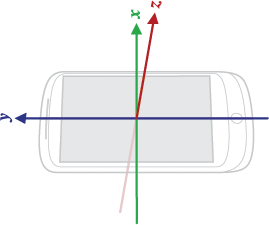
只有而且只有当
getWindowManager().getDefaultDisplay().getRotation() == Surface.ROTATION_0问题是如何完成这段代码:-这些案例分支
switch (mScreenRotation) {
    case Surface.ROTATION_0:
    Log.v("SurfaceRemap", "0 degree");
    axisX = SensorManager.AXIS_X;// is this valid?
    axisY = SensorManager.AXIS_Y;// is this valid?
    break;

    case Surface.ROTATION_90:
    Log.v("SurfaceRemap", "90 degree");
    // examples says remapCoordinateSystem(inR, AXIS_Y, AXIS_MINUS_X, outR);
    axisX = SensorManager.AXIS_Y;
    axisY = SensorManager.AXIS_MINUS_X;
    break;

    case Surface.ROTATION_180:
    Log.v("SurfaceRemap", "180 degree");
    break;

    case Surface.ROTATION_270:
    Log.v("SurfaceRemap", "270 degree");
    break;

    default:
    Log.v("SurfaceRemap", "don't know the mScreenRotation value: "+mScreenRotation+" you should never seen this message!");
    break;
}


boolean remapped = SensorManager.remapCoordinateSystem(R, axisX, axisY, R);

float orientation[] = new float[3];

SensorManager.getOrientation(R, orientation);// All three angles above are in radians and positive in the counter-clockwise direction.
inclination = SensorManager.getInclination(I);
编辑:我写了一个小测试应用程序,它在屏幕上显示屏幕旋转: 0,90,270度(现在不能做180度)
看来,如果旋转0比90度不变(axisX = SensorManager.AXIS_X;axisY = SensorManager.AXIS_Y;),则应该是:
axisX = SensorManager.AXIS_MINUS_Y;
axisY = SensorManager.AXIS_X;
比谷歌文档上说的值错误的地方还要多!问题是哪里?!
getRotationMatrix返回以下内容:
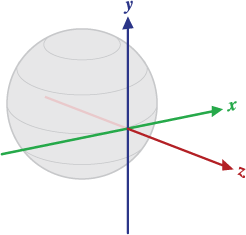
X被定义为矢量积Y.Z (它与设备当前位置的地面切线,大致指向东方)。 Y在设备当前位置与地面切向,并指向磁北极。 Z指向天空,垂直于地面。
看上面的电话!我要从左向右,背对着地面。
getOrientation返回以下内容:
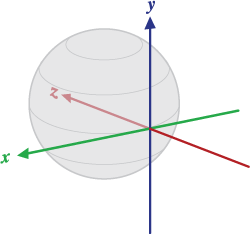
X被定义为矢量乘积Y.Z (它与设备当前位置的地面切线,大致为西点)。 Y在设备当前位置与地面切向,并指向磁北极。 Z指向地球中心,垂直于地面。
values[0]:方位,绕Z轴旋转。values[1]:螺距,围绕X轴旋转。values[2]:滚动,绕Y轴旋转。
电话应该怎么打?
最后,我想要像飞机这样的角度值。我的电话(我)往北走:(偏航方位)
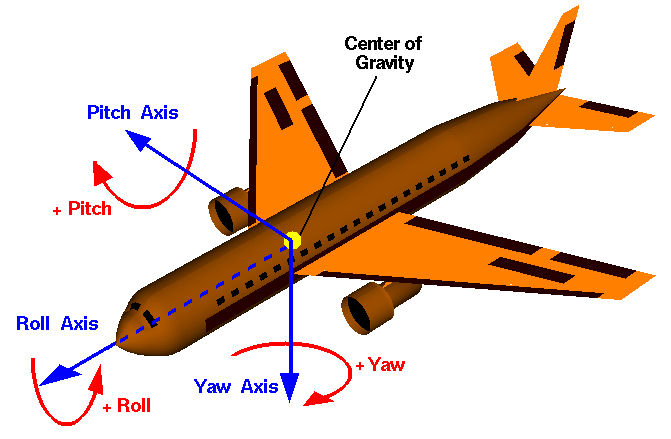
              if ScreenRotation = 0 degree
Pitch axis = -orientationAxisX  =  rotationAxisX
Roll axis  =  orientationAxisY  =  rotationAxisY
Yaw axis = orientationAxisZ = -rotationAxisZ回答 5
Stack Overflow用户
发布于 2013-12-24 11:12:07
要完成开关分支,我只需考虑使用remapCoordinateSystem方法javadoc:
X定义了设备的X轴映射在哪个世界轴和方向上。 Y定义设备的Y轴映射在哪个世界轴和方向上。
因此,将您的设备从其自然方向(90、180或270度)旋转,并问自己:原始设备方向中的X正轴在当前设备方向中对应于哪个轴?Y轴也是如此。
所以,如果你的设备旋转了90度,你会看到原来的X正轴对应于当前的正Y轴,而原始的正Y轴对应于当前的方向负X轴。
所以应该是:
switch (mScreenRotation) {
    case Surface.ROTATION_0:
        axisX = SensorManager.AXIS_X;
    axisY = SensorManager.AXIS_Y;
        break;

    case Surface.ROTATION_90:
        axisX = SensorManager.AXIS_Y;
    axisY = SensorManager.AXIS_MINUS_X;
        break;

    case Surface.ROTATION_180:
        axisX = SensorManager.AXIS_MINUS_X;
    axisY = SensorManager.AXIS_MINUS_Y;
        break;

    case Surface.ROTATION_270:
        axisX = SensorManager.AXIS_MINUS_Y;
    axisY = SensorManager.AXIS_X;
        break;

    default:
        break;
}
对我有用希望能帮上忙。
Stack Overflow用户
发布于 2016-10-19 08:09:31
谢谢keianhzo,你的回答很好,手机在地面上平放。对于“通过”显示的AR应用程序,我发现它可以工作:使用正确的轴:
int screenRotation = mActivity.getWindowManager().getDefaultDisplay().getRotation();
//use the correct axis
int axisX = SensorManager.AXIS_X;
int axisY = SensorManager.AXIS_Y;
switch (mMode) {
    case LOOK_THROUGH: {
        // look through always uses x and z
        axisX = SensorManager.AXIS_X;
        axisY = SensorManager.AXIS_Z;
        break;
    }
    case FLAT: {
        // flat changes the x axis depending on rotation state
        switch (screenRotation) {
            case Surface.ROTATION_0:
                axisX = SensorManager.AXIS_X;
                axisY = SensorManager.AXIS_Y;
                break;
            case Surface.ROTATION_90:
                axisX = SensorManager.AXIS_Y;
                axisY = SensorManager.AXIS_MINUS_X;
                break;
            case Surface.ROTATION_180:
                axisX = SensorManager.AXIS_MINUS_X;
                axisY = SensorManager.AXIS_MINUS_Y;
                break;
            case Surface.ROTATION_270:
                axisX = SensorManager.AXIS_MINUS_Y;
                axisY = SensorManager.AXIS_X;
                break;
            default:
                break;
        }
        break;
    }
    default:
        break;
}
获得定向学位:
boolean success = SensorManager.remapCoordinateSystem(getQuaternion().getMatrix4x4().getMatrix(), axisX, axisY, mRotationMatrixTransformed);
if (success) {
    SensorManager.getOrientation(mRotationMatrixTransformed, mOrientationValues);

    for (int i = 0; i < 3; i++) {
        mOrientationDegrees[i] = (float) Math.toDegrees(mOrientationValues[i]);
    }
//And for look through, add the rotation state
    if (mMode == MODE.LOOK_THROUGH) {
    // look through has different angles depending on rotation state
    switch (screenRotation) {
        case Surface.ROTATION_90: {
            mOrientationDegrees[2] += 90;
            break;
        }
        case Surface.ROTATION_180: {
            mOrientationDegrees[2] += 180;
            break;
        }
        case Surface.ROTATION_270: {
            mOrientationDegrees[2] += 270;
            break;
        }
    }
}Stack Overflow用户
发布于 2015-02-06 03:48:20
在我的应用程序中,我就是这样做的:
        float[] rotationMatrixOrig = new float[9];
        SensorManager.getRotationMatrix(rotationMatrixOrig, null, lastAccelerometerValue, lastMagnetometerValue);

        int screenRotation = app.getCurrentActivity().getWindowManager().getDefaultDisplay().getRotation();
        int axisX, axisY;
        boolean isUpSideDown = lastAccelerometerValue[2] < 0;

        switch (screenRotation) {
            case Surface.ROTATION_0:
                axisX = (isUpSideDown ? SensorManager.AXIS_MINUS_X : SensorManager.AXIS_X);
                axisY = (Math.abs(lastAccelerometerValue[1]) > 6.0f ?
                        (isUpSideDown ? SensorManager.AXIS_MINUS_Z : SensorManager.AXIS_Z) :
                        (isUpSideDown ? SensorManager.AXIS_MINUS_Y : SensorManager.AXIS_Y));
                break;
            case Surface.ROTATION_90:
                axisX = (isUpSideDown ? SensorManager.AXIS_MINUS_Y : SensorManager.AXIS_Y);
                axisY = (Math.abs(lastAccelerometerValue[0]) > 6.0f ?
                        (isUpSideDown ? SensorManager.AXIS_Z : SensorManager.AXIS_MINUS_Z) :
                        (isUpSideDown ? SensorManager.AXIS_X : SensorManager.AXIS_MINUS_X));
                break;
            case  Surface.ROTATION_180:
                axisX = (isUpSideDown ? SensorManager.AXIS_X : SensorManager.AXIS_MINUS_X);
                axisY = (Math.abs(lastAccelerometerValue[1]) > 6.0f ?
                        (isUpSideDown ? SensorManager.AXIS_Z : SensorManager.AXIS_MINUS_Z) :
                        (isUpSideDown ? SensorManager.AXIS_Y : SensorManager.AXIS_MINUS_Y));
                break;
            case Surface.ROTATION_270:
                axisX = (isUpSideDown ? SensorManager.AXIS_Y : SensorManager.AXIS_MINUS_Y);
                axisY = (Math.abs(lastAccelerometerValue[0]) > 6.0f ?
                        (isUpSideDown ? SensorManager.AXIS_MINUS_Z : SensorManager.AXIS_Z) :
                        (isUpSideDown ? SensorManager.AXIS_MINUS_X : SensorManager.AXIS_X));
                break;
            default:
                axisX = (isUpSideDown ? SensorManager.AXIS_MINUS_X : SensorManager.AXIS_X);
                axisY = (isUpSideDown ? SensorManager.AXIS_MINUS_Y : SensorManager.AXIS_Y);
        }

        float[] rotationMatrix = new float[9];
SensorManager.remapCoordinateSystem(rotationMatrixOrig, axisX, axisY, rotationMatrix);https://stackoverflow.com/questions/18782829
复制相似问题
腾讯云开发者

Copyright © 2013 - 2026 Tencent Cloud. All Rights Reserved. 腾讯云 版权所有
深圳市腾讯计算机系统有限公司 ICP备案/许可证号:粤B2-20090059  粤公网安备44030502008569号
腾讯云计算(北京)有限责任公司 京ICP证150476号 | 京ICP备11018762号