
UIAlertViewStyleLoginAndPasswordInput in iOS7
UIAlertViewStyleLoginAndPasswordInput in iOS7
提问于 2013-09-12 08:15:54
我正在iOS7上测试我的工作应用程序。当应用程序启动时,它要求播放机登录。为了收集用户凭据,我使用带有样式UIAlertViewStyleLoginAndPasswordInput的AlertView
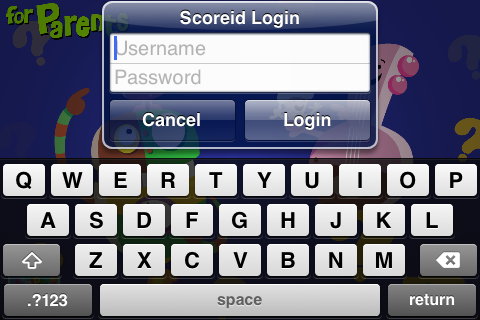
它在iOS6里看起来很好
但是在iOS7上发生了一些奇怪的事情
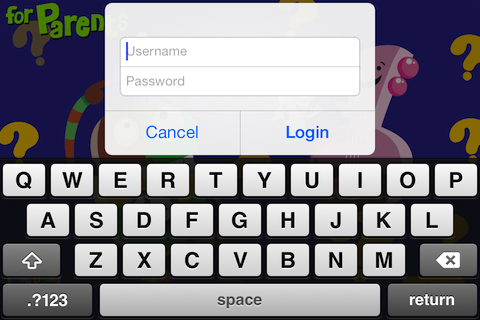
包含标题的AlertView UILabel仍然存在,但它是隐藏的,因为它的高度似乎过高。滚动UILabel最终显示标题。
回答 2
Stack Overflow用户
发布于 2013-09-13 13:24:21
当我将我的应用程序移植到iOS 7时,我已经试验了我的工作,像素中有一些变化。该应用程序必须重新配置为同样的。我建议手动调整对话框的高度以适应屏幕。
P.S.:我还在学习阶段,所以如果我说的不对,就避免让我知道。谢谢。
Stack Overflow用户
发布于 2013-09-29 14:18:43
看起来你正试图使标题或信息达到一个特殊的高度。消除高度变化,并允许系统自动创建高度。
你没有发布任何密码,所以,我只是猜测。
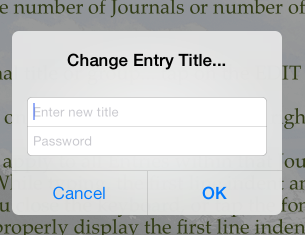
我只是把我的警告视图代码换成了iOS7,这比以前的样式要简单得多。_prompt这里是一个设置为UIAlertView的属性
- (IBAction) addEntryTapped:(id)sender
{
    [_editorTextView resignFirstResponder];
    [self saveTextChanges];
    [self dismissPopovers];
    _prompt = [[UIAlertView alloc] init];
    // change the UIAlertViewStyle to the one you need to use
    _prompt.alertViewStyle = UIAlertViewStylePlainTextInput;
    UITextField *text = [_prompt textFieldAtIndex:0];
    _textField = text;
    [_prompt setDelegate:self];
    [_prompt setTitle:@"New Entry Title..."];
    [_prompt setMessage:@""];
    [_prompt addButtonWithTitle:@"Cancel"];
    [_prompt addButtonWithTitle:@"OK"];

    [_textField setPlaceholder:@"New Entry Title"];
    _textField.autocapitalizationType = UITextAutocapitalizationTypeWords;
    _textField.autocorrectionType = UITextAutocorrectionTypeNo;

    [_prompt show];

    // set cursor and show keyboard
    [_textField becomeFirstResponder];
}
页面原文内容由Stack Overflow提供。腾讯云小微IT领域专用引擎提供翻译支持
原文链接:
https://stackoverflow.com/questions/18758943
复制相关文章
相似问题
腾讯云开发者

Copyright © 2013 - 2026 Tencent Cloud. All Rights Reserved. 腾讯云 版权所有
深圳市腾讯计算机系统有限公司 ICP备案/许可证号:粤B2-20090059  粤公网安备44030502008569号
腾讯云计算(北京)有限责任公司 京ICP证150476号 | 京ICP备11018762号