
CSS表在DIV中调整大小
CSS表在DIV中调整大小
提问于 2013-09-10 09:12:05
我有一张我有麻烦的桌子。我希望在分区中两张桌子并排并排,都是等宽的。我已经尝试手动设置宽度等,但没有成功,任何帮助在这一点上将是伟大的。
现在看起来是这样的
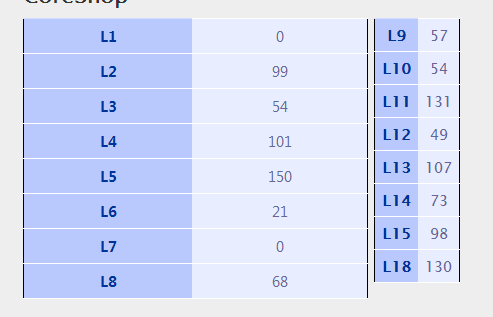
Html
<div class = "CoresAreaDiv">


<label class="CoresLabel">CoreShop</label>

<table  class="CoreShopTable"  >

<tr>
<th>
L1
</th>

<td>@ViewData["L1"]</td>

</tr>
<tr>
<th>L2</th>
<td>@ViewData["L2"]</td>
</tr>
<tr>
<th>L3</th>
<td>@ViewData["L3"]</td>
</tr>
<tr>
<th>L4</th>
<td>@ViewData["L4"]</td>
</tr>
<tr>
<th>L5</th>
<td>@ViewData["L5"]</td>
</tr>
<tr>
<th>L6</th>
<td>@ViewData["L6"]</td>
</tr>
<tr>
<th>L7</th>
<td>@ViewData["L7"]</td>
</tr>
<tr>
<th>L8</th>
<td>@ViewData["L8"]</td>
</tr>
</table>

<table class="CoreShopTable2">

<tr>
<th>L9</th>
<td>@ViewData["L9"]</td>
</tr>

<tr>
<th>L10</th>
<td>@ViewData["L10"]</td>
</tr>

<tr>
<th>L11</th>
<td>@ViewData["L11"]</td>
</tr>

<tr>
<th>L12</th>
<td>@ViewData["L12"]</td>
</tr>

<tr>
<th>L13</th>
<td>@ViewData["L13"]</td>
</tr>

<tr>
<th>L14</th>
<td>@ViewData["L14"]</td>
</tr>

<tr>
<th>L15</th>
<td>@ViewData["L15"]</td>
</tr>

<tr>
<th>L18</th>
<td>@ViewData["L18"]</td>
</tr>


</table>

</div>
下面的CSS代码是
    .CoresAreaDiv
{

 width:50%;

}


}
table.CoreShopTable
{
    text-align: left;
    margin: 45px;
    border-collapse: collapse;
    font-family: "Lucida Sans Unicode" , "Lucida Grande" , Sans-Serif;
    width: 20%;;
    position: relative;
    float: left;
}


table.CoreShopTable th
{
    width: 2%;
    font-weight: normal;
    padding: 8px;
    background: #b9c9fe url('table-images/gradhead.png') repeat-x;
    border-top: 2px solid #d3ddff;
    border-bottom: 1px solid #fff;
    color: #039;
    font-size: larger;
    font-weight: bolder;
    text-align: center;
}


table.CoreShopTable td
{
    padding: 8px;
    border-bottom: 1px solid #fff;
    color: #669;
    border-top: 1px solid #fff;
    background: #e8edff url('table-images/gradback.png') repeat-x;
    font-size: larger;
    text-align: center;
    width: 2%;
}

table.CoreShopTable td:hover
{
    background: #d0dafd url(C:\Users\pbrady\Desktop\Code\MvcApplication1\MvcApplication1\Images\gradhover.png);
    color: #339;
}


table.CoreShopTable2
{
    text-align: left;
    margin: 45px;
    border-collapse: collapse;
    font-family: "Lucida Sans Unicode" , "Lucida Grande" , Sans-Serif;
    width: 50px;
    float: right;
    right: -50px;
    top: -357px;
    position: relative;

}

table.CoreShopTable2 th
{
    width: 20%;
    font-weight: normal;
    padding: 8px;
    background: #b9c9fe url('table-images/gradhead.png') repeat-x;
    border-top: 2px solid #d3ddff;
    border-bottom: 1px solid #fff;
    color: #039;
    font-size: larger;
    font-weight: bolder;
    text-align: center;
}


table.CoreShopTable2 td
{
    padding: 8px;
    border-bottom: 1px solid #fff;
    color: #669;
    border-top: 1px solid #fff;
    background: #e8edff url('table-images/gradback.png') repeat-x;
    font-size: larger;
    text-align: center;
}回答 3
Stack Overflow用户
回答已采纳
发布于 2013-09-10 15:22:19
下面是一个有用的小提琴:http://jsfiddle.net/avrahamcool/npvK5/
我花了一段时间才弄清楚你的问题是什么。
- 您的css中有一个额外的关闭大括号
}。导致样式表无法正确加载。 - 您的包含的div对于两个表on the fiddle page来说太小了,所以我放弃了
width: 50%;。但是在一个普通的页面上,你应该有足够的空间,这样你就可以把它带回来。 - 这里到处都是
position: relative;,以及不必要的top&right声明。把一些margin带到那些毁了一切的桌子上。所有的一切都被风吹走了。 - 我已经删除了
width和padding的th&td声明(其中一些是2%和20%,另一些是50px,伙计。)一团糟,你需要的时候就把他们带回来。他们不应该影响布局。 - 我添加了一个
<br/>将表从标签中分离出来。 - 我删除了所有默认的
margin&padding,以获得所有可用空间(使用*选择器)。
当我在那里的时候,我冒昧地修复了你的一些CSS,注意我的小提琴是多么的清晰和容易。我删除了一些声明,因为它们是默认的。少了就多了。
因此,结论是:
HTML:
<div class="CoresAreaDiv">
    <label class="CoresLabel">CoreShop</label>
    <br/>
    <table class="CoreShopTable">
        <tr>
            <th>L1</th>
            <td>@ViewData["L1"]</td>
        </tr>
        <tr>
            <th>L2</th>
            <td>@ViewData["L2"]</td>
        </tr>
        <tr>
            <th>L3</th>
            <td>@ViewData["L3"]</td>
        </tr>
        <tr>
            <th>L4</th>
            <td>@ViewData["L4"]</td>
        </tr>
        <tr>
            <th>L5</th>
            <td>@ViewData["L5"]</td>
        </tr>
        <tr>
            <th>L6</th>
            <td>@ViewData["L6"]</td>
        </tr>
        <tr>
            <th>L7</th>
            <td>@ViewData["L7"]</td>
        </tr>
        <tr>
            <th>L8</th>
            <td>@ViewData["L8"]</td>
        </tr>
    </table>
    <table class="CoreShopTable">
        <tr>
            <th>L9</th>
            <td>@ViewData["L9"]</td>
        </tr>
        <tr>
            <th>L10</th>
            <td>@ViewData["L10"]</td>
        </tr>
        <tr>
            <th>L11</th>
            <td>@ViewData["L11"]</td>
        </tr>
        <tr>
            <th>L12</th>
            <td>@ViewData["L12"]</td>
        </tr>
        <tr>
            <th>L13</th>
            <td>@ViewData["L13"]</td>
        </tr>
        <tr>
            <th>L14</th>
            <td>@ViewData["L14"]</td>
        </tr>
        <tr>
            <th>L15</th>
            <td>@ViewData["L15"]</td>
        </tr>
        <tr>
            <th>L18</th>
            <td>@ViewData["L18"]</td>
        </tr>
    </table>
</div>
CSS:
*
{
    margin:0;
    padding: 0;
}
table.CoreShopTable
{
    border-collapse: collapse;
    font-family:"Lucida Sans Unicode", "Lucida Grande", Sans-Serif;
    width: 50%;
    float: left;
}
table.CoreShopTable th {
    background: #b9c9fe url('table-images/gradhead.png') repeat-x;
    border-top: 2px solid #d3ddff;
    border-bottom: 1px solid #fff;
    color: #039;
    font-size: larger;
    font-weight: bolder;
}
table.CoreShopTable td
{
    border-bottom: 1px solid #fff;
    color: #669;
    border-top: 1px solid #fff;
    background: #e8edff url('table-images/gradback.png') repeat-x;
    font-size: larger;
    text-align: center;
}

table.CoreShopTable td:hover {
    background: #d0dafd url(C:\Users\pbrady\Desktop\Code\MvcApplication1\MvcApplication1\Images\gradhover.png);
    color: #339;
}Stack Overflow用户
发布于 2013-09-10 09:16:15
起作用了..。
<div width="100%">
<table width="48%">
//your stuff
</table>
<table width="48%">
//your stuff
</table>
</div>
表宽最多可达50%。如果它不适用于you.Then,请使用float:left;
Stack Overflow用户
发布于 2013-09-10 15:26:57
可能是div,它是为了节省表格,我不明白你为什么不把另一排放在那张表里,而不仅仅是同一张表,但我相信你有你的理由,
.CoresAreaDiv {
margin: 0;
padding: 0;
}
或者..。
只需移除第二个表的左边框:
.CoreShopTable2 tr {
border-left: none;
margin-left: 0; /* to make sure there is still no awkward space */
}
或者保留边境线
页面原文内容由Stack Overflow提供。腾讯云小微IT领域专用引擎提供翻译支持
原文链接:
https://stackoverflow.com/questions/18714885
复制相关文章
相似问题
腾讯云开发者

Copyright © 2013 - 2026 Tencent Cloud. All Rights Reserved. 腾讯云 版权所有
深圳市腾讯计算机系统有限公司 ICP备案/许可证号:粤B2-20090059  粤公网安备44030502008569号
腾讯云计算(北京)有限责任公司 京ICP证150476号 | 京ICP备11018762号