
HtmlEditorExtender默认样式
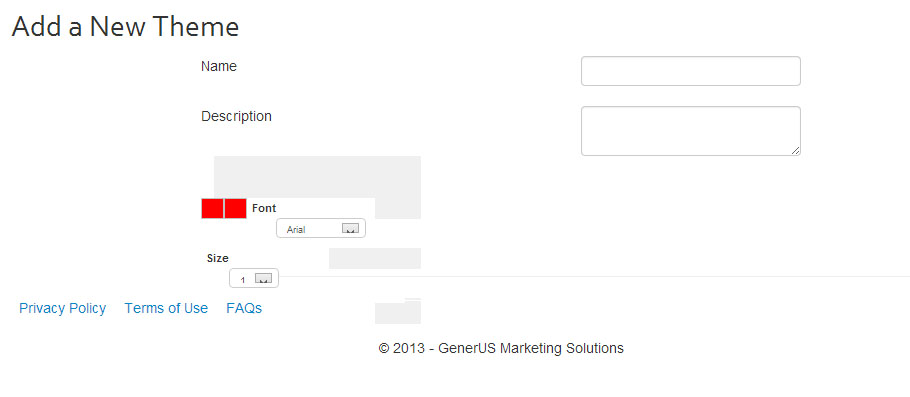
我的页面上有一个ajax HtmlEditorExtender,如下所示:
问题是,它没有任何默认的样式。因此,我有一堆简单的按钮,没有图像或任何东西。我试图找到这个所谓的"Editor.css“页面,如这里所描述的:HTMLEditor.ashx,但它似乎不存在任何地方。它在我的dev服务器上这样做,但是在我的生产服务器上,它什么也不做(只是一个普通的文本框)。有人能帮忙吗?
我的aspx代码如下
<%@ Page Title="" Language="C#" MasterPageFile="~/Site.Master" AutoEventWireup="true" CodeBehind="New.aspx.cs" Inherits="C4G.NPO.Themes.New" %>
<asp:Content ID="Content1" ContentPlaceHolderID="MainContent" runat="server">
    <script type="text/javascript">
        function colorChanged(sender) {
            sender.get_element().style.color = "#" + sender.get_selectedColor();
        }
    </script>
    <script type="text/javascript">
        $(document).ready(function () {
            $("#Editor").wysiwyg();
        });
    </script>
    <div id="MainContent">
        <h1>Add a New Theme</h1>
        <div class="Form" style="width: 600px;">
            <div class="FormRow">
                <asp:Label ID="Label1" runat="server" Text="Name"></asp:Label><asp:TextBox ID="NameTextBox" runat="server"></asp:TextBox>
            </div>
            <div class="FormRow">
                <asp:Label ID="Label2" runat="server" Text="Description"></asp:Label><asp:TextBox ID="DescriptionTextBox" runat="server" TextMode="MultiLine"></asp:TextBox>
            </div>
            <div class="FormRow">
                <asp:TextBox runat="server" ID="Editor"></asp:TextBox>
                <ajaxToolkit:HtmlEditorExtender ID="HtmlEditorExtender1"
                    TargetControlID="Editor" DisplaySourceTab="true"
                    runat="server">
                    <Toolbar>
                        <ajaxToolkit:Undo />
                        <ajaxToolkit:Redo />
                        <ajaxToolkit:Bold />
                        <ajaxToolkit:Italic />
                        <ajaxToolkit:Underline />
                        <ajaxToolkit:StrikeThrough />
                        <ajaxToolkit:Subscript />
                        <ajaxToolkit:Superscript />
                        <ajaxToolkit:JustifyLeft />
                        <ajaxToolkit:JustifyCenter />
                        <ajaxToolkit:JustifyRight />
                        <ajaxToolkit:JustifyFull />
                        <ajaxToolkit:InsertOrderedList />
                        <ajaxToolkit:InsertUnorderedList />
                        <ajaxToolkit:CreateLink />
                        <ajaxToolkit:UnLink />
                        <ajaxToolkit:RemoveFormat />
                        <ajaxToolkit:SelectAll />
                        <ajaxToolkit:UnSelect />
                        <ajaxToolkit:Delete />
                        <ajaxToolkit:Cut />
                        <ajaxToolkit:Copy />
                        <ajaxToolkit:Paste />
                        <ajaxToolkit:BackgroundColorSelector />
                        <ajaxToolkit:ForeColorSelector />
                        <ajaxToolkit:FontNameSelector />
                        <ajaxToolkit:FontSizeSelector />
                        <ajaxToolkit:Indent />
                        <ajaxToolkit:Outdent />
                        <ajaxToolkit:InsertHorizontalRule />
                        <ajaxToolkit:HorizontalSeparator />
                        <ajaxToolkit:InsertImage />
                    </Toolbar>
                </ajaxToolkit:HtmlEditorExtender>
            </div>
            <div class="FormRow">

            </div>
        </div>
    </div>
</asp:Content>
以防万一,这是我的web.config文件:
<?xml version="1.0" encoding="utf-8"?>
<!--
  For more information on how to configure your ASP.NET application, please visit
  http://go.microsoft.com/fwlink/?LinkId=169433
  -->
<configuration>
  <configSections>
    <!-- For more information on Entity Framework configuration, visit http://go.microsoft.com/fwlink/?LinkID=237468 -->
    <section name="entityFramework" type="System.Data.Entity.Internal.ConfigFile.EntityFrameworkSection, EntityFramework, Version=6.0.0.0, Culture=neutral, PublicKeyToken=b77a5c561934e089" requirePermission="false" />
    <sectionGroup name="system.web">
      <section name="sanitizer" requirePermission="false" type="AjaxControlToolkit.Sanitizer.ProviderSanitizerSection, AjaxControlToolkit"/>
    </sectionGroup>
  </configSections>
  <connectionStrings>
    Connection Strings Here
  </connectionStrings>
  <system.web>
    <sanitizer defaultProvider="HtmlAgilityPackSanitizerProvider">
      <providers>
        <add name="HtmlAgilityPackSanitizerProvider" type="AjaxControlToolkit.Sanitizer.HtmlAgilityPackSanitizerProvider"></add>
      </providers>
    </sanitizer>
    <customErrors mode="Off" />
    <compilation debug="true" targetFramework="4.5" />
    <httpRuntime targetFramework="4.5" />
    <pages>
      <namespaces>
        <add namespace="System.Web.Optimization" />
        <add namespace="Microsoft.AspNet.Identity" />
      </namespaces>
      <controls>
        <add assembly="Microsoft.AspNet.Web.Optimization.WebForms" namespace="Microsoft.AspNet.Web.Optimization.WebForms" tagPrefix="webopt" />
        <add tagPrefix="ajaxToolkit" assembly="AjaxControlToolkit" namespace="AjaxControlToolkit" /></controls>
    </pages>
    <membership>
      <providers>
        <!--
          ASP.NET Membership is disabled in this template. Please visit the following link http://go.microsoft.com/fwlink/?LinkId=301889 to learn about the ASP.NET Membership support in this template
        -->
        <clear />
      </providers>
    </membership>
    <profile>
      <providers>
        <!--
          ASP.NET Membership Profile is disabled in this template. Please visit the following link http://go.microsoft.com/fwlink/?LinkId=301889 to learn about the ASP.NET Membership support in this template
        -->
        <clear />
      </providers>
    </profile>
    <roleManager>
      <!--
            ASP.NET Membership Role is disabled in this template. Please visit the following link http://go.microsoft.com/fwlink/?LinkId=301889 to learn about the ASP.NET Membership support in this template
        -->
      <providers>
        <clear />
      </providers>
    </roleManager>
    <!--
            If you are deploying to a cloud environment that has multiple web server instances,
            you should change session state mode from "InProc" to "Custom". In addition,
            change the connection string named "DefaultConnection" to connect to an instance
            of SQL Server (including SQL Azure and SQL  Compact) instead of to SQL Server Express.
      -->
    <sessionState mode="InProc" customProvider="DefaultSessionProvider">
      <providers>
        <add name="DefaultSessionProvider" type="System.Web.Providers.DefaultSessionStateProvider, System.Web.Providers, Version=1.0.0.0, Culture=neutral, PublicKeyToken=31bf3856ad364e35" connectionStringName="DefaultConnection" />
      </providers>
    </sessionState>
  </system.web>
  <system.webServer>
    <modules runAllManagedModulesForAllRequests="true" />
  </system.webServer>
  <entityFramework>
    <defaultConnectionFactory type="System.Data.Entity.Infrastructure.LocalDbConnectionFactory, EntityFramework">
      <parameters>
        <parameter value="v11.0" />
      </parameters>
    </defaultConnectionFactory>
    <providers>
      <provider invariantName="System.Data.SqlClient" type="System.Data.Entity.SqlServer.SqlProviderServices, EntityFramework.SqlServer" />
    </providers>
  </entityFramework>
</configuration>
我得到的是:
回答 1
Stack Overflow用户
发布于 2013-09-09 17:51:19
您的开发环境或服务器(或两者都有)存在此问题吗?
这些图像来自一个名为"WebResource.axd“的文件--这是您在项目中看不到但由AjaxControlToolkit库自动生成的内容。没有看到您的代码或问题的示例,我猜您的库可能没有在您的项目中正确设置。
设置它的一个简单方法是使用Library Package Manager (Nuget)将库安装到您的网站中。这不仅将设置引用,还将配置您的web.config。FYI,我刚刚做了以下测试:
1)在Visual 2中创建一个新的空ASP.NET项目(在项目中添加一个新的webform ) 3)从您提供的页面复制示例HTML标记并将其粘贴到我的新表单4中)向页面添加一个ToolkitScriptManager和TextBox,就在表单下面和HTML之前:
<ajaxToolkit:ToolkitScriptManager ID="tsm" runat="server"></ajaxToolkit:ToolkitScriptManager>
<asp:TextBox ID="TextBox1" runat="server"></asp:TextBox>
5)在HTML编辑器的标记中添加了以下属性(我不建议您这样做--我这样做只是为了快速测试):
EnableSanitization="false"我会自己尝试,如果成功的话,比较你的两个项目的不同之处。如果没有,使用一个面向公众的链接更新这篇文章(如果可能的话)或HTML编辑器的标记。
https://stackoverflow.com/questions/18703633
复制相似问题
腾讯云开发者

Copyright © 2013 - 2026 Tencent Cloud. All Rights Reserved. 腾讯云 版权所有
深圳市腾讯计算机系统有限公司 ICP备案/许可证号:粤B2-20090059  粤公网安备44030502008569号
腾讯云计算(北京)有限责任公司 京ICP证150476号 | 京ICP备11018762号