
通过VisualVM发现文件I/O瓶颈
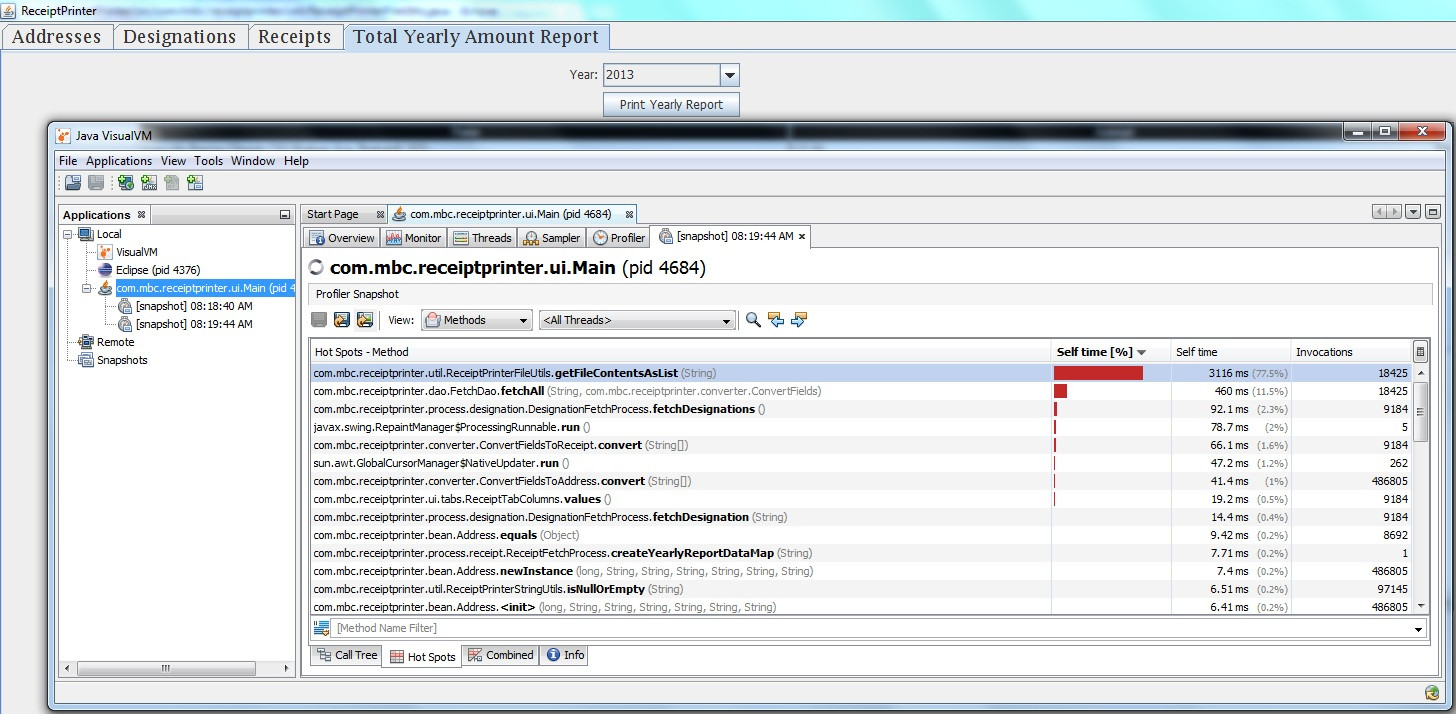
我在我的应用程序中发现了一个瓶颈,随着文件中数据的增长,这个瓶颈不断增长(见下面VisualVM的附带屏幕截图)。
下面是getFileContentsAsList代码。如何才能更好地提高性能呢?我读过几篇关于有效文件I/O的文章,有些人建议使用Scanner来有效地从文件中读取。我也尝试过Apache,但它的运行速度并不快。
导致应用程序运行速度较慢的数据文件是8 KB...that,对我来说不太大。
我可以转换成像Apache这样的嵌入式数据库,如果这看起来更好的话。最终,寻找能帮助应用程序更快运行的东西(这是一个Java1.7Swing应用程序BTW)。
这是getFileContentsAsList的代码
public static List<String> getFileContentsAsList(String filePath) throws IOException {
    if (ReceiptPrinterStringUtils.isNullOrEmpty(filePath)) throw new IllegalArgumentException("File path must not be null or empty");

    Scanner s = null;
    List<String> records = new ArrayList<String>();

    try {
        s = new Scanner(new BufferedReader(new FileReader(filePath)));
        s.useDelimiter(FileDelimiters.RECORD);

        while (s.hasNext()) {
           records.add(s.next());
        }
    } finally {
        if (s != null) {
            s.close();
        }
    }

    return records;
}
回答 3
Stack Overflow用户
发布于 2013-09-07 03:15:07
因此,如果您这样做的话,file.io就会变得非常昂贵--我在屏幕截图中看到了一个lot...as,而包含file.io调用的原始代码getFileContentsAsList被调用了很多次(18.425次)。VisualVM是指出这些瓶颈的一个真正的工具!
在考虑了提高性能的各种方法之后,我意识到,可能最好的方法是尽可能少地执行file.io调用。因此,我决定使用私有静态变量来保存文件内容,并且只在静态初始化器中和文件被写入时执行file.io操作。由于我的应用程序(幸运的是)没有过度编写(而是过度阅读),这将使应用程序得到更好的执行。
下面是包含getFileContentsAsList方法的整个类的源代码。我对该方法进行了快照,它现在运行在57.2ms(低于3116 ms)。而且,这是我最长的运行方法,现在是我最长的运行方法。前5位运行时间最长的方法现在总共运行了498.8 ms,而在最初的屏幕截图中运行的方法总共运行了3812.9 ms。这是一个百分比下降约85% 100 * (498.8 - 3812.9) / 3812.9。
package com.mbc.receiptprinter.util;

import java.io.File;
import java.io.IOException;
import java.util.ArrayList;
import java.util.Arrays;
import java.util.HashMap;
import java.util.List;
import java.util.Map;
import java.util.logging.Level;

import org.apache.commons.io.FileUtils;

import com.mbc.receiptprinter.constant.FileDelimiters;
import com.mbc.receiptprinter.constant.FilePaths;

/*
 * Various File utility functions.  This class uses the Apache Commons FileUtils class.
 */
public class ReceiptPrinterFileUtils {

    private static Map<String, String> fileContents = new HashMap<String, String>();

    private static Map<String, Boolean> fileHasBeenUpdated = new HashMap<String, Boolean>();

    static {
        for (FilePaths fp : FilePaths.values()) {
            File f = new File(fp.getPath());
            try {
                FileUtils.touch(f);
                fileHasBeenUpdated.put(fp.getPath(), false);
                fileContents.put(fp.getPath(), FileUtils.readFileToString(f));
            } catch (IOException e) {
                ReceiptPrinterLogger.logMessage(ReceiptPrinterFileUtils.class,
                                                Level.SEVERE,
                                                "IOException while performing FileUtils.touch in static block of ReceiptPrinterFileUtils", e);
            }
        }
    }

    public static String getFileContents(String filePath) throws IOException {
        if (ReceiptPrinterStringUtils.isNullOrEmpty(filePath)) throw new IllegalArgumentException("File path must not be null or empty");
        File f = new File(filePath);
        if (fileHasBeenUpdated.get(filePath)) {
            fileContents.put(filePath, FileUtils.readFileToString(f));
            fileHasBeenUpdated.put(filePath, false);
        }
        return fileContents.get(filePath);
    }

    public static List<String> convertFileContentsToList(String fileContents) {
        List<String> records = new ArrayList<String>();
        if (fileContents.contains(FileDelimiters.RECORD)) {
            records = Arrays.asList(fileContents.split(FileDelimiters.RECORD));
        }
        return records;
    }

    public static void writeStringToFile(String filePath, String data) throws IOException {
        fileHasBeenUpdated.put(filePath, true);
        FileUtils.writeStringToFile(new File(filePath), data);
    }

    public static void writeStringToFile(String filePath, String data, boolean append) throws IOException {
        fileHasBeenUpdated.put(filePath, true);
        FileUtils.writeStringToFile(new File(filePath), data, append);
    }
}Stack Overflow用户
发布于 2013-09-06 14:27:30
必要时,ArrayList的大小乘以1.5。这是O(log(N))。(向量中使用加倍。)如果我想加快速度,我肯定会在这里使用O(1) LinkedList和BufferedReader.readLine()而不是扫描仪。很难相信读取一个8k文件的时间是一个严重的问题。你一秒钟就能读几百万行。
Stack Overflow用户
发布于 2013-09-06 13:05:56
如果长度不经常变化的话,ArrayList在阅读和写作方面都有很好的表现。在您的应用程序中,长度经常会发生变化(当它满了并且添加了一个元素时,大小会加倍),您的应用程序需要将您的数组复制到一个新的、更长的数组中。
您可以使用LinkedList,其中添加了新元素,不需要复制操作。List<String> records = new LinkedList<String>();
或者,您可以使用接近完成的单词数初始化ArrayList。这将减少复制操作的数量。List<String> records = new ArrayList<String>(2000);
https://stackoverflow.com/questions/18658017
复制相似问题
腾讯云开发者

Copyright © 2013 - 2026 Tencent Cloud. All Rights Reserved. 腾讯云 版权所有
深圳市腾讯计算机系统有限公司 ICP备案/许可证号:粤B2-20090059  粤公网安备44030502008569号
腾讯云计算(北京)有限责任公司 京ICP证150476号 | 京ICP备11018762号