
设置UITableViewCell TableView setEditing时无法选择setEditing
设置UITableViewCell TableView setEditing时无法选择setEditing
提问于 2013-09-03 20:59:02
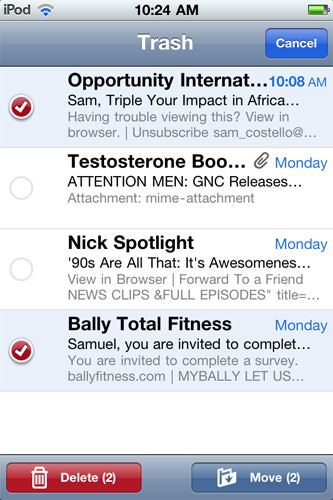
我希望能够选择多行,如下面所示的默认邮件应用程序:
我有一个叫做编辑的按钮
[self.myTableView setEditing:YES animated:YES]
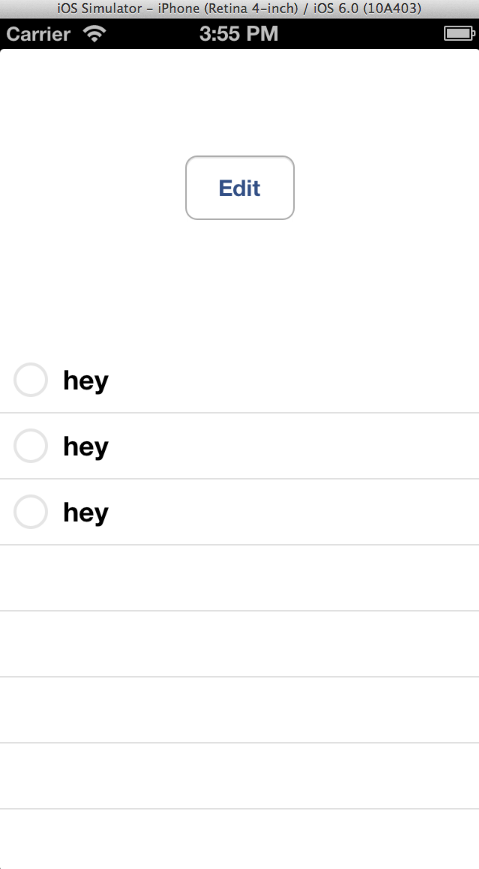
编辑按钮成功地显示了单元格左侧的圆圈,如上面所示的邮件应用程序。但是,当我实际选择其中一行时,什么都不会发生。红色的标号并没有像我所期望的那样出现在圆圈中。为什么红色的标号没有出现?
#pragma mark - UITableViewDataSource Methods

- (UITableViewCell *)tableView:(UITableView *)tableView cellForRowAtIndexPath:(NSIndexPath *)indexPath {
    UITableViewCell *cell = [tableView dequeueReusableCellWithIdentifier:@"MyIdentifier"];

    if (cell == nil) {
        cell = [[UITableViewCell alloc] initWithStyle:UITableViewCellStyleSubtitle reuseIdentifier:@"MyIdentifier"];
    }

    cell.textLabel.text = @"hey";

    return cell;
}

- (NSInteger)tableView:(UITableView *)tableView numberOfRowsInSection:(NSInteger)section {
    return 3;
}

#pragma mark - UITableViewDelegate Methods

- (void)tableView:(UITableView *)tableView didSelectRowAtIndexPath:(NSIndexPath *)indexPath {
    [tableView deselectRowAtIndexPath:indexPath animated:YES];
}

- (UITableViewCellEditingStyle)tableView:(UITableView *)tableView editingStyleForRowAtIndexPath:(NSIndexPath *)indexPath {
    return 3;
}

#pragma mark - Private Methods

- (IBAction)editButtonTapped:(id)sender {
    if (self.myTableView.editing) {
        [self.myTableView setEditing:NO animated:YES];
    }
    else {
        [self.myTableView setEditing:YES animated:YES];
    }
}回答 1
Stack Overflow用户
回答已采纳
发布于 2013-09-03 21:05:05
您必须显式地将选择设置为在编辑模式下启用:
[self.tableView setAllowsSelectionDuringEditing:YES];或
[self.tableView setAllowsMultipleSelectionDuringEditing:YES];根据docs:默认情况下,这些属性被设置为NO。
如果此属性的值为“是”,则用户可以在编辑期间选择行。默认值为否。如果要限制单元格的选择而不管模式如何,请使用allowsSelection。
此外,下面的代码片段可能会导致您的选择出现问题,因为一旦选定行,它就会立即取消它的选择。
- (void)tableView:(UITableView *)tableView didSelectRowAtIndexPath:(NSIndexPath *)indexPath
{
    [tableView deselectRowAtIndexPath:indexPath animated:YES];
}页面原文内容由Stack Overflow提供。腾讯云小微IT领域专用引擎提供翻译支持
原文链接:
https://stackoverflow.com/questions/18601385
复制相关文章
相似问题
腾讯云开发者

Copyright © 2013 - 2026 Tencent Cloud. All Rights Reserved. 腾讯云 版权所有
深圳市腾讯计算机系统有限公司 ICP备案/许可证号:粤B2-20090059  粤公网安备44030502008569号
腾讯云计算(北京)有限责任公司 京ICP证150476号 | 京ICP备11018762号