
如何在IOS中翻转贺卡
如何在IOS中翻转贺卡
提问于 2013-09-03 08:07:35
我正在开发一个应用程序,在这个应用程序中我必须打开像这个视频一样的卡片。
https://www.youtube.com/watch?v=srnRuhFvYl0&feature=youtu.be
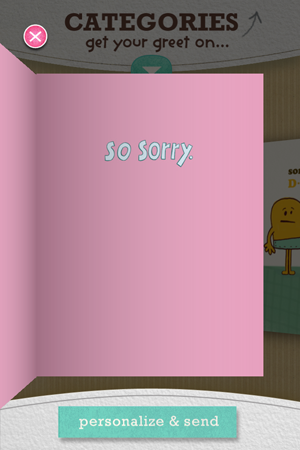
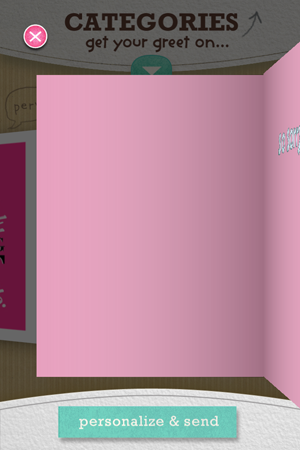
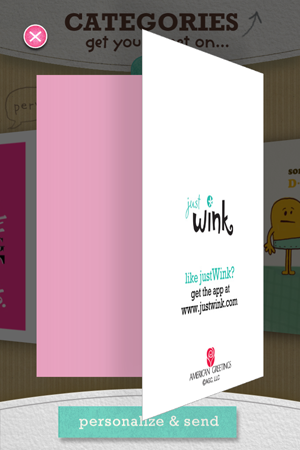
我搜索了一下,但没有找到任何用于此功能的代码。
贺卡有四面。我需要查看贺卡的每一面,无论是动画还是UIGesturerecognizer,当点击或触摸时,就像在Wink中一样。
任何一个建议的想法或样例代码将不胜感激。
“预先谢谢”
回答 1
Stack Overflow用户
发布于 2013-09-03 10:09:08
我为你写了这段代码.
*把这个放在.pch文件中
定义DEGREES_TO_RADIANS (d ) (d* M_PI / 180)
不要忘记添加和导入QuartzCore框架*
    #import "MyViewController.h"
    #import <QuartzCore/QuartzCore.h>

    @interface MyViewController (){
        CATransform3D intialTransform;
        CATransform3D middelTransform;
        CATransform3D finalTransform;
    }

    @property(nonatomic,strong) UIView *myView1;
    @property(nonatomic,strong) UIView *myView2;

    @end

    @implementation MyViewController

    - (id)initWithNibName:(NSString *)nibNameOrNil bundle:(NSBundle *)nibBundleOrNil
    {
        self = [super initWithNibName:nibNameOrNil bundle:nibBundleOrNil];
        if (self) {
            // Custom initialization
        }
        return self;
    }

    - (void)viewDidLoad
    {
        [super viewDidLoad];

        UIButton *myButton =[[UIButton alloc]initWithFrame:CGRectMake(300, 100, 120, 50)];
        [myButton addTarget:self action:@selector(unfoldGreeting:) forControlEvents:UIControlEventTouchDown];
        [myButton setTitle:@"Unfold" forState:UIControlStateNormal];
        [myButton setBackgroundColor:[UIColor blackColor]];
        [self.view addSubview:myButton];


        _myView1 = [[UIView alloc]initWithFrame:CGRectMake(400, 200, 200, 300)];
        [_myView1 setBackgroundColor:[UIColor redColor]];
        [self.view addSubview:_myView1];

        UILabel *myLabel = [[UILabel alloc]initWithFrame:CGRectMake(10, 150, 100, 100)];
        [myLabel setText:@"Happy Birthday"];
        [myLabel setFont:[UIFont fontWithName:@"Arial" size:25]];
        [myLabel setTextColor:[UIColor whiteColor]];
        [myLabel sizeToFit];
        [_myView1 addSubview:myLabel];

        intialTransform = CATransform3DIdentity;
        intialTransform.m34 = 1.0 / -500;
        intialTransform = CATransform3DRotate(intialTransform, DEGREES_TO_RADIANS(70), 1.0f, 0.0f, 0.0f);
        _myView1.layer.transform = intialTransform;

        _myView2 = [[UIView alloc]initWithFrame:CGRectMake(400, 200, 200, 300)];
        [_myView2 setBackgroundColor:[UIColor purpleColor]];
        [self.view addSubview:_myView2];
        _myView2.layer.transform = intialTransform;

        middelTransform = CATransform3DIdentity;
        middelTransform.m34 = 1.0 / -500;
        middelTransform = CATransform3DRotate(middelTransform, DEGREES_TO_RADIANS(70), 1.0f, 0.0f, 0.0f);
        middelTransform = CATransform3DRotate(middelTransform, DEGREES_TO_RADIANS(-100), 0.0f, 1.0f, 0.0f);
        middelTransform = CATransform3DTranslate(middelTransform,116, 0,100);


        finalTransform = CATransform3DIdentity;
        finalTransform.m34 = 1.0 / -500;
        finalTransform = CATransform3DRotate(finalTransform, DEGREES_TO_RADIANS(70), 1.0f, 0.0f, 0.0f);
        finalTransform = CATransform3DRotate(finalTransform, DEGREES_TO_RADIANS(-170), 0.0f, 1.0f, 0.0f);
        finalTransform = CATransform3DTranslate(finalTransform,198, 0,16);


    }

    -(void)unfoldGreeting:(UIButton *)iSender{

        [UIView animateWithDuration:1.0f animations:^{
            _myView2.layer.transform = middelTransform;
        } completion:^ (BOOL iFinished) {
            [UIView animateWithDuration:1.0f animations:^{
            _myView2.layer.transform = finalTransform;
            }completion:nil];
        }];
    }
希望这能帮到你。
页面原文内容由Stack Overflow提供。腾讯云小微IT领域专用引擎提供翻译支持
原文链接:
https://stackoverflow.com/questions/18587125
复制相关文章
相似问题
腾讯云开发者

Copyright © 2013 - 2026 Tencent Cloud. All Rights Reserved. 腾讯云 版权所有
深圳市腾讯计算机系统有限公司 ICP备案/许可证号:粤B2-20090059  粤公网安备44030502008569号
腾讯云计算(北京)有限责任公司 京ICP证150476号 | 京ICP备11018762号