
用jChartFX改变派图比例
用jChartFX改变派图比例
提问于 2013-09-02 19:36:53
有什么想法,如何改变图表比例相对于它的父图表div?
目前它看起来像这样
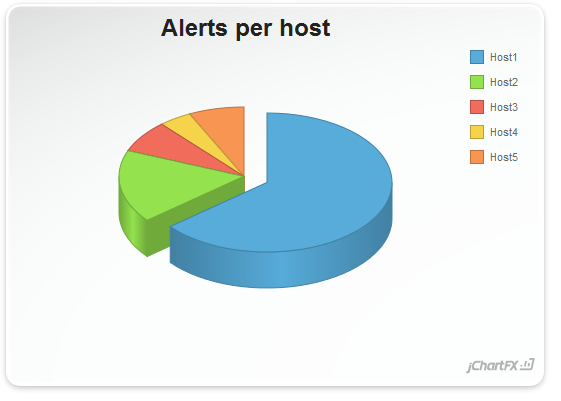
..。它应该是这样的
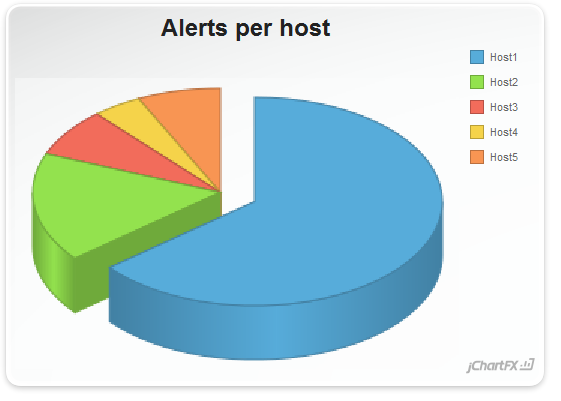
用于此示例的代码可在此处找到。
http://support.softwarefx.com/jChartFX/article/2501235#27182674-0690-e211-84a5-0019b9e6b500
HTML
<!DOCTYPE html>
<html>
<head>
   <title>Customized Tooltips</title>
   <link rel="stylesheet" type="text/css" href="http://www.jchartfx.com/libs/v7/current/styles/jchartfx.css"/>
   <link rel="stylesheet" type="text/css" href="sample.css"/>

   <script type="text/javascript" src="http://www.jchartfx.com/libs/v7/current/js/jchartfx.system.js"></script>
   <script type="text/javascript" src="http://www.jchartfx.com/libs/v7/current/js/jchartfx.coreVector.js"></script>
   <script type="text/javascript" src="http://www.jchartfx.com/libs/v7/current/js/jchartfx.coreVector3d.js"></script>
   <script type="text/javascript" src="http://www.jchartfx.com/libs/v7/current/js/jchartfx.advanced.js"></script>
   <script type="text/javascript" src="http://www.jchartfx.com/libs/v7/current/js/jchartfx.animation.js"></script>
   <script type="text/javascript" src="sample.js"></script>

</head>
<body>
    <div id="ChartDiv1" style="width:550px;height:400px;display:inline-block"></div>
</body>
</html>


  var chart1;

  function onLoadDoc() {
        chart1 = new cfx.Chart();
        chart1.setGallery(cfx.Gallery.Pie);
        chart1.getAnimations().getLoad().setEnabled(true);
        var pie = chart1.getGalleryAttributes();
        pie.setExplodingMode(cfx.ExplodingMode.First);

        chart1.getView3D().setEnabled(true);
        chart1.getLegendBox().setVisible(true);

        //...
}回答 1
Stack Overflow用户
发布于 2014-05-01 22:08:26
您可以使用边距属性:
chart1.getPlotAreaMargin().setTop(0);
chart1.getPlotAreaMargin().setBottom(0);
chart1.getPlotAreaMargin().setRight(0);
chart1.getPlotAreaMargin().setLeft(0);页面原文内容由Stack Overflow提供。腾讯云小微IT领域专用引擎提供翻译支持
原文链接:
https://stackoverflow.com/questions/18579777
复制相关文章
相似问题
腾讯云开发者

Copyright © 2013 - 2026 Tencent Cloud. All Rights Reserved. 腾讯云 版权所有
深圳市腾讯计算机系统有限公司 ICP备案/许可证号:粤B2-20090059  粤公网安备44030502008569号
腾讯云计算(北京)有限责任公司 京ICP证150476号 | 京ICP备11018762号