
在Inno安装程序中创建TChromium时出错
在Inno安装程序中创建TChromium时出错
提问于 2013-09-02 06:20:43
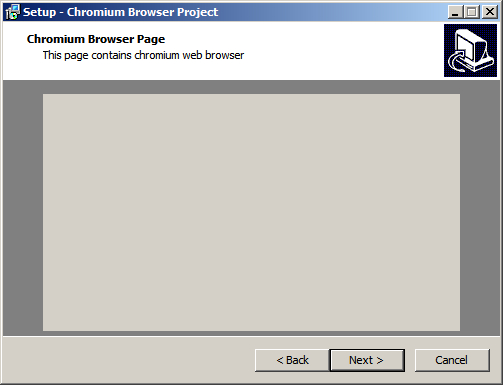
我试图创建一个TChromium的DLL来用于inno安装程序,相当于TLama make与TWebBrowser,创建Inno web浏览器,但我不能,我遵循相同的逻辑基本过程,但在创建过程中,是创建窗口内的inno设置是奇怪的,是离开附件打印,显示图像。
编辑:我正在使用DelphiXE2和DCEF3。
procedure CreateChromium(ParentWnd: HWND; Left, Top, Width, Height: Integer);
begin
  Chromium := TChromium.Create(nil);
  Chromium.ParentWindow := ParentWnd;
  Chromium.Left := Left;
  Chromium.Top := Top;
  Chromium.Width := Width;
  Chromium.Height := Height;
  Chromium.Visible := true;
  Chromium.HandleNeeded;
end;
回答 1
Stack Overflow用户
回答已采纳
发布于 2013-09-02 09:57:05
铬控件在你的屏幕截图上有它的默认颜色,所以如果这是你的问题,让我们把它改为不同的颜色。我写了关于它的文章,in this post是为DCEF1编写的,但是在DCEF3中,需要执行类似的步骤。看看这个插件的简约代码,它为初始化函数添加了新的Color参数,并展示了如何设置Chromium背景色:
unit MainUnit;

interface

uses
  Winapi.Windows, System.SysUtils, Vcl.Graphics, Vcl.GraphUtil, Soap.EncdDecd,
  CefVCL;

procedure CreateChromium(ParentWnd: HWND; Color: TColor; Left, Top, Width,
  Height: Integer); stdcall;

implementation

var
  Chromium: TChromium;

procedure CreateChromium(ParentWnd: HWND; Color: TColor; Left, Top, Width,
  Height: Integer);
const
  CSSHeader = 'data:text/css;charset=utf-8;base64,';
begin
  Chromium := TChromium.Create(nil);
  Chromium.ParentWindow := ParentWnd;

  // here is the tricky part; you must take the constant CSS header part and
  // concatenate it with Base64 encoded CSS style string as shown here
  Chromium.UserStyleSheetLocation := CSSHeader +
    EncodeString(Format('body {background-color:%s;}',
    [ColorToWebColorStr(Color)]));
  // and after you set the style, you need to recreate the browser
  Chromium.ReCreateBrowser('about:blank');

  Chromium.Left := Left;
  Chromium.Top := Top;
  Chromium.Width := Width;
  Chromium.Height := Height;
end;

end.页面原文内容由Stack Overflow提供。腾讯云小微IT领域专用引擎提供翻译支持
原文链接:
https://stackoverflow.com/questions/18566802
复制相关文章
相似问题
腾讯云开发者

Copyright © 2013 - 2026 Tencent Cloud. All Rights Reserved. 腾讯云 版权所有
深圳市腾讯计算机系统有限公司 ICP备案/许可证号:粤B2-20090059  粤公网安备44030502008569号
腾讯云计算(北京)有限责任公司 京ICP证150476号 | 京ICP备11018762号