
一个窗口中有25个WPF日历,打开窗口需要5秒。
我对WPF很陌生,并试图了解它的速度可能会慢多少。我在Visual 2010 (.NET 4)中启动了一个新的WPF应用程序,并创建了这个XAML:
<Window x:Class="CalendarTest1.MainWindow"
        xmlns="http://schemas.microsoft.com/winfx/2006/xaml/presentation"
        xmlns:x="http://schemas.microsoft.com/winfx/2006/xaml"
        Title="MainWindow" Height="800" Width="1000">
    <WrapPanel>
        <Calendar />
        <Calendar />
        <Calendar />
...repeats for a total of 25 calendar objects...
    </WrapPanel>
</Window>
当我在IDE中运行我的应用程序时,打开窗口需要5秒。一旦打开,它很快就会重新绘制(就像我调整大小一样),一切看起来都很简单。
我的PC不是最快的: AMD双核2.3GHz,2GB RAM,XP 32位操作系统,车载视频.
我可以放置25个按钮,而不是日历,在不到1秒内加载。
我正在尝试创建类似month日历中日视图中的小月份日历,如下所示:
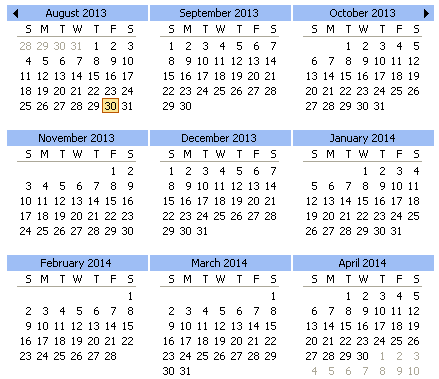
因此,我想我可以使用一个WrapPanel,并在它调整大小时添加/删除日历控件。我可能不需要25,但即使是9或12,它也比我想象的要慢(我有一个遗留的Win32应用程序,它在不到1秒的时间内显示了18个日历)。
我的问题是:
Calendar控件是因为某个特定的设计而慢吗?--要么是设计不好,要么不是为这种使用而设计的,还是因为它试图显示大量的数据/控件/信息?
如果我费尽心思去创建自己的控件,假设我使用了一个好的设计(欢迎一般想法),它会更快吗?还是这只是WPF的“典型”呢?
对于这种使用,我能做些什么来使默认日历控件更快吗?
回答 3
Stack Overflow用户
发布于 2013-08-30 20:58:30
这本身并不是一个答案,但是将它添加到Window.Resources中可以使我的机器上的负载时间减少50% (现在25个日历的加载时间在1秒以下)。
    <Window.Resources>
        <Style TargetType="CalendarDayButton">
            <Setter Property="Template">
                <Setter.Value>
                    <ControlTemplate TargetType="CalendarDayButton">
                        <ContentPresenter ContentSource="Content" Margin="2"/>
                    </ControlTemplate>
                </Setter.Value>
            </Setter>
        </Style>

        <Style TargetType="Calendar">
            <Setter Property="CalendarDayButtonStyle" Value="{StaticResource {x:Type CalendarDayButton}}"/>
        </Style>
    </Window.Resources>
编辑:
此视觉更改不影响控件的功能。所有的日历日项目仍然是Selectable,您可以绑定Calendar.SelectedDate属性。
只是没有视觉上的迹象表明一个项目是被选中的,因此点击日期似乎什么也做不了。
只需将此添加到您的ControlTemplate中:
                <ControlTemplate TargetType="CalendarDayButton">
                    <ContentPresenter ContentSource="Content" Margin="2"/>

                    <ControlTemplate.Triggers>
                        <!-- Set The FontWeight to "Bold" when Selected -->
                        <Trigger Property="IsSelected" Value="True">
                            <Setter Property="FontWeight" Value="Bold"/>
                        </Trigger>
                    </ControlTemplate.Triggers>
</ControlTemplate>您可以使用此ControlTemplate及其Triggers来添加视觉效果。尽管要记住,模板越复杂,加载所需的时间就越长。
Stack Overflow用户
发布于 2013-08-30 20:41:29
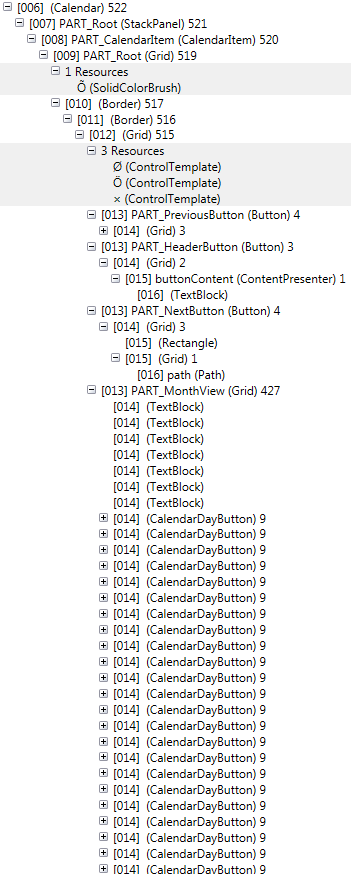
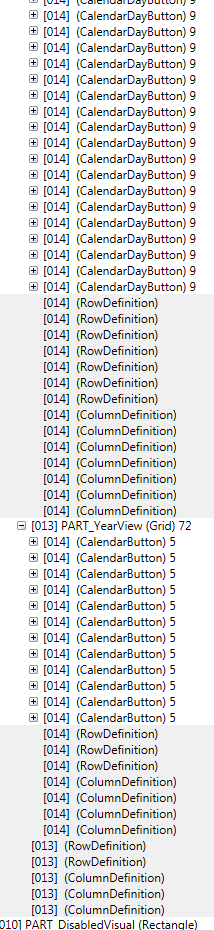
这将让您了解什么是日历,而不是使用Snoop按钮。是的,我们确实期望很多日历会花费更多的渲染时间。如果您需要大量使用它们,我将尝试创建您自己的更简单的和/或虚拟化它们
这是一个按钮,三个孩子..。

这是一个日历,522个孩子。注意,我没有展开的每个CalendarButtons仍然每个都有9个子
Stack Overflow用户
发布于 2013-08-30 23:53:44
我将更新这个控件,因为我有时间完成这个新控件,但到目前为止,我已经向自己证明,我可以在窗口中拥有大量的控件,并且仍然可以快速加载它。在本例中,1050个TextBlocks (7列*6行*我的用户控件的25个实例)和我的窗口在不到1秒内加载。
到目前为止,以下是我的简单用户控件:
<UserControl x:Class="FastCalendar.UserControl1"
             xmlns="http://schemas.microsoft.com/winfx/2006/xaml/presentation"
             xmlns:x="http://schemas.microsoft.com/winfx/2006/xaml"
             xmlns:mc="http://schemas.openxmlformats.org/markup-compatibility/2006"
             xmlns:d="http://schemas.microsoft.com/expression/blend/2008"
             xmlns:local="clr-namespace:FastCalendar"
             xmlns:vm="clr-namespace:FastCalendar.ViewModels"
             mc:Ignorable="d"
             d:DesignHeight="300" d:DesignWidth="300" Margin="5">
    <UserControl.Resources>
        <vm:MainViewModel x:Key="ViewModel" />
    </UserControl.Resources>
    <ItemsControl Width="180" Height="170" ItemsSource="{Binding Path=Days, Source={StaticResource ViewModel}}">
        <ItemsControl.ItemContainerStyle>
            <Style>
                <Setter Property="Grid.Row" Value="{Binding Path=Row}" />
                <Setter Property="Grid.Column" Value="{Binding Path=Column}" />
            </Style>
        </ItemsControl.ItemContainerStyle>

        <ItemsControl.ItemTemplate>
            <DataTemplate>
                <TextBlock VerticalAlignment="Center" HorizontalAlignment="Center" Text="{Binding Path=Day}" />
            </DataTemplate>
        </ItemsControl.ItemTemplate>

        <ItemsControl.ItemsPanel>
            <ItemsPanelTemplate>
                <Grid ShowGridLines="True">
                    <Grid.RowDefinitions>
                        <RowDefinition />
                        <RowDefinition />
                        <RowDefinition />
                        <RowDefinition />
                        <RowDefinition />
                        <RowDefinition />
                    </Grid.RowDefinitions>
                    <Grid.ColumnDefinitions>
                        <ColumnDefinition />
                        <ColumnDefinition />
                        <ColumnDefinition />
                        <ColumnDefinition />
                        <ColumnDefinition />
                        <ColumnDefinition />
                        <ColumnDefinition />
                    </Grid.ColumnDefinitions>
                </Grid>
            </ItemsPanelTemplate>
        </ItemsControl.ItemsPanel>

    </ItemsControl>
</UserControl>
我把其中的25个放在一个WrapPanel中,它在不到1秒的时间内加载。我仍然需要在我的用户控件中添加更多的控件和样式,但我认为它仍然比内置的Calendar控件快得多(我希望如此)。
P.S.--即使我的用户控件在窗口上有50份拷贝,它也会在1秒内加载。
https://stackoverflow.com/questions/18540771
复制相似问题
腾讯云开发者

Copyright © 2013 - 2026 Tencent Cloud. All Rights Reserved. 腾讯云 版权所有
深圳市腾讯计算机系统有限公司 ICP备案/许可证号:粤B2-20090059  粤公网安备44030502008569号
腾讯云计算(北京)有限责任公司 京ICP证150476号 | 京ICP备11018762号