
在WPF中更改自定义CheckBox的图像
我已经创建了以下自定义CheckBox,它使用图像而不是CheckBox。这是很好的工作,但是,我希望能够改变图像的要求。理想情况下,我希望使用应用程序资源Properties.Resources.SomeImage16 (一个.png文件)。XAML是
<Style x:Key="styleCustomCheckBox"
       TargetType="{x:Type CheckBox}">
    <Setter Property="Template">
        <Setter.Value>
            <ControlTemplate TargetType="{x:Type CheckBox}">
                <StackPanel Orientation="Horizontal">
                    <Image x:Name="imageCheckBox"
                           Width="16"
                           Height="16"
                           Source="F:\Camus\ResourceStudio\Graphics\Images\UnPinned16.png"/>
                    <ContentPresenter VerticalAlignment="Center"/>
                </StackPanel>
                <ControlTemplate.Triggers>
                    <Trigger Property="IsChecked" Value="False">
                        <Setter TargetName="imageCheckBox"
                                Property="Source"
                                Value="F:\Camus\ResourceStudio\Graphics\Images\Pinned16.png"/>
                    </Trigger>
                    <Trigger Property="IsChecked" Value="True">
                        <Setter TargetName="imageCheckBox"
                                Property="Source"
                                Value="F:\Camus\ResourceStudio\Graphics\Images\UnPinned16.png"/>
                    </Trigger>
                </ControlTemplate.Triggers>
            </ControlTemplate>
        </Setter.Value>
    </Setter>
</Style>
与实施
<ListBox SelectionMode="Single" >
    <StackPanel Orientation="Horizontal">
        <CheckBox Style="{StaticResource styleCustomCheckBox}"
                  HorizontalAlignment="Left"
                  VerticalAlignment="Center"
                  Margin="4,0,4,0"/>
        <TextBlock VerticalAlignment="Top"
                   Text="SomeRecentDocument.resx"/>
    </StackPanel>
</ListBox>如何更改自定义CheckBox 中使用的图像(即将固定的/未固定的图像更改为勾/十字等)不需要创建新的样式/模板?
耽误您时间,实在对不起。
回答 3
Stack Overflow用户
发布于 2013-08-30 17:19:03
正如前面提到的,@HighCore需要使用矢量图形的能力。在这种情况下,要使用Path,Data中的where到绘制对象的指定坐标(MSDN)。
优势:
- 不要将它存储在文件中,大小要小一些。
- 动态变化的颜色,大小和整个形状
小矮人(我认为):
- 您并不总是能够为该
Data找到正确的Path
关于负:有一些特殊的站点(www.modernuiicons.com)和实用程序来将图像转换为Data。
使用CheckBox更改Path的样式
Style
<Style x:Key="styleCustomCheckBox" TargetType="{x:Type CheckBox}">
        <Setter Property="FontFamily" Value="Verdana" />
        <Setter Property="FontSize" Value="14" />

        <Setter Property="Template">
            <Setter.Value>
                <ControlTemplate TargetType="{x:Type CheckBox}">
                    <StackPanel Orientation="Horizontal">
                        <Path x:Name="MyPin" Width="18" Height="18" Stretch="Fill" Fill="#FF000000"
                              Data="F1 M 56.1355,32.5475L 43.4466,19.8526C 42.7886,20.4988 42.298,21.2123 41.9749,21.9932C 41.6519,22.7741 41.4903,23.5729 41.4903,24.3895C 41.4903,25.1942 41.6529,25.987 41.9779,26.7679L 34.0577,34.6821C 33.3918,34.3372 32.6991,34.0776 31.9796,33.9032C 31.2601,33.7288 30.5298,33.6415 29.7885,33.6415C 28.623,33.6415 27.4953,33.8526 26.4052,34.2748C 25.315,34.697 24.3419,35.3342 23.4856,36.1865L 30.2344,42.9174L 25.9027,47.9032L 22.6532,51.8425L 20.5988,54.5836C 20.1212,55.2892 19.8823,55.753 19.8823,55.975L 19.8645,56.0701L 19.9002,56.088L 19.9002,56.1474L 19.9358,56.1058L 20.0131,56.1236C 20.2351,56.1236 20.6989,55.8888 21.4045,55.419L 24.1457,53.3765L 28.0849,50.1151L 33.0945,45.7775L 39.8016,52.5025C 40.6579,51.6462 41.2961,50.6731 41.7163,49.5829C 42.1365,48.4928 42.3466,47.367 42.3466,46.2056C 42.3466,45.4603 42.2603,44.729 42.0879,44.0115C 41.9155,43.294 41.6548,42.6003 41.3069,41.9304L 49.2202,34.0161C 50.0011,34.3372 50.7939,34.4978 51.5986,34.4978C 52.4192,34.4978 53.2189,34.3362 53.9979,34.0132C 54.7768,33.6901 55.4894,33.2015 56.1355,32.5475 Z "/>

                        <ContentPresenter VerticalAlignment="Center" Margin="10,0,0,0" />
                    </StackPanel>

                    <ControlTemplate.Triggers>
                        <Trigger Property="IsChecked" Value="False">
                            <Setter TargetName="MyPin" Property="Data" Value="F1 M 32.3691,30.2225L 33.2253,29.3901L 15.361,11.5258C 13.9814,12.7067 12.6951,13.9936 11.5148,15.3738L 26.6252,30.4842C 27.743,30.1631 28.8767,30.0025 30.0263,30.0025C 30.8191,30.0025 31.6,30.0759 32.3691,30.2225 Z M 45.5039,49.3629L 60.6292,64.4826C 62.0123,63.2996 63.3017,62.0101 64.4846,60.6268L 46.6218,42.7866L 45.7834,43.619L 45.9439,44.7726L 45.9915,45.9261L 45.8785,47.6713L 45.5039,49.3629 Z M 56.1355,32.5475L 43.4466,19.8526C 42.7886,20.4987 42.298,21.2123 41.9749,21.9932C 41.6519,22.7741 41.4903,23.5729 41.4903,24.3895C 41.4903,25.1942 41.6529,25.987 41.9779,26.7679L 34.0577,34.6821C 33.3918,34.3372 32.6991,34.0776 31.9796,33.9032C 31.2601,33.7288 30.5298,33.6415 29.7885,33.6415C 28.623,33.6415 27.4953,33.8526 26.4052,34.2748C 25.315,34.697 24.3419,35.3342 23.4856,36.1865L 30.2344,42.9174L 25.9027,47.9032L 22.6532,51.8425L 20.5988,54.5836C 20.1212,55.2892 19.8823,55.753 19.8823,55.975L 19.8645,56.0701L 19.9002,56.0879L 19.9002,56.1474L 19.9358,56.1058L 20.0131,56.1236C 20.2351,56.1236 20.6989,55.8888 21.4045,55.419L 24.1457,53.3765L 28.0849,50.1151L 33.0945,45.7775L 39.8016,52.5025C 40.6579,51.6462 41.2961,50.6731 41.7163,49.5829C 42.1365,48.4928 42.3466,47.367 42.3466,46.2056C 42.3466,45.4603 42.2603,44.729 42.0879,44.0115C 41.9155,43.294 41.6548,42.6003 41.306,41.9304L 49.2202,34.0161C 50.0011,34.3372 50.7939,34.4978 51.5986,34.4978C 52.4192,34.4978 53.219,34.3362 53.9979,34.0132C 54.7768,33.6901 55.4894,33.2015 56.1355,32.5475 Z " />
                            <Setter TargetName="MyPin" Property="Fill" Value="Gray" />
                        </Trigger>
                    </ControlTemplate.Triggers>
                </ControlTemplate>
            </Setter.Value>
        </Setter>
</Style>
Using
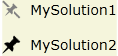
<StackPanel Orientation="Vertical" HorizontalAlignment="Center">
    <CheckBox Height="35"
              Style="{StaticResource styleCustomCheckBox}"
              Content="MySolution1" />

    <CheckBox Height="35"
              Style="{StaticResource styleCustomCheckBox}"
              Content="MySolution2" />
</StackPanel>
Output
我们还可以将Path's存储在资源中,并将它们引用如下:
<Path x:Key="MyPath" Data="F1 M 38,19C 48.4934,19 57,27.5066 ... />

...

<Setter TargetName="MainPath" Property="Data"
        Value="{Binding Source={StaticResource MyPath}, Path=Data}" />
Edit
为了指定任意图标,我创建了两个附加的依赖项属性(字符串类型):
- IsCheckedOnData
- IsCheckedOffData
IsCheckedOnData按IsChecked = "True"包含Data值,由IsChecked = "False"包含IsCheckedOffData值。
现在您只需要确定图标的字符串并定义这样的资源(例如)。
完整的例子:
XAML
<Window x:Class="CustomCheckBoxHelp.MainWindow"
    xmlns="http://schemas.microsoft.com/winfx/2006/xaml/presentation"
    xmlns:x="http://schemas.microsoft.com/winfx/2006/xaml"
    xmlns:local="clr-namespace:CustomCheckBoxHelp"
    xmlns:sys="clr-namespace:System;assembly=mscorlib"
    WindowStartupLocation="CenterScreen"
    Title="MainWindow" Height="350" Width="525">

<Window.Resources>
    <sys:String x:Key="Up">
        F1 M 37.8516,35.625L 34.6849,38.7917L 23.6016,50.2708L
        23.6016,39.9792L 37.8516,24.9375L 52.1016,39.9792L 52.1016,
        50.2708L 41.0182,38.7917L 37.8516,35.625 Z
    </sys:String>

    <sys:String x:Key="Down">
        F1 M 37.8516,39.5833L 52.1016,24.9375L 52.1016,35.2292L
        37.8516,50.2708L 23.6016,35.2292L 23.6016,24.9375L 37.8516,39.5833 Z
    </sys:String>

    <Style x:Key="styleCustomCheckBox" TargetType="{x:Type CheckBox}">
        <Setter Property="FontFamily" Value="Verdana" />
        <Setter Property="FontSize" Value="14" />

        <Setter Property="Template">
            <Setter.Value>
                <ControlTemplate TargetType="{x:Type CheckBox}">
                    <StackPanel Orientation="Horizontal">
                        <Path x:Name="MyPin" Width="18" Height="18" Stretch="Fill" Fill="#FF000000"
                              Data="{Binding RelativeSource={RelativeSource TemplatedParent}, Path=(local:CustomCheckBoxClass.IsCheckedOnData)}" />
                        <ContentPresenter VerticalAlignment="Center" Margin="10,0,0,0" />
                    </StackPanel>

                    <ControlTemplate.Triggers>
                        <Trigger Property="IsChecked" Value="False">
                            <Setter TargetName="MyPin" Property="Data"
                                    Value="{Binding RelativeSource={RelativeSource TemplatedParent}, Path=(local:CustomCheckBoxClass.IsCheckedOffData)}" />
                            <Setter TargetName="MyPin" Property="Fill" Value="Gray" />
                        </Trigger>
                    </ControlTemplate.Triggers>
                </ControlTemplate>
            </Setter.Value>
        </Setter>
    </Style>
</Window.Resources>

<Grid>
    <StackPanel Orientation="Vertical" HorizontalAlignment="Center" Background="Beige">
        <CheckBox Height="35"
                  local:CustomCheckBoxClass.IsCheckedOnData="{StaticResource Up}"
                  local:CustomCheckBoxClass.IsCheckedOffData="{StaticResource Down}"
                  Style="{StaticResource styleCustomCheckBox}"
                  Content="MySolution1" />

        <CheckBox Height="35"
                  local:CustomCheckBoxClass.IsCheckedOnData="{StaticResource Up}"
                  local:CustomCheckBoxClass.IsCheckedOffData="{StaticResource Down}"
                  Style="{StaticResource styleCustomCheckBox}"
                  Content="MySolution2" />
    </StackPanel>
</Grid>
</Window>
Code behind
public partial class MainWindow : Window
{
    public MainWindow()
    {
        InitializeComponent();
    }
}

public class CustomCheckBoxClass : DependencyObject
{
    #region IsCheckedOnDataProperty

    public static readonly DependencyProperty IsCheckedOnDataProperty;

    public static void SetIsCheckedOnData(DependencyObject DepObject, string value)
    {
        DepObject.SetValue(IsCheckedOnDataProperty, value);
    }

    public static string GetIsCheckedOnData(DependencyObject DepObject)
    {
        return (string)DepObject.GetValue(IsCheckedOnDataProperty);
    }

    #endregion

    #region IsCheckedOffDataProperty

    public static readonly DependencyProperty IsCheckedOffDataProperty;

    public static void SetIsCheckedOffData(DependencyObject DepObject, string value)
    {
        DepObject.SetValue(IsCheckedOffDataProperty, value);
    }

    public static string GetIsCheckedOffData(DependencyObject DepObject)
    {
        return (string)DepObject.GetValue(IsCheckedOffDataProperty);
    }

    #endregion

    static CustomCheckBoxClass()
    {
        PropertyMetadata MyPropertyMetadata = new PropertyMetadata(string.Empty);

        IsCheckedOnDataProperty = DependencyProperty.RegisterAttached("IsCheckedOnData",
                                                            typeof(string),
                                                            typeof(CustomCheckBoxClass),
                                                            MyPropertyMetadata);

        IsCheckedOffDataProperty = DependencyProperty.RegisterAttached("IsCheckedOffData",
                                                            typeof(string),
                                                            typeof(CustomCheckBoxClass),
                                                            MyPropertyMetadata);
    }
}Note:的样式--我没有使用TemplateBinding --是因为TemplateBinding不能在模板或其VisualTree属性之外工作,所以您甚至不能在模板的触发器中使用TemplateBinding。因此,我们必须使用构造{RelativeSource TemplatedParent}和等于要检索其值的依赖项属性的Path。
Stack Overflow用户
发布于 2013-08-30 16:00:18
对不起,我还不知道如何在这些资源中引用图像,但是如果您可以将这些图像添加到应用程序根目录中名为Images的文件夹中,那么您将能够引用这些图像,如下所示:
<Image Source="/ApplicationName;component/Images/SomeImage16.png" />Stack Overflow用户
发布于 2020-10-09 05:03:59
如前所述,您可以通过选中和未选中来更改复选框触发器。图像将显示相应的触发器。您的xml代码对我很好,我只需删除触发器真portion.because,默认情况下焦点为false部分,单击复选框图像UnPinned16.png是可见的。而agan单击图片Pinned16.png是visibale。
<Style x:Key="styleCustomCheckBox"
       TargetType="{x:Type CheckBox}">
    <Setter Property="Template">
        <Setter.Value>
            <ControlTemplate TargetType="{x:Type CheckBox}">
                <StackPanel Orientation="Horizontal">
                    <Image x:Name="imageCheckBox"
                           Width="16"
                           Height="16" Source="F:\Camus\ResourceStudio\Graphics\Images\UnPinned16.png"/>
                    <ContentPresenter VerticalAlignment="Center"/>
                </StackPanel>
                <ControlTemplate.Triggers>
                    <Trigger Property="IsChecked" Value="False">
                        <Setter TargetName="imageCheckBox"
                                Property="Source"
                                Value="F:\Camus\ResourceStudio\Graphics\Images\Pinned16.png"/>
                    </Trigger>
                </ControlTemplate.Triggers>
            </ControlTemplate>
        </Setter.Value>
    </Setter>
</Style>
我在文本块下面使用这个复选框
<CheckBox Style="{StaticResource styleCustomCheckBox}"
                  HorizontalAlignment="Left"
                  VerticalAlignment="Center"
Margin="4,0,4,0"/>https://stackoverflow.com/questions/18537033
复制相似问题
腾讯云开发者

Copyright © 2013 - 2026 Tencent Cloud. All Rights Reserved. 腾讯云 版权所有
深圳市腾讯计算机系统有限公司 ICP备案/许可证号:粤B2-20090059  粤公网安备44030502008569号
腾讯云计算(北京)有限责任公司 京ICP证150476号 | 京ICP备11018762号