
jQuery移动按钮组:如何对完整的垂直组进行居中?
jQuery移动按钮组:如何对完整的垂直组进行居中?
提问于 2013-08-30 08:19:14
我现在试着美化我的资料来源。为此,我希望将按钮和单选按钮的宽度更改为80%,并将对齐更改为中心。对于按钮,我做的css设置非常好,但我不能集中单选按钮组。
HTML:
<div data-role="page" id="testPage" data-theme="e">
    <fieldset data-role="controlgroup">
        <legend id="SettingsDifficulty"></legend>
        <input class="rbgroup1" type="radio" name="test" id="radio-choice-1" value="3" />
        <label for="radio-choice-1" id="label1" class="activeOnce">Radio 1</label>
        <input class="rbgroup1" type="radio" name="test" id="radio-choice-2" value="4" />
        <label for="radio-choice-2" id="label2" class="activeOnce">Radio 2</label>
        <input class="rbgroup1" type="radio" name="test" id="radio-choice-3" value="5" />
        <label for="radio-choice-3" id="label3" class="activeOnce">Radio 3</label>
    </fieldset>
    </br>
    <hr>
    </br>
<a href="#settings" data-role="button" id="buton" class="activeOnce">Button</a>

</div>
CSS:
.ui-btn.activeOnce
{
  width:80%;
  margin-left: auto;
  margin-right: auto;
  text-align: center;
}
在末端的单一按钮现在在80%的宽度和完美的居中。单选按钮的宽度也是80%,但仍然是左对齐的。在web上,我找到了一些水平单选按钮组的解决方案,但是这个解决方案不适用于数据类型=“垂直”。也有办法把这个集中起来吗?
非常感谢你帮助我:-)。
JSFIDDLE:http://jsfiddle.net/7eKZb
回答 2
Stack Overflow用户
回答已采纳
发布于 2013-08-30 09:32:03
使用jQuery移动网格系统,ui-grid-b和3块ui-block-a,ui-block-b和ui-block-c。
<div class="ui-grid-b">
  <div class="ui-block-left ui-block-a"><!-- Placeholder --></div>
    <div class="ui-block-center ui-block-b">
      <fieldset data-role="controlgroup">
        <!-- Buttons go here -->
      </fieldset>
    </div>
  <div class="ui-block-right ui-block-c"><!-- Placeholder --></div>
</div>
以及覆盖块a、b和c的宽度。为了不覆盖其他块,我使用了额外的自定义类。
.ui-block-left, .ui-block-right {
  width: 10% !important;
}

.ui-block-center {
  width: 80% !important;
}Stack Overflow用户
发布于 2013-08-30 08:26:23
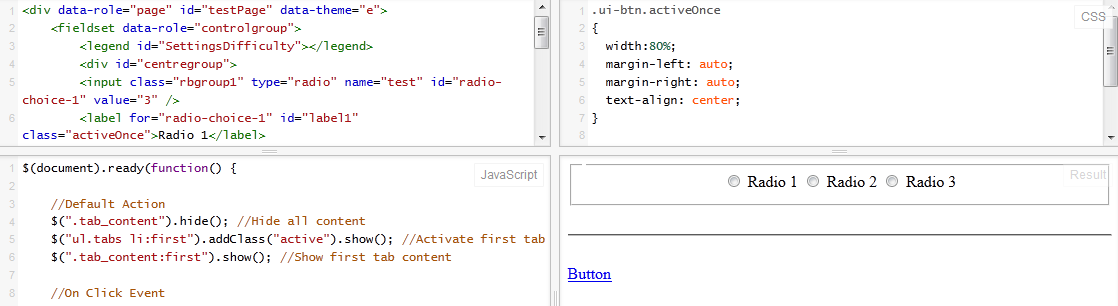
看这把小提琴http://jsfiddle.net/bB2vM/
我把你的单选按钮组包在一个div里,它起作用了,看小提琴。
<div data-role="page" id="testPage" data-theme="e">
<fieldset data-role="controlgroup">
    <legend id="SettingsDifficulty"></legend>
    <div id="centregroup">
    <input class="rbgroup1" type="radio" name="test" id="radio-choice-1" value="3" />
    <label for="radio-choice-1" id="label1" class="activeOnce">Radio 1</label>
    <input class="rbgroup1" type="radio" name="test" id="radio-choice-2" value="4" />
    <label for="radio-choice-2" id="label2" class="activeOnce">Radio 2</label>
    <input class="rbgroup1" type="radio" name="test" id="radio-choice-3" value="5" />
    <label for="radio-choice-3" id="label3" class="activeOnce">Radio 3</label>
    </div>
</fieldset>
</br>
<hr>
</br>
按钮
这是css
.ui-btn.activeOnce
{
  width:80%;
  margin-left: auto;
  margin-right: auto;
  text-align: center;
}

#centregroup
{
  text-align:center;
}
看“尖叫”。
页面原文内容由Stack Overflow提供。腾讯云小微IT领域专用引擎提供翻译支持
原文链接:
https://stackoverflow.com/questions/18528175
复制相关文章
相似问题
腾讯云开发者

Copyright © 2013 - 2026 Tencent Cloud. All Rights Reserved. 腾讯云 版权所有
深圳市腾讯计算机系统有限公司 ICP备案/许可证号:粤B2-20090059  粤公网安备44030502008569号
腾讯云计算(北京)有限责任公司 京ICP证150476号 | 京ICP备11018762号