
ScrollView,LinearLayout混沌
ScrollView,LinearLayout混沌
提问于 2013-08-26 01:00:03
我今天给我的应用程序添加了一个滚动视图。我想要的东西像谷歌现在卡。它起了作用,但我希望它是全屏的,但在底部。在底部,我得到了一个EditText和一个按钮,我希望滚动视图停止在那里,这样它们都是可见的。我该怎么做?:这是我的活动:
 <android.support.v4.widget.DrawerLayout
    xmlns:android="http://schemas.android.com/apk/res/android"
    android:id="@+id/drawer_layout"
    android:layout_width="match_parent"
    android:layout_height="match_parent" >

    <RelativeLayout xmlns:android="http://schemas.android.com/apk/res/android"
                    android:id="@+id/chat_layout"
                    android:icon="@drawable/ic_linkrholoorange"
                    xmlns:tools="http://schemas.android.com/tools"
                    android:layout_width="match_parent"
                    android:layout_height="match_parent"
                    android:paddingLeft="@dimen/activity_horizontal_margin"
                    android:paddingRight="@dimen/activity_horizontal_margin"
                    android:paddingTop="@dimen/activity_vertical_margin"
                    android:paddingBottom="@dimen/activity_vertical_margin"
                    tools:context=".Chat"
                    android:text = "Now">


        <ScrollView xmlns:android="http://schemas.android.com/apk/res/android"
                    xmlns:tools="http://schemas.android.com/tools"
                    android:layout_width="fill_parent"
                    android:layout_height="fill_parent"
                    android:fillViewport="true" >

        <com.linkr.chat.NowLayout
                    android:layout_width="match_parent"
                    android:layout_height="match_parent"
                    android:background="#e3e3e3"
                    android:orientation="vertical">
                <TextView
                        android:id="@+id/card"
                        style="@style/nowCardStyle"
                        android:layout_width="match_parent"
                        android:layout_height="100dp"
                        tools:context=".Chat"
                        android:layout_alignTop="@+id/linearLayout"
                        android:layout_alignLeft="@+id/linearLayout"/>

            </com.linkr.chat.NowLayout>
        </ScrollView>


        <LinearLayout
                android:layout_width="wrap_content"
                android:layout_height="10dp"
                android:id="@+id/linearLayout">

            <EditText
                    android:layout_width="wrap_content"
                    android:layout_height="wrap_content"
                    android:inputType="textMultiLine"
                    android:ems="10"
                    android:id="@+id/chatTextArea"
                    android:layout_alignTop="@+id/sendButton"
                    android:layout_toLeftOf="@+id/sendButton"
                    android:layout_alignBottom="@+id/sendButton"
                    android:layout_alignLeft="@+id/scrollView"
                    android:enabled="false"
                    android:focusable="false"
                    android:hint="What's on your mind..."
                    android:visibility="visible"/>

            <Button
                    android:layout_width="wrap_content"
                    android:layout_height="wrap_content"
                    android:id="@+id/sendButton"
                    android:gravity="bottom"
                    android:background="@drawable/social_send_now"
                    android:onClick="sendMethod"
                    android:layout_alignBottom="@+id/scrollView"
                    android:layout_alignRight="@+id/scrollView"/>

        </LinearLayout>

    </RelativeLayout>


    <!-- The navigation drawer -->

    <!--<ImageView
        android:id="@+id/drawerimage"
        android:layout_width="320dp"
        android:layout_height="100dp"
        android:layout_gravity="start"
        android:background="@drawable/desert"
        android:choiceMode="singleChoice"></ImageView>-->
    <ListView
            android:id="@+id/drawer"
            android:layout_width="320dp"
            android:layout_height="match_parent"
            android:background="#F3F3F4"
            android:layout_gravity="start"
            android:choiceMode="singleChoice"
            android:hint="What's on your mind?"
            android:divider="@android:color/darker_gray"
            android:dividerHeight="1dp" ></ListView>

</android.support.v4.widget.DrawerLayout>
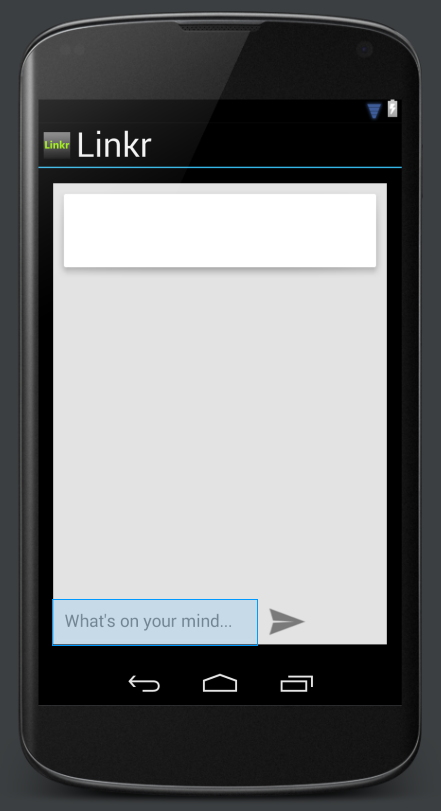
我希望你能帮我,非常感谢!
回答 1
Stack Overflow用户
回答已采纳
发布于 2013-08-26 01:02:50
你还没有说出正在发生的事情,所以很难说出问题出在哪里。但是,你要按照你想要的方式来做,我建议你增加这个属性
android:layout_alignParentBottom="true"到您的LineareLayout中使用EditText和Button。看看能不能。有点像
<LinearLayout
     android:layout_width="wrap_content"
     android:layout_height="10dp"
     android:id="@+id/linearLayout"
android:layout_alignParentBottom="true"> <!-- Add this line here -->您的EditText和Button的父级是一个LinearLayout,但是它们具有如下的属性
android:layout_alignTop="@+id/sendButton"
android:layout_toLeftOf="@+id/sendButton"
android:layout_alignBottom="@+id/sendButton"
android:layout_alignLeft="@+id/scrollView"但这些都是RelativeLayout的属性,因此它们不会对View的父级LinearLayout产生任何影响,至少不会产生任何想要的效果。
有关每个博士们所具有的属性,请参见ViewGroup。
页面原文内容由Stack Overflow提供。腾讯云小微IT领域专用引擎提供翻译支持
原文链接:
https://stackoverflow.com/questions/18435260
复制相关文章
相似问题
腾讯云开发者

Copyright © 2013 - 2026 Tencent Cloud. All Rights Reserved. 腾讯云 版权所有
深圳市腾讯计算机系统有限公司 ICP备案/许可证号:粤B2-20090059  粤公网安备44030502008569号
腾讯云计算(北京)有限责任公司 京ICP证150476号 | 京ICP备11018762号