
FPPopover cell.detailTextLabel.text
FPPopover cell.detailTextLabel.text
提问于 2013-08-24 01:28:54
对于那些熟悉FPPopOver:https://github.com/50pixels/FPPopover的人
单元格能显示字幕吗?我不得不把我的UITableViewController附加到一个笔尖上。
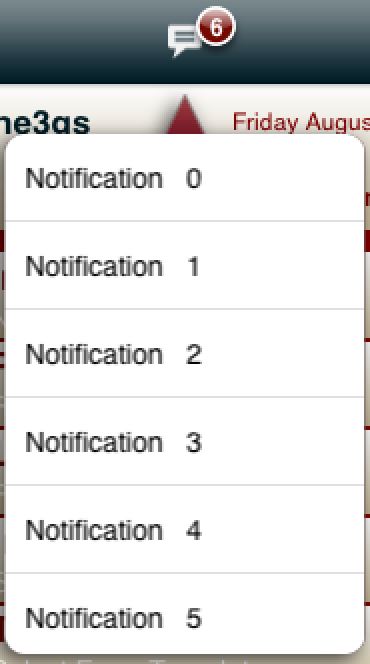
在故事板中,我将单元格设置为显示字幕,但是,当popOver出现在iPhone上时,只有cell.textLabel.text是可见的-- cell.detailTextLabel.text没有出现。
- (UITableViewCell *)tableView:(UITableView *)tableView cellForRowAtIndexPath:(NSIndexPath *)indexPath
{
    static NSString *CellIdentifier = @"Cell";
    UITableViewCell *cell = [tableView dequeueReusableCellWithIdentifier:CellIdentifier forIndexPath:indexPath];

    if (cell==nil)
    {
        cell = [[UITableViewCell alloc]initWithStyle:UITableViewCellStyleSubtitle reuseIdentifier:CellIdentifier];
    }
    NSString  *entityName= [[managedObject entity]name];
    cell.textLabel.text = [NSString stringWithFormat:@"%@   %i", entityName, [indexPath row]];
    cell.detailTextLabel.text = @"Subtitle";

}
这是一张图片:
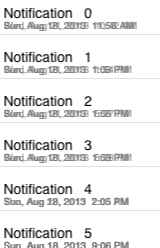
更新在使用标签显示字幕后,将单元格滚动回视图后,会发生以下情况:
回答 1
Stack Overflow用户
发布于 2013-08-24 04:12:19
如果它根本不起作用,那么另一种方法是,您可以使用lable和set的lable框架作为详细文本,并将其添加为cell.contentview加载项视图,这样您就可以在表视图单元格中获得详细的文本。
- (UITableViewCell *)tableView:(UITableView *)tableView cellForRowAtIndexPath:(NSIndexPath *)indexPath
{
UITableViewCell *cell = (UITableViewCell*)[tblUser dequeueReusableCellWithIdentifier:nil];
if (cell == nil) {
    cell = [[UITableViewCell alloc] initWithStyle:UITableViewCellStyleDefault reuseIdentifier:nil];
}
NSMutableDictionary *objUser = [arrUser objectAtIndex:indexPath.row];

    strName = [objUser objectForKey:@"Name"];
    strDate = [objUser objectForKey:@"Date"];

    UILabel *lblName = [[UILabel alloc] initWithFrame:CGRectMake(85, 10, 215, 20)];
    lblName.text = strName;
    lblName.textColor = [UIColor whiteColor];
    [lblName setBackgroundColor:[UIColor clearColor]];
    [cell.contentView addSubview:lblName];

    UILabel *lblDate = [[UILabel alloc] initWithFrame:CGRectMake(85, 34, 215, 20)];
    lblDate.text = strDate;
    lblDate.textColor = [UIColor whiteColor];
    [lblDate setBackgroundColor:[UIColor clearColor]];
    [cell.contentView addSubview:lblDate];
return cell;
}页面原文内容由Stack Overflow提供。腾讯云小微IT领域专用引擎提供翻译支持
原文链接:
https://stackoverflow.com/questions/18414024
复制相关文章
相似问题
腾讯云开发者

Copyright © 2013 - 2026 Tencent Cloud. All Rights Reserved. 腾讯云 版权所有
深圳市腾讯计算机系统有限公司 ICP备案/许可证号:粤B2-20090059  粤公网安备44030502008569号
腾讯云计算(北京)有限责任公司 京ICP证150476号 | 京ICP备11018762号