
Teechart:底部轴标号角
Teechart:底部轴标号角
提问于 2013-08-22 11:14:21
我用Teechart做.net V3。
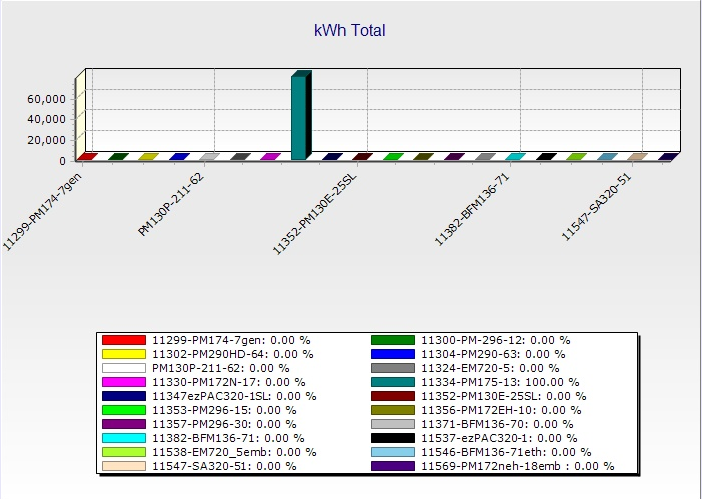
当尝试将X标签旋转到45°时,有些标签没有显示,但是如果角度设置为90°,则没有问题。
请参阅下列图片:
这是45°旋转:
这是90°旋转:
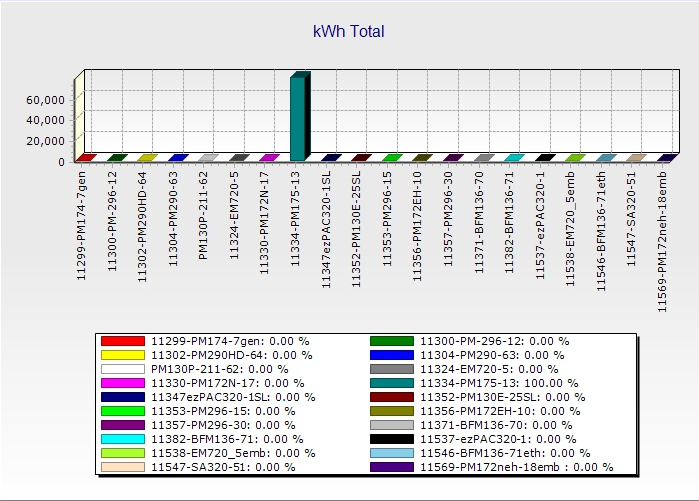
是否可以显示所有45°角度的标签?
回答 1
Stack Overflow用户
回答已采纳
发布于 2013-08-23 14:28:09
我认为当您使用45°的角度时,您可以使用自定义标签来实现所有标签的显示。您可以在下一段代码中执行以下操作:
private Steema.TeeChart.TChart tChart1;
public Form1()
{
  InitializeComponent();
  tChart1 = new Steema.TeeChart.TChart();
  this.Controls.Add(tChart1);
  tChart1.Left = 100;
  tChart1.Top = 50;
  tChart1.Width = 500;
  tChart1.Height = 350;
  tChart1.Dock = DockStyle.Fill;
  InitialzieChart();
}
private void InitialzieChart()
{
  Steema.TeeChart.Styles.Bar bar1 = new Steema.TeeChart.Styles.Bar(tChart1.Chart);
  DateTime dt = DateTime.Today;
  Random rnd = new Random();
  bar1.XValues.DateTime = true;
  //bar1.date
  for (int i = 0; i < 20; i++)
  {
    bar1.Add(dt, rnd.Next(100));
    dt = dt.AddDays(5);
  }

  tChart1.Axes.Bottom.Labels.Angle = 45;
  tChart1.Panel.MarginLeft = 10;
  tChart1.Legend.Alignment = Steema.TeeChart.LegendAlignments.Bottom;
  AddCustomLabels();
}
private void AddCustomLabels()
{
  tChart1.Axes.Bottom.Labels.Items.Clear();
  for (int i = 0; i < tChart1[0].Count; i++)
  {
    tChart1.Axes.Bottom.Labels.Items.Add(tChart1[0].XValues[i], DateTime.FromOADate(tChart1[0].XValues[i]).ToLongDateString());
  }
}
你能告诉我们以前的代码在你的结尾是否有效吗?
谢谢,
页面原文内容由Stack Overflow提供。腾讯云小微IT领域专用引擎提供翻译支持
原文链接:
https://stackoverflow.com/questions/18378862
复制相关文章
相似问题
腾讯云开发者

Copyright © 2013 - 2026 Tencent Cloud. All Rights Reserved. 腾讯云 版权所有
深圳市腾讯计算机系统有限公司 ICP备案/许可证号:粤B2-20090059  粤公网安备44030502008569号
腾讯云计算(北京)有限责任公司 京ICP证150476号 | 京ICP备11018762号