
GroupBox.AutoSize和GroupBox.Text包装
GroupBox.AutoSize和GroupBox.Text包装
提问于 2013-08-20 14:19:10
GroupBox有两个问题,它们出现在设置GroupBox.AutoSizeMode = AutoSizeMode.GrowAndShrink和GroupBox.AutoSize = true之后。
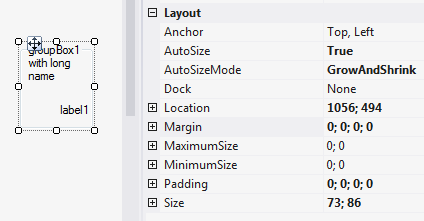
- 根本不考虑
GroupBox.Text宽度。只会对内容进行大小调整,如果不合适,文本就会被包装。如果它不能适应-它根本不显示。 GroupBox的底部和内部的Label之间存在着不必要的巨大差距。
问题:
如何使GroupBox在自动调整尺寸时尊重其Text属性?以及如何消除这一差距?
由于某些原因,我的previous问题被搁置了。我应该删除它还是怎样?
P.S.:如果你正在等待什么,请评论什么是不确切的-在我的要求!
回答 1
Stack Overflow用户
发布于 2017-09-21 21:48:57
/*
Calculate the Text Width in pixels, then set the size for the GroupBox.
*/


groupBoxA.SuspendLayout();


SizeF stringSizeLabel;

using (System.Drawing.Graphics graphics = System.Drawing.Graphics.FromImage(new Bitmap(1, 1)))
{
    Font stringFont = new Font("Microsoft Sans Serif", 8.25F);
    stringSizeLabel = graphics.MeasureString("SAMPLE TEXT", stringFont);
}

int iWidth = (int)(stringSizeLabel.Width * 1.35f); // Give a little extra width
int iHeight = 78; // This is a sample value

groupBoxA.Size = new System.Drawing.Size(iWidth, iHeight);
groupBoxA.MinimumSize = new System.Drawing.Size(iWidth, iHeight);


groupBoxA.ResumeLayout(false);
groupBoxA.PerformLayout();页面原文内容由Stack Overflow提供。腾讯云小微IT领域专用引擎提供翻译支持
原文链接:
https://stackoverflow.com/questions/18337421
复制相关文章
相似问题
腾讯云开发者

Copyright © 2013 - 2026 Tencent Cloud. All Rights Reserved. 腾讯云 版权所有
深圳市腾讯计算机系统有限公司 ICP备案/许可证号:粤B2-20090059  粤公网安备44030502008569号
腾讯云计算(北京)有限责任公司 京ICP证150476号 | 京ICP备11018762号