
如果没有deployJava.js,我如何才能用javascript找到java版本?
这是对
Detect version of Java using JavaScript
我的限制是,出于安全原因,javascript不应该初始化java插件(也不使用deployJava,后者反过来使用插件)。
此外,不应使用applet。
,否则如何检测java版本?
回答 1
Stack Overflow用户
发布于 2013-08-19 01:41:13
下面是我在链接线程上从only answer拼凑而成的一些基本脚本,这些脚本几乎是有用的,并且不使用Deployment脚本。
当前的尝试对于支持mimeTypes & plugins的navigator对象的浏览器是很好的。对于IE,它使用ActiveX (它可以检测JRE家族)。
javainfo.js
// As a version string, this might be '1.4.2_31'.
// I.E. it is not a 'number' but a 'string' and therefore must be treated as a string.
var highestVersion = 'undefined';

// not available in IE, but all other known desktop browsers
var mimes = window.navigator.mimeTypes;
// not available in IE, but all other known desktop browsers
var plugins = window.navigator.plugins;

function isJava() {
    return (
        typeof(navigator.javaEnabled) !== 'undefined' &&
        navigator.javaEnabled());
}

function getVersion() {
    var version = 0;
    if (isJava()) {
        version = 1.1;
    }
    for (var ii=0; ii<mimes.length; ii++) {
        var t = mimes[ii].type;
        if (t.indexOf("java")>0 &&
            t.indexOf("jpi")>0 &&
            t.indexOf("applet")>0
            ) {
            var parts = t.split("=");
            version = parts[parts.length-1];
        }
    }
    if (highestVersion=='undefined') highestVersion = version;
    return version;
}

function isJWS() {
    var ver = highestVersion;
    var className = false;
    if (ver>'1.0') {
        className = undefined;
    }
    if (ver>'1.4.2') {
        className = true;
    }
    return className;
}

function isPlugin2() {
    var ver = highestVersion;
    var className = false;
    if (ver>'1.0') {
        className = undefined;
    }
    if (ver>'1.6.0_10') {
        className = true;
    }
    return className;
}

function getIEVersion() {
    if (testUsingActiveX('1.9.0')) {
        return '1.9.0';
    } else if (testUsingActiveX('1.8.0')) {
        return '1.8.0';
    } else if (testUsingActiveX('1.7.0')) {
        return '1.7.0';
    } else if (testUsingActiveX('1.6.0')) {
        return '1.6.0';
    } else if (testUsingActiveX('1.5.0')) {
        return '1.5.0';
    } else if (testUsingActiveX('1.4.2')) {
        return '1.4.2';
    }
    return false;
}

if (supportsActiveX() && getVersion()=='1.1') {
    highestVersion = getIEVersion();
}

/** This checks directly for the support for ActiveX.
Internet Explorer 11 completely dropped support for ActiveX. */
function supportsActiveX() {
    return typeof window.ActiveXObject != 'undefined';
}

/*
A fragile way to determine either 'IE' or 'ActiveX support'.
function isIE() {
    // return navigator.appName=='Microsoft Internet Explorer';
    // return navigator.appVersion.indexOf(".NET CLR")>0
    return supportsActiveX();
}
*/

function testUsingActiveX(version) {
    var objectName = 'JavaWebStart.isInstalled.' + version + '.0';

    // we need the typeof check here for this to run on FF/Chrome
    // the check needs to be in place here - cannot even pass ActiveXObject
    // as arg to another function
    if (typeof ActiveXObject == 'undefined' || !ActiveXObject) {
        alert('[testUsingActiveX()] Browser claims to be IE, but no ActiveXObject object?');
        return false;
    }

    try {
        return (new ActiveXObject(objectName) != null);
    } catch (exception) {
        return false;
    }
}

function get3CellRow(cell1, cell2, cell3) {
    var s = "" +
        "<tr>" +
        "<td class='" +
        getClassName(cell1) +
        "'>" +
        cell1 +
        "</td>" +
        getDataStyledCell(cell2) +
        "<td class='" +
        getClassName(cell3) +
        "'>" +
        cell3 +
        "</td>" +
        "</tr>" +
        "";

    return s;
}

function getDataStyledCell(value) {
    var s = "<td class='datum " +
        getClassName(value) +
        "'>" +
        value +
        "</td>";

    return s;
}

function getClassName(val) {
    var className = undefined;

    if (
        (val) ||
        (!val) ||
        (val!=="undefined")
        ) {
        className = val;
    }

    return className;
}

function getBrowserInfo() {
    var s = "";

    var props = [
        'appCodeName','appName','appVersion',
        'userAgent',
        'platform','cookieEnabled'
    ];

    s += "<table border='1'>";
    for (var i=0; i<props.length; i++) {
        s+= "<tr>";
        s+= "<td><b>";
        s+= props[i];
        s+= "</b></td>";
        s+= "<td>";
        s+= navigator[props[i]];
        s+= "</td>";
        s+= "</tr>";
    }
    s += "</table>";

    return s;
}
这是我用来查看结果信息的典型HTML。
<!DOCTYPE html>
<html>
<head>
<meta charset="UTF-8">
<title>Java Information - Non Deployment Toolkit Script</title>
<meta name='author' content='Andrew Thompson'>
<meta name='description' content='Non Deployment Toolkit Script'>
<script src='javainfo.js'></script>
<style type='text/css'>
.true {
background-color: #6F6;
}
.false {
background-color: #FB0;
}
.undefined {
background-color: #FF0;
}
.datum {
font-family: monospace;
}
td {
padding: 4px;
}
</style>
</head>
<body>
<h1>Java on this PC</h1>
<h2>Overview</h2>
<p>This page endeavors to ascertain the installation, availability
& version of the Java installed on the client PC.
More importantly, it attempts to discover the information <b>without
invoking the Java Plug-In</b> itself.
The last part is what makes it different
to the Deployment Toolkit Script supplied by Oracle.
</p>
<script type='text/javascript'>
document.write("<h2>Browser Info.</h2>");
document.write(getBrowserInfo());
document.write("<h2>Basic Info.</h2>");
document.write("<table border='1'>");
document.write(get3CellRow('<b>Enabled</b>', isJava(), 'Java is enabled (1.1+) - IE info. (short of ActiveX) stops here'));
document.write(get3CellRow('<b>Version</b>', getVersion(), 'Maximum version reliably <em>known</em> to be available'));
if (supportsActiveX()) {
document.write(get3CellRow('<b>MSIE</b>', getIEVersion(), 'Maximum version reliably known to be available in IE, tested using ActiveX'));
}
document.write(get3CellRow('<b>JWS</b>', isJWS(), 'Java Web Start available (1.4.2+)'));
document.write(get3CellRow('<b>Plug-In 2</b>', isPlugin2(), 'Plug-In 2 available (1.6.0_10+)'));
document.write("</table>");
if (plugins.length>0) {
document.write("<h2>Navigator Plug-Ins</h2>");
document.write("<table border='1'>");
document.write("<tr><th>Name</th><th>Version</th><th>File Name</th><th>Description</th></tr>");
for (var ii=0; ii<plugins.length; ii++) {
var t = plugins[ii].name;
if (t.indexOf("Java")>-1) {
document.write("<tr>");
document.write("<td>" + plugins[ii].name + "</td>");
document.write(getDataStyledCell(plugins[ii].version));
document.write("<td>" + plugins[ii].filename + "</td>");
document.write("<td>" + plugins[ii].description + "</td>");
document.write("</tr>");
}
}
document.write("</table>");
}
if (mimes.length>0) {
document.write("<h2>Navigator Mime-Types</h2>");
document.write("<table border='1'>");
document.write("<tr><th>Mime</th><th>Description</th><th>Types</th></tr>");
for (var ii=0; ii<mimes.length; ii++) {
var t = mimes[ii].type;
if (t.indexOf("java")>0 &&
((t.indexOf("jpi")>0 || t.indexOf("deploy")>0 || t.indexOf("vm")>0) ||
mimes[ii].description.length>0)
) {
document.write("<tr>");
document.write("<td>" + mimes[ii].type + "</td>");
document.write("<td>" + mimes[ii].description + "</td>");
document.write("<td>" + mimes[ii].suffixes + "</td>");
document.write("</tr>");
}
}
document.write("</table>");
}
</script>
<hr>
<h2>Description</h2>
<p>In order (if available) the information is:
<ul>
<li><b>Browser info. Table:</b> Not strictly related to Java - the
information in the other tables is determined without
further reference to any information shown in this table (except for the <code>appName</code> used for
identifying IE).
OTOH it is an helpful guide
as to what we should be <em>expecting</em>
from the other information. E.G. IE
will not show the Plug-In or Mime Type tables. <em>Only</em>
FF displays the plug-in version numbers.
</li>
<li><b>Basic info. Table</b>
<ul>
<li><b>Enabled</b>: Java is known to this browser and enabled, according to JavaScript <code>navigator.javaEnabled()</code>.</li>
<li><b>Version</b>: The maximum Java version known to be supported in this browser/PC.
It is set to <code>1.1</code> if the previous check is <code>true</code>, since the MSVM
was the first Java version the public could get in a browser, and the MSVM
implemented Java 1.1. Goes on to check
<code>application/x-java-applet;jpi-version</code>
in the mime types if available
(i.e. typically browsers that are <em>not</em> IE).
</li>
<li><b>MSIE</b> (IE Only): The maximum Java version known to be supported by this instance of Internet Explorer
as determined using ActiveX. It runs from 1.4.2, 1.5.0.. through 1.9.0.
</li>
<li><b>JWS</b>:
Inferred from a comparison of the version to the Sun JRE in which
it was co-bundled or introduced.</li>
<li><b>Plug-In 2</b>:
Inferred from a comparison of the version to the Sun JRE in which
it was co-bundled or introduced.</li>
</ul>
</li>
<li><b>Navigator Object Tables:</b>
<em>The rest of the info. is gleaned from the <code>navigator</code> object.
IE does not include this information.</em>
<ul>
<li><b>Plug-Ins</b>: More details of the Java related plugins.
Filtered for <code>Java</code> in the <code>name</code>.
A <code>description</code> showing "Next Generation Java Plug-in" or <code>name</code>
"Java Deployment Toolkit" should be 1.6.0_10+.</li>
<li><b>Mime-Types</b>: More information on the Java related Mime-Types.
Filtered in <code>mime</code> field for <code>'java'</code> + <code>('jpi'||'vm'||'deploy')</code>
or a non-empty <code>description</code>.
The value <code>java-deployment-toolkit</code> in the <code>mime</code>
is a good indicator of 1.6.0_10+.
</li>
</ul>
</li>
</ul>
</body>
</html>输出
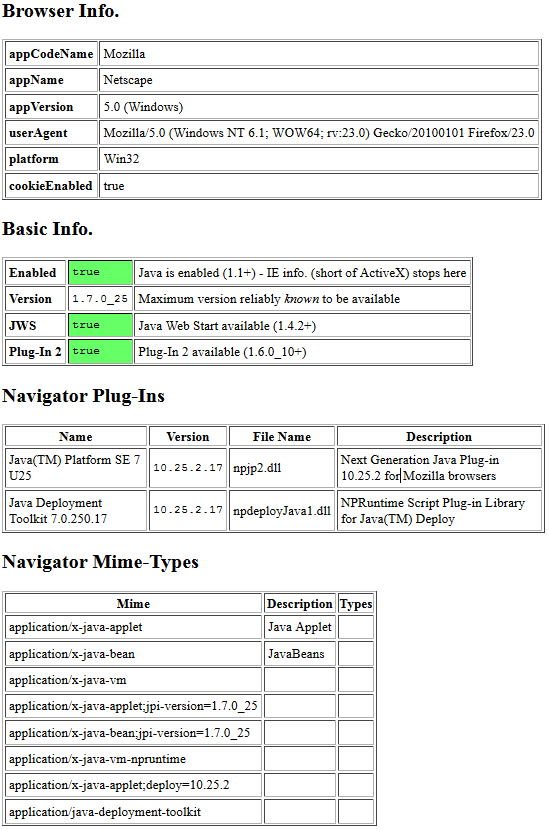
FireFox
Browser Info.
appCodeName Mozilla
appName Netscape
appVersion  5.0 (Windows)
userAgent   Mozilla/5.0 (Windows NT 6.1; WOW64; rv:23.0) Gecko/20100101 Firefox/23.0
platform    Win32
cookieEnabled   true

Basic Info.
Enabled true    Java is enabled (1.1+) - IE info. stops here
Version 1.7.0_25    Maximum version reliably known to be available
JWS true    Java Web Start available (1.4.2+)
Plug-In 2   true    Plug-In 2 available (1.6.0_10+)

Navigator Plug-Ins
Name    Version File Name   Description
Java(TM) Platform SE 7 U25  10.25.2.17  npjp2.dll   Next Generation Java Plug-in 10.25.2 for Mozilla browsers
Java Deployment Toolkit 7.0.250.17  10.25.2.17  npdeployJava1.dll   NPRuntime Script Plug-in Library for Java(TM) Deploy

Navigator Mime-Types
Mime    Description Types
application/x-java-applet   Java Applet
application/x-java-bean JavaBeans
application/x-java-vm
application/x-java-applet;jpi-version=1.7.0_25
application/x-java-bean;jpi-version=1.7.0_25
application/x-java-vm-npruntime
application/x-java-applet;deploy=10.25.2
application/java-deployment-toolkit
铬
Browser Info.
appCodeName Mozilla
appName Netscape
appVersion  5.0 (Windows NT 6.1; WOW64) AppleWebKit/537.36 (KHTML, like Gecko) Chrome/28.0.1500.95 Safari/537.36
userAgent   Mozilla/5.0 (Windows NT 6.1; WOW64) AppleWebKit/537.36 (KHTML, like Gecko) Chrome/28.0.1500.95 Safari/537.36
platform    Win32
cookieEnabled   true

Basic Info.
Enabled true    Java is enabled (1.1+) - IE info. stops here
Version 1.7.0_25    Maximum version reliably known to be available
JWS true    Java Web Start available (1.4.2+)
Plug-In 2   true    Plug-In 2 available (1.6.0_10+)

Navigator Plug-Ins
Name    Version File Name   Description
Java(TM) Platform SE 7 U25  undefined   npjp2.dll   Next Generation Java Plug-in 10.25.2 for Mozilla browsers
Java Deployment Toolkit 7.0.250.17  undefined   npDeployJava1.dll   NPRuntime Script Plug-in Library for Java(TM) Deploy

Navigator Mime-Types
Mime    Description Types
application/x-java-applet   Java Applet
application/x-java-bean JavaBeans
application/x-java-vm
application/x-java-applet;jpi-version=1.7.0_25
application/x-java-bean;jpi-version=1.7.0_25
application/x-java-vm-npruntime
application/x-java-applet;deploy=10.25.2
application/java-deployment-toolkit
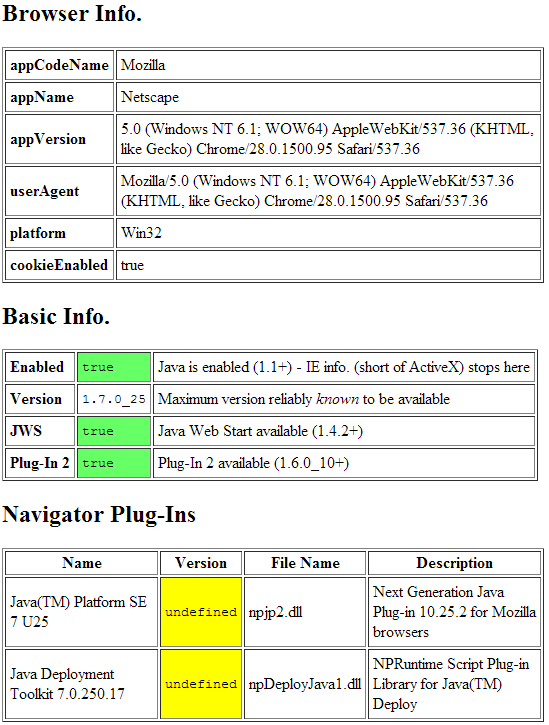
(注意:导航器Mime-类型从图像中修剪,因为它是相同的信息。)(作为FF)
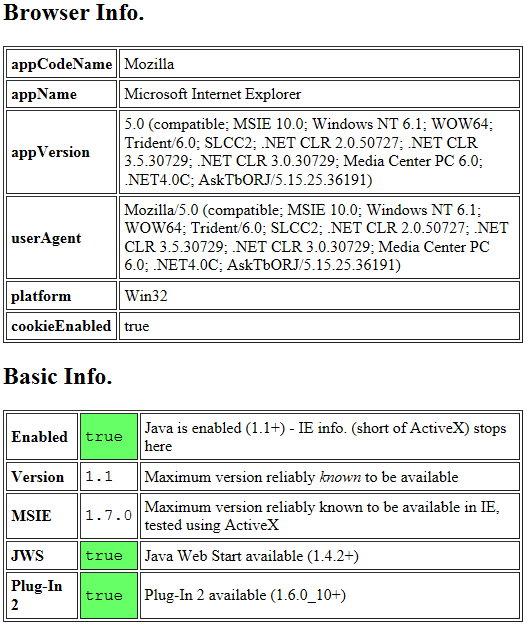
Internet Explorer
Browser Info.
appCodeName Mozilla
appName Microsoft Internet Explorer
appVersion 5.0 (compatible; MSIE 10.0; Windows NT 6.1; WOW64; Trident/6.0; SLCC2; .NET CLR 2.0.50727; .NET CLR 3.5.30729; .NET CLR 3.0.30729; Media Center PC 6.0; .NET4.0C; AskTbORJ/5.15.25.36191)
userAgent Mozilla/5.0 (compatible; MSIE 10.0; Windows NT 6.1; WOW64; Trident/6.0; SLCC2; .NET CLR 2.0.50727; .NET CLR 3.5.30729; .NET CLR 3.0.30729; Media Center PC 6.0; .NET4.0C; AskTbORJ/5.15.25.36191)
platform Win32
cookieEnabled true

Basic Info.
Enabled true Java is enabled (1.1+) - IE info. (short of ActiveX) stops here
Version 1.1 Maximum version reliably known to be available
MSIE 1.7.0 Maximum version reliably known to be available in IE, tested using ActiveX
JWS true Java Web Start available (1.4.2+)
Plug-In 2 true Plug-In 2 available (1.6.0_10+)
11+
11已经放弃了对ActiveX的支持,所以它可能是这样出现的。
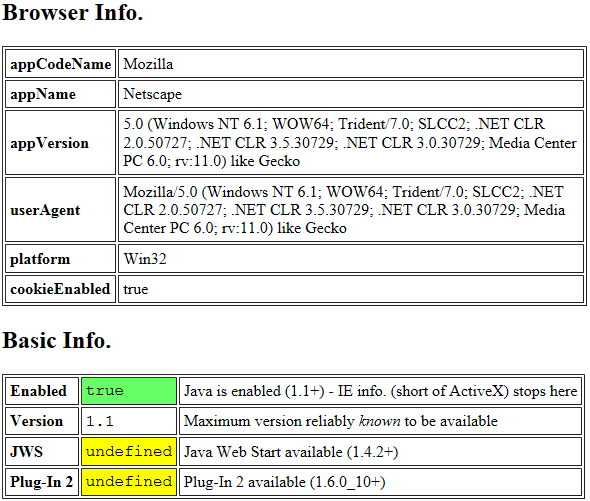
好的一面是,如果这是Internet 11+,并且已经启用了Java,那么它至少已经安装了Java1.7.0。从Java 1.6开始,Java就一直默认自动更新。因此,这个浏览器在逻辑上(至少在默认情况下)具有最新的JRE版本。
https://stackoverflow.com/questions/18255782
复制相似问题
腾讯云开发者

Copyright © 2013 - 2026 Tencent Cloud. All Rights Reserved. 腾讯云 版权所有
深圳市腾讯计算机系统有限公司 ICP备案/许可证号:粤B2-20090059  粤公网安备44030502008569号
腾讯云计算(北京)有限责任公司 京ICP证150476号 | 京ICP备11018762号