
Java复杂表单- SpringLayout
Java复杂表单- SpringLayout
提问于 2013-08-15 00:17:14
我需要帮助创建Java swing表单。表单是动态创建的,并要求用户提供各种输入。输入不同,可以是Textfield、RadioButton、ComboBox。我正试图确定这样一个表格的最佳布局。目前,我有这样的情况:
JPanel pnlForm = new JPanel(new SpringLayout());

for (Parameter p : globals) {
  JLabel lblName = new JLabel(p.getName() + ": ", JLabel.TRAILING);
  pnlForm.add(lblName);

  // The input field depends on parameter type
  if (p.getType().equals("filename")) {
    JPanel pnlFileChooser = new JPanel();
    JTextArea txtArea = new JTextArea(p.getValue());
    JButton btnFileChooser = new JButton("Browse");
    pnlFileChooser.add(txtArea);
    pnlFileChooser.add(btnFileChooser);
    pnlForm.add(pnlFileChooser);
  } else if (p.getType().equals("textbox")) {
    JTextArea txtArea = new JTextArea(p.getValue());
    pnlForm.add(txtArea);
  } else if (p.getType().equals("checkbox")) {
     // not yet implemented
  } else if (p.getType().equals("radio")) {
     ButtonGroup bgRadios = new ButtonGroup();
     for(String option : p.getSelections()){
        JRadioButton btnOption = new JRadioButton(option);
        btnOption.setMnemonic(KeyEvent.VK_B);
        btnOption.setActionCommand(option);
        bgRadios.add(btnOption);
        pnlForm.add(btnOption);
     }
  } else {
    JLabel lblError = new JLabel("ERROR! Unknown type!" + p.getType());
    lblName.setLabelFor(lblError);
    pnlForm.add(lblError);
  }

    //Lay out the panel.
    SpringUtilities.makeCompactGrid(pnlDetails,
            globals.size() - 1, 2, //rows, cols
            1, 1,  //initX, initY
            5, 5); //xPad, yPad
这是目前非常动荡(单选按钮将不会停留在同一地区)。有什么想法可以让这个布局更好吗?
谢谢!
编辑
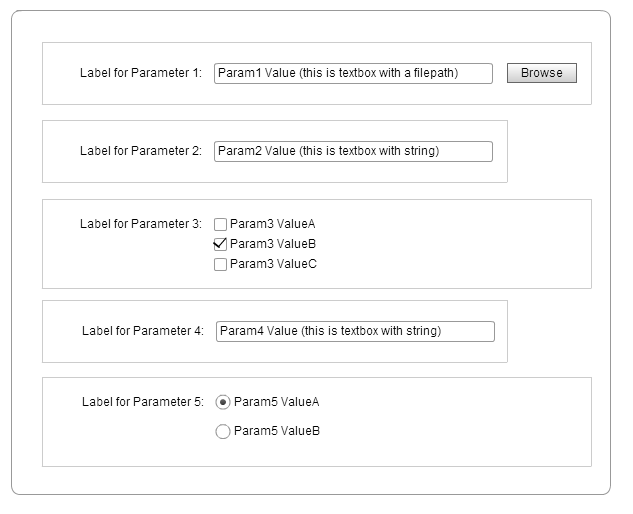
添加下面的图表,说明这可能是什么样子。灰色线可以被忽略,仅仅是为了显示JPanel可能在哪里。每一行都是基于某些用户输入动态生成的。我怎么能做一个像这样的表格呢?
回答 1
Stack Overflow用户
回答已采纳
发布于 2013-08-21 17:54:28
最后,我使用了每行有两个面板的SpringLayout来完成这项工作。左面板包含标签,右边包含输入字段。这似乎很有效:
    for (Parameter p : params) {
        // The label for this parameter
        JLabel pname = new JLabel(p.getName() + ": ", JLabel.TRAILING);

        // Setup the sub panels for this layout, aligned to point each other
        JPanel pnlLeft = new JPanel(new FlowLayout(FlowLayout.RIGHT));
        JPanel pnlRight = new JPanel(new FlowLayout(FlowLayout.LEFT));

        // The value field for this parameter, depends on param type
        if (p.getType().equals("filename")) {
            JButton btnBrowse = new JButton("Browse");
            btnBrowse.setActionCommand(pfilepath + p.getId());
            btnBrowse.addActionListener(this);
            JTextField pvalue = new JTextField(p.getValue(),50);
            pnlRight.add(pvalue);
            pnlRight.add(btnBrowse);
        } else if (p.getType().equals("directory")) {
            JButton btnBrowse = new JButton("Browse");
            btnBrowse.setActionCommand(pdirpath + p.getId());
            btnBrowse.addActionListener(this);
            JTextField pvalue = new JTextField(p.getValue(),50);
            pnlRight.add(pvalue);
            pnlRight.add(btnBrowse);
        } else if (p.getType().equals("textbox")) {
            JTextField pvalue = new JTextField(p.getValue(),50);
            pnlRight.add(pvalue);
        } else if (p.getType().equals("checkbox")) {
            for(String option : p.getSelections()){
                JCheckBox chkbox = new JCheckBox(option);
                if (p.getValue().contains(option)){
                    chkbox.setSelected(true);
                }
                chkbox.setName(p.getId() + "_" + option);
                chkbox.setActionCommand(pchkbox + p.getId() + "_" + option);
                chkbox.addActionListener(this);
                pnlRight.add(chkbox);
            }
        } else if (p.getType().equals("radio")) {
            ButtonGroup bgRadios = new ButtonGroup();
            for(String option : p.getSelections()){
                JRadioButton radio = new JRadioButton(option);
                if (p.getValue().equals(option)){
                    radio.setSelected(true);
                }
                radio.setName(p.getId() + "_" + option);
                radio.setActionCommand(pradio + p.getId() + "_" + option);
                radio.addActionListener(this);
                bgRadios.add(radio);
                pnlRight.add(radio);
            }
        } else {
            JTextField pvalue = new JTextField(p.getValue(),50);
            pvalue.setText("ERROR! Invalid global parameter type!" + p.getType());
            pvalue.setEditable(false);
            pnlRight.add(pvalue);
        }

        // Add subpanels to this main panel and set labeling
        pnlLeft.add(pname);
        pname.setLabelFor(pnlRight);
        add(pnlLeft);
        add(pnlRight);
    }

    // Correctly setup SpringLayout grid for this main panel
    SpringUtilities.makeCompactGrid(this,
            params.size(), 2, //rows, cols
            1, 1,  //initX, initY
1, 1); //xPad, yPad页面原文内容由Stack Overflow提供。腾讯云小微IT领域专用引擎提供翻译支持
原文链接:
https://stackoverflow.com/questions/18244407
复制相关文章
相似问题
腾讯云开发者

Copyright © 2013 - 2026 Tencent Cloud. All Rights Reserved. 腾讯云 版权所有
深圳市腾讯计算机系统有限公司 ICP备案/许可证号:粤B2-20090059  粤公网安备44030502008569号
腾讯云计算(北京)有限责任公司 京ICP证150476号 | 京ICP备11018762号