
Android为android文本辩护
Android为android文本辩护
提问于 2013-08-12 16:38:31
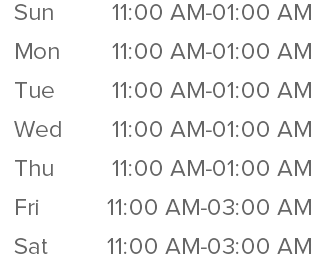
我正在努力确保所有的时间都是合理的(这意味着他们开始和结束在相同的边际),你可以看到,从星期一到星期四,他们正确地对齐。星期五和星期六11:00和其他的不对齐。毫无疑问,由于03:00和01:00占用了不同的空间。但有什么办法能使它们完全一致吗?
<LinearLayout xmlns:android="http://schemas.android.com/apk/res/android"
    android:layout_width="match_parent"
    android:layout_height="match_parent"
    android:paddingTop="@dimen/margin_3times"
    android:orientation="horizontal"
    android:weightSum="1"
     >
    <com.example.views.TextView
        android:id="@+id/openhour_day"
        android:layout_width="0px"
        android:layout_weight="0.9"
        android:layout_height="wrap_content"
        android:textColor="@color/gray_dark"
        android:textSize="@dimen/middle_text_size"
        android:text="Day"/>
    <com.example.views.TextView
        android:id="@+id/openhour_hour"
        android:layout_width="wrap_content"
        android:layout_height="wrap_content"
        android:layout_weight="0.1"
        android:singleLine="true"
        android:textColor="@color/gray_dark"
        android:textSize="@dimen/middle_text_size"
        android:text="Hour"/>

</LinearLayout>
回答 3
Stack Overflow用户
回答已采纳
发布于 2013-08-12 16:52:18
你可以用一种单间距字体。单间距字体对每个字符使用固定的宽度大小。Android有Droids,您可以使用。
<LinearLayout xmlns:android="http://schemas.android.com/apk/res/android"
    android:layout_width="match_parent"
    android:layout_height="match_parent"
    android:paddingTop="@dimen/margin_3times"
    android:orientation="horizontal"
    android:weightSum="1"
     >
    <com.example.views.TextView
        android:id="@+id/openhour_day"
        android:layout_width="0px"
        android:layout_weight="0.9"
        android:layout_height="wrap_content"
        android:textColor="@color/gray_dark"
        android:textSize="@dimen/middle_text_size"
        android:typeface="monospace"
        android:text="Day"/>
    <com.example.views.TextView
        android:id="@+id/openhour_hour"
        android:layout_width="wrap_content"
        android:layout_height="wrap_content"
        android:layout_weight="0.1"
        android:singleLine="true"
        android:textColor="@color/gray_dark"
        android:textSize="@dimen/middle_text_size"
        android:typeface="monospace"
        android:text="Hour"/>

</LinearLayout>Stack Overflow用户
发布于 2013-08-12 16:43:03
尝试以下几点:
<?xml version="1.0" encoding="utf-8"?>
<LinearLayout xmlns:android="http://schemas.android.com/apk/res/android"
    android:layout_width="match_parent"
    android:layout_height="match_parent"
    android:orientation="horizontal"
    android:paddingTop="@dimen/margin_3times" >

    <com.example.views.TextView
        android:id="@+id/openhour_day"
        android:layout_width="0px"
        android:layout_height="wrap_content"
        android:layout_weight="1"
        android:textColor="@color/gray_dark"
        android:textSize="@dimen/middle_text_size"
        android:text="Day" />

    <com.example.views.TextView
        android:id="@+id/openhour_hour"
        android:layout_width="wrap_content"
        android:layout_height="wrap_content"
        android:layout_gravity="left"
        android:layout_weight="2"
        android:textColor="@color/gray_dark"
        android:textSize="@dimen/middle_text_size"
        android:singleLine="true"
        android:text="Hour" />

</LinearLayout>Stack Overflow用户
发布于 2018-04-29 19:14:33
app Grandle : compile 'me.biubiubiu.justifytext:library:1.1'

Text View code :
 <me.biubiubiu.justifytext.library.JustifyTextView
        android:id="@+id/text"
        android:layout_width="match_parent"
        android:layout_height="wrap_content"
/>页面原文内容由Stack Overflow提供。腾讯云小微IT领域专用引擎提供翻译支持
原文链接:
https://stackoverflow.com/questions/18192241
复制相关文章
相似问题
腾讯云开发者

Copyright © 2013 - 2026 Tencent Cloud. All Rights Reserved. 腾讯云 版权所有
深圳市腾讯计算机系统有限公司 ICP备案/许可证号:粤B2-20090059  粤公网安备44030502008569号
腾讯云计算(北京)有限责任公司 京ICP证150476号 | 京ICP备11018762号