
如何将c++11支持添加到语法vim插件中?
我在我的c++11项目中使用语法。当我在vim中编辑和保存(:w)时,合成器插件会给出每个初始化程序列表{}和每个循环上的错误,这些循环显然是c++11缺少的特性。
我用病原体安装了合成器。
下面是我在初始化程序列表和每个循环(都是编译良好的c++11 )上遇到的错误的两个例子:
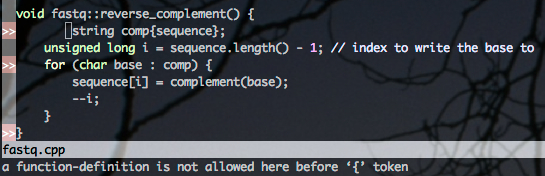
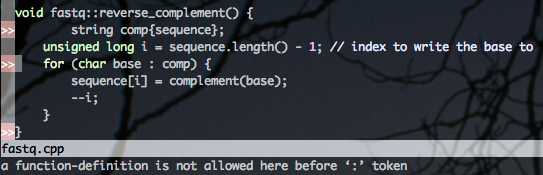
回答 5
Stack Overflow用户
发布于 2013-08-14 14:15:42
事实证明,syntastic的C++ linter (语法检查器)有许多选项可以在.vimrc上设置(不幸的是,我希望它是特定于项目的,比如.clang_complete解决方案)。
为了启用c++11标准和使用libc++库(这是我的项目正在使用的),我在我的~/..vimrc中添加了以下行
let g:syntastic_cpp_compiler = 'clang++'
let g:syntastic_cpp_compiler_options = ' -std=c++11 -stdlib=libc++'
现在效果很好。
Stack Overflow用户
发布于 2014-04-03 03:38:38
我面临着同样的问题,,我坚持分别处理c++98和c++11,。以下是我的解决办法:
在bundle/syntastic/syntax_checkers/cpp11/下创建名为gcc.vim的文件,并将这些文件复制到文件中:
"============================================================================
"File:        cpp11.vim
"Description: Syntax checking plugin for syntastic.vim
"Maintainer:  Gregor Uhlenheuer <kongo2002 at gmail dot com>
"License:     This program is free software. It comes without any warranty,
"             to the extent permitted by applicable law. You can redistribute
"             it and/or modify it under the terms of the Do What The Fuck You
"             Want To Public License, Version 2, as published by Sam Hocevar.
"             See http://sam.zoy.org/wtfpl/COPYING for more details.
"
"============================================================================

if exists('g:loaded_syntastic_cpp11_gcc_checker')
    finish
endif
let g:loaded_syntastic_cpp11_gcc_checker = 1

if !exists('g:syntastic_cpp11_compiler')
    let g:syntastic_cpp11_compiler = executable('g++') ? 'g++' : 'clang++'
endif

if !exists('g:syntastic_cpp11_compiler_options')
    let g:syntastic_cpp11_compiler_options = '-std=c++11'
endif

let s:save_cpo = &cpo
set cpo&vim

function! SyntaxCheckers_cpp11_gcc_IsAvailable() dict
    return executable(expand(g:syntastic_cpp11_compiler))
endfunction

function! SyntaxCheckers_cpp11_gcc_GetLocList() dict
    return syntastic#c#GetLocList('cpp11', 'gcc', {
        \ 'errorformat':
        \     '%-G%f:%s:,' .
        \     '%f:%l:%c: %trror: %m,' .
        \     '%f:%l:%c: %tarning: %m,' .
        \     '%f:%l:%c: %m,'.
        \     '%f:%l: %trror: %m,'.
        \     '%f:%l: %tarning: %m,'.
        \     '%f:%l: %m',
        \ 'main_flags': '-x c++ -fsyntax-only',
        \ 'header_flags': '-x c++',
        \ 'header_names': '\m\.\(h\|hpp\|hh\)$' })
endfunction

call g:SyntasticRegistry.CreateAndRegisterChecker({
    \ 'filetype': 'cpp11',
    \ 'name': 'gcc' })

let &cpo = s:save_cpo
unlet s:save_cpo

" vim: set et sts=4 sw=4:
这将使gcc检查可用(需要其他检查?你可以做类似的事情,我为你自己做的)文件与&filetype == 'cpp11‘在vim中。如何使您的文件在vim中自动识别为cpp11文件类型?只需在~/.vim/ftdetect/下创建名为~/.vim/ftdetect/的文件,内容如下:
au bufnewfile,bufread *.cpp11 set ft=cpp11
au bufnewfile,bufread *.cppx set ft=cpp11通过这种方式,您可以将*.cpp文件分别处理为c++98标准和*.cpp11或*.cppx作为c++11标准,这不仅包括语法检查,还包括语法突出显示(如果需要cpp11语法突出显示支持,这个vim插件将是有用的,尽管并不完美)。
Stack Overflow用户
发布于 2014-05-23 07:28:45
它有特定于项目的选项,如.clang_complete解决方案。
您可以设置g:syntastic_cpp_config_file和g:syntastic_c_config_file文件的路径。默认情况下,.syntastic_cpp_config用于C++。将文件放在项目的根目录中,并在其中包含编译器选项(每行一个)
对于详细信息
https://stackoverflow.com/questions/18158772
复制相似问题
腾讯云开发者

Copyright © 2013 - 2026 Tencent Cloud. All Rights Reserved. 腾讯云 版权所有
深圳市腾讯计算机系统有限公司 ICP备案/许可证号:粤B2-20090059  粤公网安备44030502008569号
腾讯云计算(北京)有限责任公司 京ICP证150476号 | 京ICP备11018762号