
Python画布object.coords倒置
Python画布object.coords倒置
提问于 2013-08-08 22:32:32
我对编程非常陌生,我刚刚编写了这段代码,可以在画布中移动一个球。它工作得很好,除了“顶部”和“底部”按钮不像预期的那样工作,它们所做的与他们应该做的完全相反!我很抱歉,但头痛了一个小时后,我还是搞不懂。谢谢你的帮助。
from tkinter import *

x1, y1 = 135, 135

def moveo (lr, tb):
    global x1, y1
    x1, y1 = x1+lr, y1+tb
    can.coords (oval, x1, y1, x1+30, y1+30)

def moveLeft ():
    moveo (-10,0)

def moveRight ():
    moveo (10,0)

def moveTop ():
    moveo (0,10)

def moveBottom ():
    moveo (0,-10)


##########MAIN############

wind = Tk()
wind.title ("Move Da Ball")

can = Canvas (wind, width = 300, height = 300, bg = "light blue")
can.pack (side = LEFT,padx = 5, pady = 5)
oval = can.create_oval(x1,y1,x1+30,y1+30,width=2,fill='orange')
Button(wind, text = 'Left', command=moveLeft).pack(padx = 5, pady = 5)
Button(wind, text = 'Right', command=moveRight).pack(padx = 5, pady = 5)
Button(wind, text = 'Top', command=moveTop).pack(padx = 5, pady = 5)
Button(wind, text = 'Bottom', command=moveBottom).pack(padx = 5, pady = 5)
Button(wind, text = 'Quit', command=wind.destroy).pack(padx = 5, pady = 5)


wind.mainloop()回答 1
Stack Overflow用户
回答已采纳
发布于 2013-08-08 22:48:48
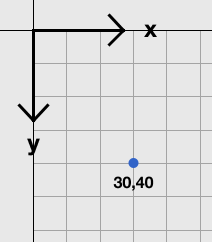
原点(0,0)位于屏幕的左上角角。当你向右走时,x轴增加,当你沿着向下走,y轴增大。
页面原文内容由Stack Overflow提供。腾讯云小微IT领域专用引擎提供翻译支持
原文链接:
https://stackoverflow.com/questions/18137313
复制相关文章
相似问题
腾讯云开发者

Copyright © 2013 - 2026 Tencent Cloud. All Rights Reserved. 腾讯云 版权所有
深圳市腾讯计算机系统有限公司 ICP备案/许可证号:粤B2-20090059  粤公网安备44030502008569号
腾讯云计算(北京)有限责任公司 京ICP证150476号 | 京ICP备11018762号