
Word到PDF转换在我的开发PC以外的机器上失败。
我正在测试如何从Winforms应用程序中以编程方式将Word文档转换为PDF。我编写了以下代码,这些代码在我的机器上运行得很好。该应用程序由一个带有2个按钮和一个文本框的表单组成。单击第一个按钮将打开一个对话框,允许用户导航到文件夹。文件夹地址存储在文本框中。然后,第二个按钮从指定的文件夹中获取每个Word文档,并为每个文件夹创建一个具有相同名称的PDF。
namespace PDFTesting
{
    public partial class Form1 : Form
    {
        public Form1()
        {
            InitializeComponent();
        }

        private void btnFind_Click(object sender, EventArgs e)
        {
            try
            {
                FolderBrowserDialog folder = new FolderBrowserDialog();
                DialogResult result = folder.ShowDialog();
                if (result == DialogResult.OK)
                {
                    string[] files = Directory.GetFiles(folder.SelectedPath);
                    txtLocation.Text = folder.SelectedPath.ToString();
                }
                else
                {
                    txtLocation.Text = null;
                }
            }
            catch (Exception eX)
            {
                throw new Exception("cDocument: Error atempting to GetPath()" + Environment.NewLine + eX.Message);
            }
        }

        private void btnConvert_Click(object sender, EventArgs e)
        {
            // Create a new Microsoft Word application object
            Microsoft.Office.Interop.Word.Application word = new Microsoft.Office.Interop.Word.Application();

            // C# doesn't have optional arguments so we'll need a dummy value
            object oMissing = System.Reflection.Missing.Value;

            // Get list of Word files in specified directory
            string docPath = txtLocation.Text;
            DirectoryInfo dirInfo = new DirectoryInfo(docPath);
            FileInfo[] wordFiles = dirInfo.GetFiles("*.doc");

            word.Visible = false;
            word.ScreenUpdating = false;

            foreach (FileInfo wordFile in wordFiles)
            {
                // Cast as Object for word Open method
                Object filename = (Object)wordFile.FullName;

                // Use the dummy value as a placeholder for optional arguments
                Document doc = word.Documents.Open(ref filename, ref oMissing,
                    ref oMissing, ref oMissing, ref oMissing, ref oMissing, ref oMissing,
                    ref oMissing, ref oMissing, ref oMissing, ref oMissing, ref oMissing,
                    ref oMissing, ref oMissing, ref oMissing, ref oMissing);
                doc.Activate();

                object outputFileName = wordFile.FullName.Replace(".docx", ".pdf");
                object fileFormat = WdSaveFormat.wdFormatPDF;

                // Save document into PDF Format
                doc.SaveAs(ref outputFileName,
                    ref fileFormat, ref oMissing, ref oMissing,
                    ref oMissing, ref oMissing, ref oMissing, ref oMissing,
                    ref oMissing, ref oMissing, ref oMissing, ref oMissing,
                    ref oMissing, ref oMissing, ref oMissing, ref oMissing);

                // Close the Word document, but leave the Word application open.
                // doc has to be cast to type _Document so that it will find the
                // correct Close method.
                object saveChanges = WdSaveOptions.wdDoNotSaveChanges;
                ((_Document)doc).Close(ref saveChanges, ref oMissing, ref oMissing);
                doc = null;
            }

            // word has to be cast to type _Application so that it will find
            // the correct Quit method.
            ((_Application)word).Quit(ref oMissing, ref oMissing, ref oMissing);
            word = null;
        }
    }
}
这与我的开发PC完全相同,但是当我构建解决方案并分发到另一台计算机(运行相同版本的Windows 7,64位)并安装Word时,我得到以下错误:
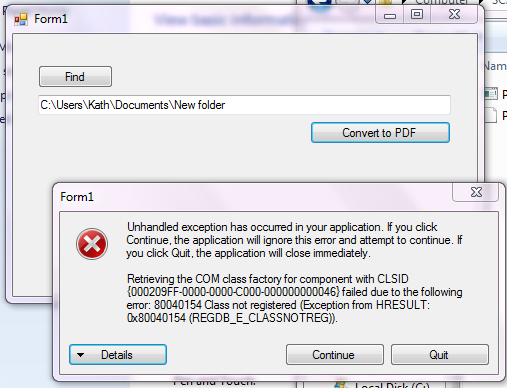
有人知道为什么我的迷你PDF应用程序不能在替代机器上工作吗?
回答 2
Stack Overflow用户
发布于 2013-08-05 15:20:18
我安装了Office 365免费月试用版,并用它创建了一个Word文档。然后我将我的应用程序指向它的文件夹,它成功地将文档转换为PDF。谢谢大尼尔让我尝试另一个版本的单词。
再看一遍,我现在注意到,最初版本的Office使用.doc扩展保存文档,而不是使用.docx扩展保存文档的Word版本。因此,我认为问题在于,下面的代码行没有正确地替换扩展-
object outputFileName = wordFile.FullName.Replace(".docx", ".pdf");现在一切都很好谢谢。
Stack Overflow用户
发布于 2013-08-05 15:17:45
如果安装office的完整版本是一个问题,则仍然可以使用打开的office执行转换。看一看下面的文章:
如何使用打开的office将办公室文档转换为PDF
https://stackoverflow.com/questions/18060201
复制相似问题
腾讯云开发者

Copyright © 2013 - 2026 Tencent Cloud. All Rights Reserved. 腾讯云 版权所有
深圳市腾讯计算机系统有限公司 ICP备案/许可证号:粤B2-20090059  粤公网安备44030502008569号
腾讯云计算(北京)有限责任公司 京ICP证150476号 | 京ICP备11018762号