
SpringLayout中的组件大小
SpringLayout中的组件大小
提问于 2013-08-03 22:34:30
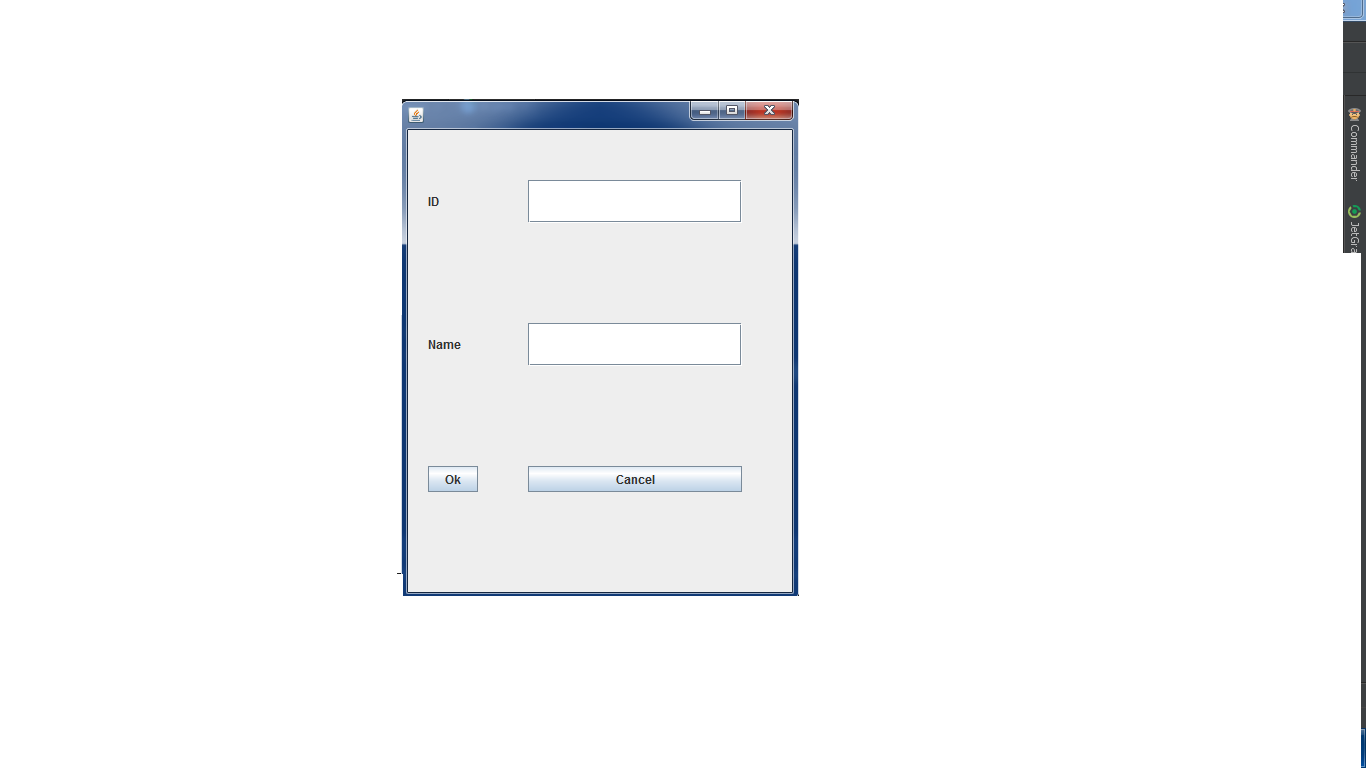
我在表单上使用SpringLayout,但正如您所见,它的外观不太好(大小既大又坏)!
public class t8 extends JFrame {

JButton okButton, cancellButton;
JTextField idTF, nameTf;
JLabel idlbl, namelbl;

public t8() {
    add(createPanel(), BorderLayout.CENTER);

    setDefaultCloseOperation(JFrame.EXIT_ON_CLOSE);
    setSize(400, 500);
    setLocation(400, 100);
    setVisible(true);
}

public static void main(String[] args) {
    new t8();
}

public JPanel createPanel() {
    JPanel panel = new JPanel();
    okButton = new JButton("Ok");
    cancellButton = new JButton("Cancel");
    idTF = new JTextField(10);
    nameTf = new JTextField(10);
    idlbl = new JLabel("ID");
    namelbl = new JLabel("Name");
    panel.add(idlbl);
    panel.add(idTF);
    panel.add(namelbl);
    panel.add(nameTf);
    panel.add(okButton);
    panel.add(cancellButton);

    panel.setLayout(new SpringLayout());
    SpringUtilities.makeCompactGrid(panel, 3, 2, 20, 50, 50, 100);
    return panel;
}
}我改变了makeCompactGrid号码,但没有成功!
( JTextFields的宽度很大,我的按钮大小也不一样)
回答 2
Stack Overflow用户
回答已采纳
发布于 2013-08-06 08:11:28
如果您不关心布局管理器,而只关心布局,那么您应该使用GridLayout,或者如果您不希望所有组件都是相同大小的GridBagLayout。下面是如何使用网格布局(只显示修改后的方法):
public JPanel createPanel() {
    JPanel panel = new JPanel();
    panel.setLayout(new GridLayout());
    okButton = new JButton("Ok");
    cancellButton = new JButton("Cancel");
    idTF = new JTextField(10);
    nameTf = new JTextField(10);
    idlbl = new JLabel("ID");
    namelbl = new JLabel("Name");
    panel.add(idlbl);
    panel.add(idTF);
    panel.add(namelbl);
    panel.add(nameTf);
    panel.add(okButton);
    panel.add(cancellButton);
    return panel;
}用GridBagLayout
public JPanel createPanel() {
    JPanel panel = new JPanel();
    GridBagLayout gb = new GridBagLayout();
    GridBagConstraints gbc = new GridBagConstraints();
    panel.setLayout(gb);
    okButton = new JButton("Ok");
    cancellButton = new JButton("Cancel");
    idTF = new JTextField(10);
    nameTf = new JTextField(10);
    idlbl = new JLabel("ID");
    namelbl = new JLabel("Name");
    add(panel, idlbl, 0, 0, 1, 1, gb, gbc, false);
    add(panel, idTF, 0, 1, 1, 1, gb, gbc, true);
    add(panel, namelbl, 1, 0, 1, 1, gb, gbc, false);
    add(panel, nameTf, 1, 1, 1, 1, gb, gbc, true);
    add(panel, okButton, 2, 0, 1, 1, gb, gbc, false);
    add(panel, cancellButton, 2, 1, 1, 1, gb, gbc, true);
    return panel;
}

private void add(Container outer, Component c, int x, int y, int w, int h, GridBagLayout gb, GridBagConstraints gbc, boolean wide) {
    gbc.gridx = x;
    gbc.gridy = y;
    gbc.gridwidth = w;
    gbc.gridheight = h;
    if (wide) {
        gbc.weightx = 100;
    } else {
        gbc.weightx = 0;
    }
    gb.setConstraints(c, gbc);
    outer.add(c);
}我相信额外的GridBagLayout复杂性可能是值得的。
Stack Overflow用户
发布于 2013-08-03 22:55:37
我建议您使用Netbeans拖放工具,这将允许您设置物理组件,并将给您预览。如果您想要使用代码,只需使用空闲的布局,并通过setSize()和setLocation()方法手动设置每个组件的位置和大小,尽管这将需要更多的代码,但将确保所有组件都处于正确的位置。
页面原文内容由Stack Overflow提供。腾讯云小微IT领域专用引擎提供翻译支持
原文链接:
https://stackoverflow.com/questions/18037955
复制相关文章
相似问题
腾讯云开发者

Copyright © 2013 - 2026 Tencent Cloud. All Rights Reserved. 腾讯云 版权所有
深圳市腾讯计算机系统有限公司 ICP备案/许可证号:粤B2-20090059  粤公网安备44030502008569号
腾讯云计算(北京)有限责任公司 京ICP证150476号 | 京ICP备11018762号