
Java数据转换
Java数据转换
提问于 2013-08-02 07:19:22
在以下代码输入中:
Enter Date: 3/2/2011输出:
Entered Date is February 3, 2011
Entered Month is 02问题是,当我输入这个日期3/14/2012时,日期格式函数会自动将月份更改为12+2(2月)。如果我把13/15/2011放在这里,它就会变成3(12+3)。
它应该在14上出现一个“无效月份”错误。
package lesson4;

import java.util.*;

import java.text.*;
public class ConvertDate {
static String Month;
static String fulldate;
static int month;
static  int[] montharray={1,2,3,4,5,6,7,8,9,10,11,12};
public static void main(String[] args){


Scanner sc = new Scanner(System.in);
System.out.print("Enter Date: ");
String ind = sc.nextLine();
//Date now = new Date();
DateFormat df = new SimpleDateFormat("dd/MM/yyyy");
SimpleDateFormat f = new SimpleDateFormat("dd");
SimpleDateFormat m = new SimpleDateFormat("MM");

Date d = null;
    Date e=null;
Date g=null;


try {
d=df.parse(ind);
e=df.parse(ind);
g=df.parse(ind);
DateFormat df3 = DateFormat.getDateInstance(DateFormat.LONG);


 fulldate = df3.format(d);
 Month=m.format(g);
month =Integer.parseInt(Month);

String date  =f.format(e);
 } catch (ParseException e1) {
// TODO Auto-generated catch block


e1.printStackTrace();
}


System.out.println("The entered date is: " + fulldate);
System.out.println("The entered month is: " + Month);

}
}回答 3
Stack Overflow用户
回答已采纳
发布于 2013-08-02 07:25:13
对于每个DateFormat实例,需要使用假参数调用setLenient:
DateFormat df = new SimpleDateFormat("dd/MM/yyyy");
df.setLenient(false);
DateFormat f = new SimpleDateFormat("dd");
f.setLenient(false);
DateFormat m = new SimpleDateFormat("MM");
m.setLenient(false);来自DateFormat#setLenient(boolean)文档:
通过宽松的解析,解析器可以使用启发式来解释不完全匹配该对象格式的输入。通过严格的解析,输入必须与该对象的格式相匹配。
Stack Overflow用户
发布于 2013-08-02 07:21:49
引用这些格式Java日期格式文档
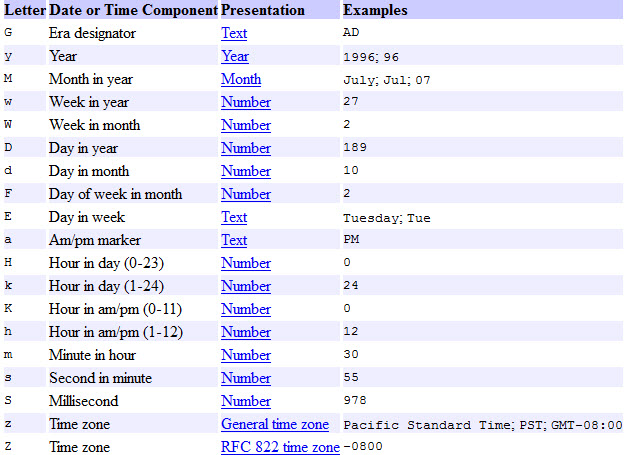
DateFormat df = new SimpleDateFormat("dd/MM/yyyy");你期待月在第二位,而输入是放在第一。
尝试:
DateFormat df = new SimpleDateFormat("MM/dd/yyyy");Stack Overflow用户
发布于 2013-08-02 07:25:51
您是否尝试过在您的DateFormat上使用“DateFormat (False)”来强制DateFormat对解析的输入严格要求?我还没有试过,但最近偶然发现了这个特性。
页面原文内容由Stack Overflow提供。腾讯云小微IT领域专用引擎提供翻译支持
原文链接:
https://stackoverflow.com/questions/18011004
复制相关文章
相似问题
腾讯云开发者

Copyright © 2013 - 2026 Tencent Cloud. All Rights Reserved. 腾讯云 版权所有
深圳市腾讯计算机系统有限公司 ICP备案/许可证号:粤B2-20090059  粤公网安备44030502008569号
腾讯云计算(北京)有限责任公司 京ICP证150476号 | 京ICP备11018762号