
Nios 2“你好世界”?
我成功地在Nios 2 Altera DE2板上运行了一个复杂的项目,我使用输入和输出创建了一个带有程序集和C代码的计时器。使用Nios 2 IDE,我可以将该项目下载到DE2,并且时钟按预期运行。但是,我并不完全理解编程模型,我还试图理解基本的Hello示例和IDE附带的诊断示例。
Hello示例
/*
 * "Hello World" example.
 *
 * This example prints 'Hello from Nios II' to the STDOUT stream. It runs on
 * the Nios II 'standard', 'full_featured', 'fast', and 'low_cost' example
 * designs. It runs with or without the MicroC/OS-II RTOS and requires a STDOUT
 * device in your system's hardware.
 * The memory footprint of this hosted application is ~69 kbytes by default
 * using the standard reference design.
 *
 * For a reduced footprint version of this template, and an explanation of how
 * to reduce the memory footprint for a given application, see the
 * "small_hello_world" template.
 *
 */

#include <stdio.h>

int main()
{
  printf("Hello from Nios II!\n");

  return 0;
}
但是当我编译和运行这个“作为Nios 2硬件”时,它只打印Hello到IDE中的标准,它不下载并在板上运行--不是应该这样做吗?如果这个例子没有在黑板上运行,它有什么意义?我做错什么了吗?如果是的话,那么这个例子编译和运行之后呢?我必须把BSD编辑器设置成什么东西吗?
更新
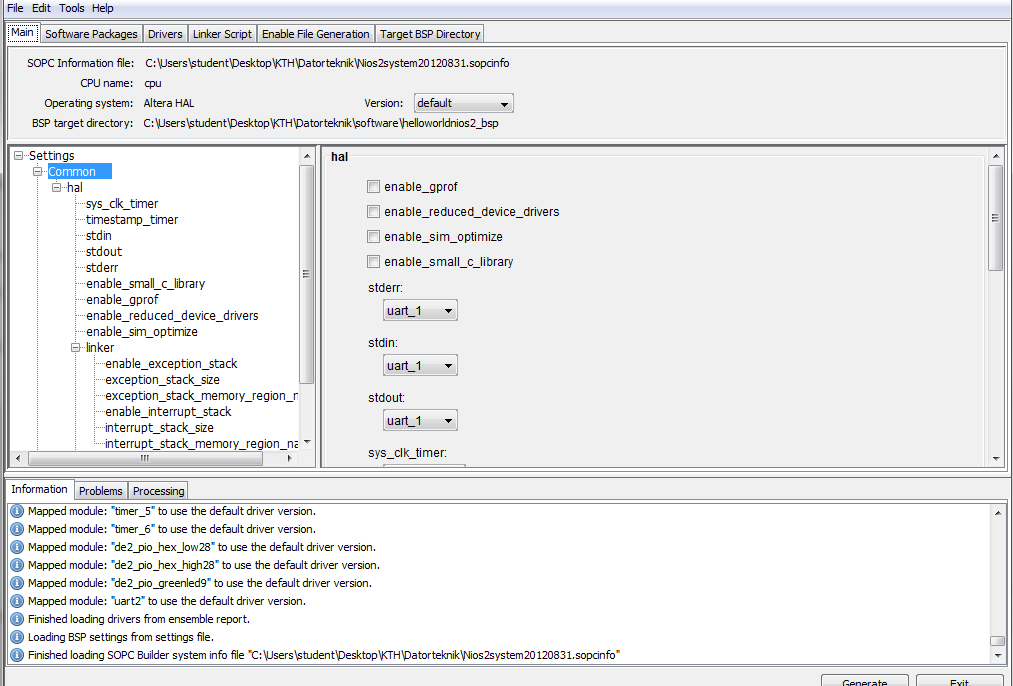
一点用都没有。我在BSP编辑器中尝试了不同的组合,但都没有效果。当我尝试以"Nios II硬件“的形式运行该项目时,即使它在IDE中说该项目正在下载到板上,也不会在板上发生任何事情。为什么容易的事情很难呢?UX是可怕的,不得不猜测是不科学的。
回答 4
Stack Overflow用户
发布于 2013-08-21 18:55:26
程序正在板上运行。从节目的评论..。
此示例将“Hello从Nios II”打印到STDOUT流。
在这种情况下,STDOUT流是软件终端。所以Nios II板正在运行hello world程序并将输出发送到计算机。要使用面板上的屏幕,您必须在配置中包括LCD显示和SOPC生成器,然后直接写入LCD屏幕。
Stack Overflow用户
发布于 2013-08-16 06:36:34
这是哥伦比亚大学嵌入式系统设计课程的一个链接。
检查连接到第三实验室,以实现在Altera DE2板上使用VHDL和C闪烁LED。
该实现使用Altera Quartus、Nios II和SOPC Builder。我将尝试总结以下步骤:
- 您需要用VHDL/Verilog编写SRAM和LED控制器来连接到Avalon总线。在上创建一个系统。使用这些控制器在SOPC (SRAM和LED组件)中创建组件。
- 将组件连接到Nios II处理器和JTAG调试模块。分配基本地址并生成系统。
- 在Nios II中,使用SOPC生成的SOPC文件创建一个C项目(Nios应用程序和模板中的BSP )。
- 用C程序替换模板中的代码(在本例中是LED闪光灯程序)。使用前面生成的基址访问LED。
- 作为Nios II硬件构建并运行您的程序。
更多信息,这里。
Stack Overflow用户
发布于 2013-07-31 09:35:05
从Nios文档(Nios II软件开发者手册)中,您必须更新BSP以将stdout设置为正确的设备。
示例:
nios2-bsp hal my_bsp --default_stdio uart1https://stackoverflow.com/questions/17966235
复制相似问题
腾讯云开发者

Copyright © 2013 - 2026 Tencent Cloud. All Rights Reserved. 腾讯云 版权所有
深圳市腾讯计算机系统有限公司 ICP备案/许可证号:粤B2-20090059  粤公网安备44030502008569号
腾讯云计算(北京)有限责任公司 京ICP证150476号 | 京ICP备11018762号