
在手指后面的旋转动画,由沿着圆圈的外部路径的按钮组成
我正在寻找一个小的指导,开始找出一个动画,跟踪手指的运动,并沿着圆圈的外部路径移动一个UIButtons的集合。
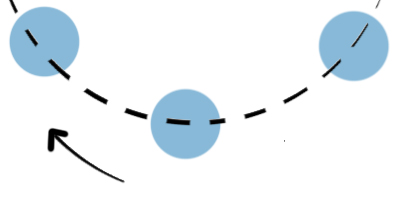
我想象它会有一种左轮手枪的感觉。就像每一个锁在底部一样
或者是通过这些幻灯片插入的一个滑动
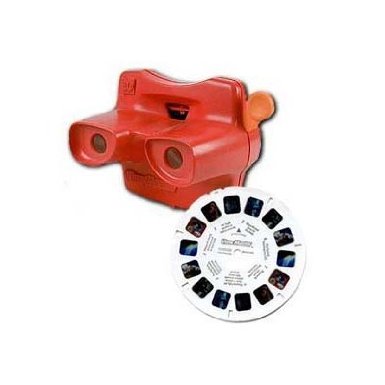
提前感谢
回答 1
Stack Overflow用户
发布于 2013-07-30 05:46:29
(GitHub上的示例代码)
这并不是很难,只是涉及到很多三角学。
现在,我要描述的是,不是一个动画,因为您要求它跟踪您的手指在标题中的位置。动画涉及到它自己的计时功能,但是由于您使用的是触摸手势,我们可以使用这个事件所具有的固有时间,并相应地旋转视图。(TL;DR:用户保持移动的时间,而不是隐式计时器)。
跟踪手指
首先,让我们定义一个跟踪角度的方便类,我称之为DialView。它实际上只是UIView的一个子类,它具有以下属性:
DialView.h
@interface DialView : UIView

@property (nonatomic,assign) CGFloat angle;

@end
DialView.m
- (void)setAngle:(CGFloat)angle
{
    _angle = angle;
    self.transform = CGAffineTransformMakeRotation(angle);
}UIButtons可以包含在这个视图中(我不确定您是否希望按钮负责旋转?)我将使用UIPanGestureRecognizer,因为它是最方便的方式)。
让我们构建一个视图控制器,它将在我们的DialView中处理一个pan手势,我们还保留一个对DialView的引用。
MyViewController.h
@class DialView;

@interface ViewController : UIViewController

// The previously defined dial view
@property (nonatomic,weak) IBOutlet DialView *dial;

// UIPanGesture selector method
- (IBAction)didReceiveSpinPanGesture:(UIPanGestureRecognizer*)gesture;

@end
这取决于你是如何勾搭平底锅手势的,就我个人而言,我是在尼布文件上做的。现在,这一职能的主体:
MyViewController.m
- (IBAction)didReceiveSpinPanGesture:(UIPanGestureRecognizer*)gesture
{
    // This struct encapsulates the state of the gesture
    struct state
    {
        CGPoint touch;          // Current touch position
        CGFloat angle;          // Angle of the view
        CGFloat touchAngle;     // Angle between the finger and the view
        CGPoint center;         // Center of the view
    };

    // Static variable to record the beginning state
    // (alternatively, use a @property or an _ivar)
    static struct state begin;

    CGPoint touch = [gesture locationInView:nil];

    if (gesture.state == UIGestureRecognizerStateBegan)
    {
        begin.touch  = touch;
        begin.angle  = self.dial.angle;
        begin.center = self.dial.center;

        begin.touchAngle = CGPointAngle(begin.touch, begin.center);
    }
    else if (gesture.state == UIGestureRecognizerStateChanged)
    {
        struct state now;
        now.touch   = touch;
        now.center  = begin.center;

        // Get the current angle between the finger and the center
        now.touchAngle = CGPointAngle(now.touch, now.center);

        // The angle of the view shall be the original angle of the view
        // plus or minus the difference between the two touch angles
        now.angle = begin.angle - (begin.touchAngle - now.touchAngle);

        self.dial.angle = now.angle;
    }
    else if (gesture.state == UIGestureRecognizerStateEnded)
    {
        // (To be Continued ...)
    }
}CGPointAngle是我发明的一种方法,它只是atan2的一个很好的包装器(如果您现在调用它,我将向您提供CGPointDistance ):
CGFloat CGPointAngle(CGPoint a, CGPoint b)
{
    return atan2(a.y - b.y, a.x - b.x);
}

CGFloat CGPointDistance(CGPoint a, CGPoint b)
{
    return sqrt(pow((a.x - b.x), 2) + pow((a.y - b.y), 2));
}
这里的关键是,有两个角度来跟踪:
- 视图本身的角度
- 手指和视图中心之间形成的角度。
在这种情况下,我们希望视图的角度是originalAngle + deltaFinger,这就是上面的代码所做的,我只是将所有的状态封装在一个结构中。
检查半径
如果要跟踪“视图的边框”,则应使用CGPointDistance方法,并检查begin.center和now.finger之间的距离是否为特定值。
这是你的家庭作业!
抢夺回来
好的,现在,这个部分是一个实际的动画,因为用户不再控制它。
可以通过定义一组角度来实现抓拍,当手指松开手指(手势结束)时,按下如下所示:
else if (gesture.state == UIGestureRecognizerStateEnded)
{
    // Number of "buttons"
    NSInteger buttons = 8;

    // Angle between buttons
    CGFloat angleDistance = M_PI*2 / buttons;

    // Get the closest angle
    CGFloat closest = round(self.dial.angle / angleDistance) * angleDistance;

    [UIView animateWithDuration:0.15 animations:^{
        self.dial.angle = closest;
    }];
}buttons变量只是视图中按钮数量的一个后备变量。方程实际上是超简单的,它只是利用四舍五入的函数来逼近闭合角。
https://stackoverflow.com/questions/17936955
复制相似问题
腾讯云开发者

Copyright © 2013 - 2026 Tencent Cloud. All Rights Reserved. 腾讯云 版权所有
深圳市腾讯计算机系统有限公司 ICP备案/许可证号:粤B2-20090059  粤公网安备44030502008569号
腾讯云计算(北京)有限责任公司 京ICP证150476号 | 京ICP备11018762号