
发出通知通知样式
我正在创建一个应用程序,为了使它正常工作,必须将通知设置为警报。
- 我已经做了我的研究,我不认为这是可能的,但如果这是怎么做的?
- 如果这是不可能的,我如何设置它,以便如果用户点击它是安全的,如果应用程序发送本地通知,它将设置为警报。
- 在xcode模拟器上,如何使通知成为警报。
- 如何检测通知是否打开并设置为警报(如果可能的话)
回答 3
Stack Overflow用户
发布于 2013-07-29 04:14:00
你在说什么通知,你自己的定时通知?
如果是这样的话,您所需要做的就是在您的通知应该出现时显示一个。
UIAlertView *alertView = [[UIAlertView alloc] initWithTitle:@"Hey"
                                                                   message:@"This is a message"
                                                                  delegate:self
                                                         cancelButtonTitle:nil
                                                         otherButtonTitles:@"Okay", nil];
[alertView show];
[alertView release]; 2.如果通知可能显示应用程序未启动时,您可以使用本地通知,正如您在UILocalNotification中提到的那样。当本地通知被触发时,无论用户是否在您的应用程序中,都会出现一个警报。
3.模拟器的,如果我理解您的意思,与#1相同。
4.您可以将本地通知或它们的某些指示符存储在数组中,并引用该数组来检查挂起的本地通知。
Stack Overflow用户
发布于 2013-07-29 05:09:33
首先为UILocalNotification注册,当通知到来时,调用它的委托方法,
- (void)application:(UIApplication *)application didReceiveLocalNotification:(UILocalNotification *)notification NS_AVAILABLE_IOS(4_0)在这种方法中,您可以传递信息或做任何您想做的事情。
您可以使用UILocalNotification方法来调度和取消通知,例如
- (void)presentLocalNotificationNow:(UILocalNotification *)notification NS_AVAILABLE_IOS(4_0);

- (void)scheduleLocalNotification:(UILocalNotification *)notification NS_AVAILABLE_IOS(4_0);  // copies notification
- (void)cancelLocalNotification:(UILocalNotification *)notification NS_AVAILABLE_IOS(4_0);
- (void)cancelAllLocalNotifications NS_AVAILABLE_IOS(4_0);Stack Overflow用户
发布于 2013-07-29 05:25:51
看这个答案
https://stackoverflow.com/a/9137501/1305001和https://stackoverflow.com/a/8259743/1305001
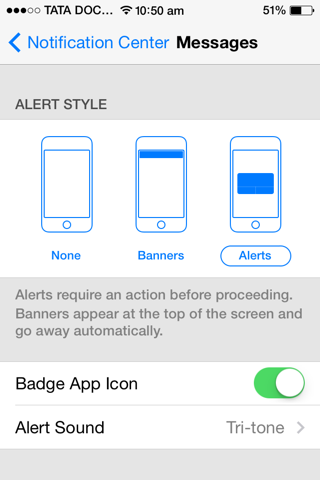
现在用户可以选择警报样式,而不是程序员。
您可以将设备->Settings->Notification>Phone-> alert样式更改为:
None
横幅
警报
https://stackoverflow.com/questions/17912956
复制相似问题
腾讯云开发者

Copyright © 2013 - 2026 Tencent Cloud. All Rights Reserved. 腾讯云 版权所有
深圳市腾讯计算机系统有限公司 ICP备案/许可证号:粤B2-20090059  粤公网安备44030502008569号
腾讯云计算(北京)有限责任公司 京ICP证150476号 | 京ICP备11018762号