
6.0 -无法访问Worklight服务器
当我试图通过右键单击应用程序名称构建和部署我的应用程序时,->作为->运行,build并部署.我在控制台中收到了一个失败通知:
未能将应用程序部署到Worklight服务器:请验证Worklight服务器是否已启动并可访问。
我首先安装了Eclipse,然后在其中安装了Worklight V6插件。是否需要通过其他方式安装Worklight服务器?
--这是整个日志:
2013-07-21 09:55:04 FWLPL0001W:服务器尚未启动.构建可能会在第一次尝试中失败。2013-07-21 09:55:13启动构建过程:应用程序'HelloWorklightApp',从目标服务器配置中检测到所有环境( 2013-07-21 09:55:14 FWLPL0010W:"localhost“)。使用主机的主IP地址101.218.109.86构建Worklight应用程序。考虑使用完全限定的主机名(避免使用"localhost")或使用有效的IP地址。可以通过从"Servers“视图打开Worklight Development Server的配置编辑器来修改该值。2013-07-21 09:55:16应用程序'HelloWorklightApp‘与所有环境构建完成。2013-07-21 09:55:16将应用程序“HelloWorklightApp”与所有环境一起部署到Worklight Server.2013-07-21 09:55:38 未能将应用程序部署到Worklight服务器:请验证Worklight服务器是否已启动并可访问。
这里是我在启动这些服务器-时得到的全部日志。
审核CWWKE0001I:服务器工作灯已经启动。ERROR CWWKO0030E:在启动链链-defaultHttpEndpoint时生成了一个异常,原因是异常CWWKO0030E TCP通道:defaultHttpEndpoint:启动通道时出现问题:无法建立回环连接审核CWWKZ0058I:监视应用程序的下拉列表。审计CWWKF0011I:服务器工作区已经准备好运行一个更智能的星球。审核CWWKZ0022W:应用程序_MobileBrowserSimulator在30.002秒内没有启动。审核CWWKZ0022W:应用程序HelloWorklightProject在30.001秒内没有启动。审核CWWKG0016I:启动服务器配置更新。审核CWWKG0018I:服务器配置没有更新。未检测到功能改变。审核CWWKG0016I:启动服务器配置更新。审核CWWKG0017I:服务器配置在0.043秒内成功更新。审核CWWKZ0022W:应用程序TestWorklightProject在30.002秒内没有启动。
更改prt和IP地址后的日志-
Launching worklight (WebSphere Application Server 8.5.5.0/wlp-1.0.3.20130524-0951) on Java HotSpot(TM) 64-Bit Server VM, version 1.6.0_45-b06 (en_IN)
[AUDIT   ] CWWKE0001I: The server worklight has been launched.
[ERROR   ] CWWKO0221E: TCP Channel defaultHttpEndpoint initialization did not succeed.  The socket bind did not succeed for host 10.0.0.1 and port 8080.  The port might already be in use.
[AUDIT   ] CWWKZ0058I: Monitoring dropins for applications.
[err] 255  WorklightPU  WARN   [Scheduled Executor-thread-1] openjpa.Runtime - An error occurred while registering a ClassTransformer with PersistenceUnitInfo: name 'WorklightPU', root URL [file:/C:/Users/Anil%20kumar/workspace/WorklightServerConfig/shared/resources/worklight-jee-library-6.0.0.jar]. The error has been consumed. To see it, set your openjpa.Runtime log level to TRACE. Load-time class transformation will not be available.
[err] 2256  WorklightPU  INFO   [Scheduled Executor-thread-1] openjpa.Runtime - Starting OpenJPA 1.2.2
[err] 2850  WorklightPU  INFO   [Scheduled Executor-thread-1] openjpa.jdbc.JDBC - Using dictionary class "org.apache.openjpa.jdbc.sql.HSQLDictionary".
[err] 1  WorklightReportsPU  WARN   [Scheduled Executor-thread-1] openjpa.Runtime - An error occurred while registering a ClassTransformer with PersistenceUnitInfo: name 'WorklightReportsPU', root URL [file:/C:/Users/Anil%20kumar/workspace/WorklightServerConfig/shared/resources/worklight-jee-library-6.0.0.jar]. The error has been consumed. To see it, set your openjpa.Runtime log level to TRACE. Load-time class transformation will not be available.
[AUDIT   ] CWWKF0011I: The server worklight is ready to run a smarter planet.
[err] 1  WorklightPU  WARN   [Scheduled Executor-thread-1] openjpa.Runtime - An error occurred while registering a ClassTransformer with PersistenceUnitInfo: name 'WorklightPU', root URL [file:/C:/Users/Anil%20kumar/workspace/WorklightServerConfig/shared/resources/worklight-jee-library-6.0.0.jar]. The error has been consumed. To see it, set your openjpa.Runtime log level to TRACE. Load-time class transformation will not be available.
[err] 214  WorklightPU  INFO   [Scheduled Executor-thread-1] openjpa.Runtime - Starting OpenJPA 1.2.2
[err] 216  WorklightPU  INFO   [Scheduled Executor-thread-1] openjpa.jdbc.JDBC - Using dictionary class "org.apache.openjpa.jdbc.sql.HSQLDictionary".
[err] 0  WorklightReportsPU  WARN   [Scheduled Executor-thread-1] openjpa.Runtime - An error occurred while registering a ClassTransformer with PersistenceUnitInfo: name 'WorklightReportsPU', root URL [file:/C:/Users/Anil%20kumar/workspace/WorklightServerConfig/shared/resources/worklight-jee-library-6.0.0.jar]. The error has been consumed. To see it, set your openjpa.Runtime log level to TRACE. Load-time class transformation will not be available.
[AUDIT   ] CWWKZ0022W: Application _MobileBrowserSimulator has not started in 33.066 seconds.
[AUDIT   ] CWWKZ0022W: Application TestWorklightProject has not started in 31.548 seconds.
[AUDIT ] CWWKZ0022W: Application HelloWorklightProject has not started in 30.002 seconds.回答 5
Stack Overflow用户
发布于 2013-08-03 09:11:21
我不知道有多少人面临这类问题,他们的Worklight服务器工作不正常,但下面是我解决问题的几个步骤。
1)删除了我的整个Eclipse文件夹。
2)再次从我从Eclipse站点下载的压缩文件中提取Eclipse文件夹。
3)在Eclipse的“帮助”选项卡中使用“安装新软件”选项卡安装Worklight v6插件。使用此过程安装的更详细信息可在此链接上获得-
http://www.ibm.com/developerworks/mobile/worklight/download/install.html
我的建议是不要使用Eclipse安装插件,因为我在使用它时在两个系统中遇到了麻烦。
4)重新启动Eclipse并检查。
Stack Overflow用户
发布于 2013-07-21 06:51:13
若干建议:
- 同样的问题,在这里也有报道。按照那里的指示。
- 确保不使用默认端口号10080。
- 在创建新的Worklight项目和应用程序之后
- Go to the Servers view in Eclipse and start the server (don't build the app); see if it loads properly
- You can look at the Worklight Development Server console view for the logs

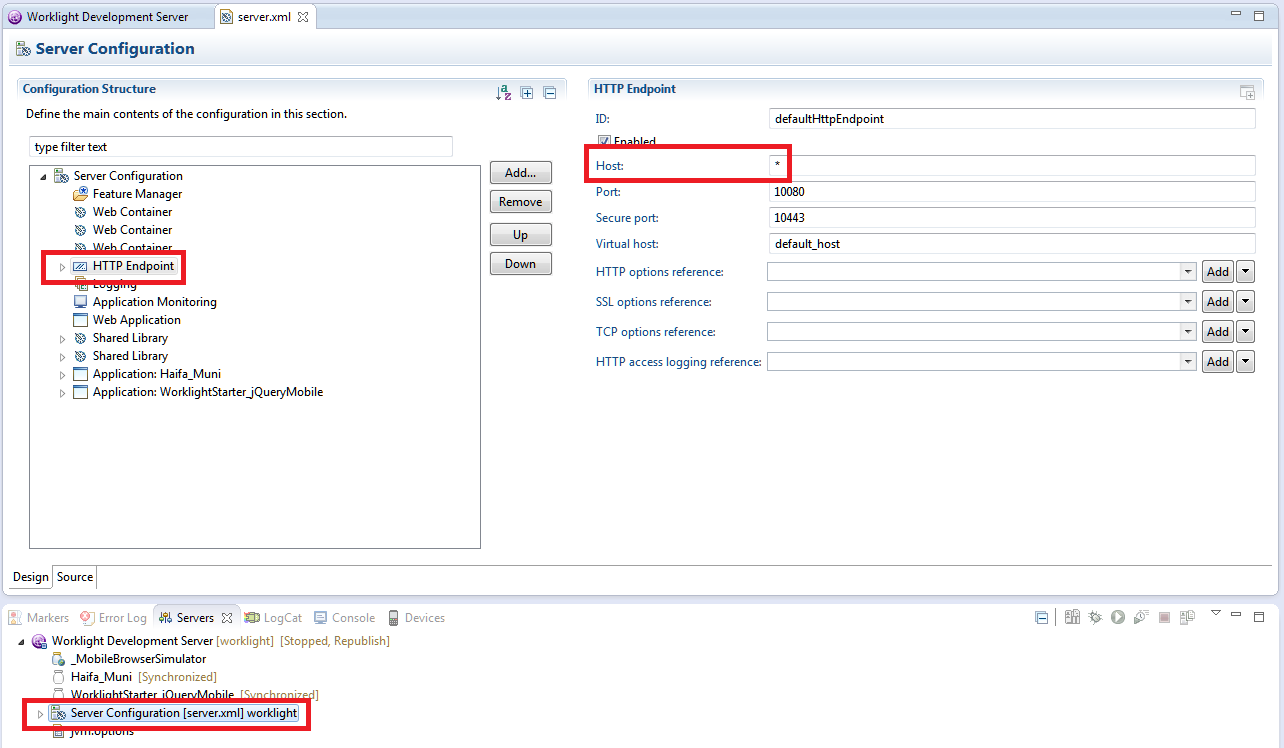
- 查看更改主机值是否有帮助。您还可以在这里更改端口,以防10080被占用,而且无论出于什么原因,您都不能释放它。 全尺寸图像

Stack Overflow用户
发布于 2013-09-03 06:14:01
这也可能是由工作站上运行的多个网络造成的。我发现安装了VMWare会使Worklight的构建端感到困惑。它在您的主机LAN端口上启动服务器,但在尝试部署应用程序时查找"localhost“,在我的计算机上它将获得VMWare LAN适配器的IP地址。
双击服务器并将“主机名:”字段更改为本地LAN的IP地址。
如果我在试图构建和部署时看到以下情况,我知道我遇到了问题:从目标服务器配置中检测到了FWLPL0010W:"localhost“。使用主机的主IP地址192.168.10.1构建Worklight应用程序。考虑使用完全限定的主机名(避免使用"localhost")或使用有效的IP地址。可以通过从"Servers“视图打开Worklight Development Server的配置编辑器来修改该值。
https://stackoverflow.com/questions/17769156
复制相似问题
腾讯云开发者

Copyright © 2013 - 2026 Tencent Cloud. All Rights Reserved. 腾讯云 版权所有
深圳市腾讯计算机系统有限公司 ICP备案/许可证号:粤B2-20090059  粤公网安备44030502008569号
腾讯云计算(北京)有限责任公司 京ICP证150476号 | 京ICP备11018762号