
JDesktopPane和BorderLayout
我正在编写一个程序,试图模拟一个物种的进化,它有一个窗口如下所示:
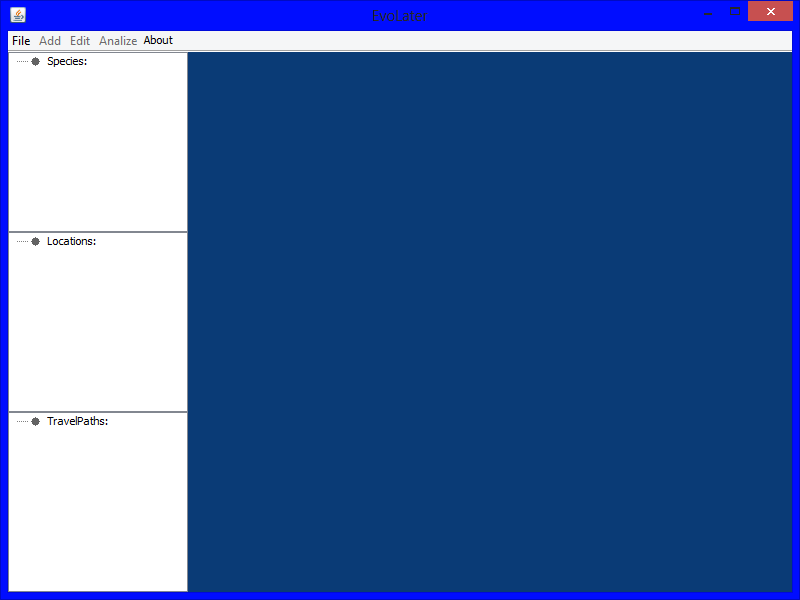
最初,右下角的空白区域是一个面板,它的目的是绘制样本、位置和旅行路径的可视化表示(这并不重要)。但是,您将能够打开某种类型的窗口,允许您创建/编辑不同的项目(如物种、位置和旅行路径)。最初,我计划那些只是弹出窗口。但是,我想我可能会使用JInternal窗格作为弹出窗口和可视化表示屏幕。
因此,在我的JFrames构造函数中:
JDesktopPane pane = new JDesktopPane();
this.setContentPane(pane);
setLayout(new BorderLayout());//To layout the menubar, and the items on the left

panel = new GraphicsPanel(manager);
panel.setVisible(true);在图形面板构造函数中:super("Graphic Project View",true,false,true,true);
这将面板锁定为BorderLayout.CENTER,并且它填充了整个空间,而不允许任何其他内容。我猜这是因为JDesktopPanes使用了一个OverlayLayout,当我将布局设置为覆盖OverlayLayout的BorderLayout时,所以只需将InternalFrame添加到中心。
所以问题是:我如何布局像JMenuBar和左病房面板这样的东西,同时保持拥有JInternalFrames的能力?
现在,我将通过JMenuBar JFrame.setJMenuBar(JMenuBar)来代替JFrame.add(menuBar,BorderLayout.NORTH),然后将左边的面板更改为JInternal框架,但如果可能的话,我更愿意保持原样。我希望能够将DesktopPane添加到JFrame at BorderLayout.CENTER,然后将框架添加到桌面窗格中。如果InternalFrame被限制在那个区域,我不会在意,只要它仍然是移动的,以此类推。
编辑:如何添加JInternalFrame(对不起,它仍然显示面板,但已转换为JInternalFrame):
panel = new GraphicsPanel(manager);
panel.setSize(desktop.getSize());
panel.setLocation(0,0);
panel.setVisible(true);
desktop.add(panel);回答 1
Stack Overflow用户
发布于 2013-06-24 00:04:53
我将从一个JPanel开始(让所有它都是基本窗格),它将容纳其他容器。
使用边框布局,我将向基窗格的WEST位置添加一个“控件”面板。在CENTER位置上,我会添加JDesktopPane。
我会将主窗口布局设置为BorderLayout,并将基窗格添加到其中。这将允许您在维护布局结果的同时使用JFrame#setJMenuBar来管理菜单栏。
这将允许您包含在桌面上使用JInternalFrames,而不影响布局的其余部分.
简单示例
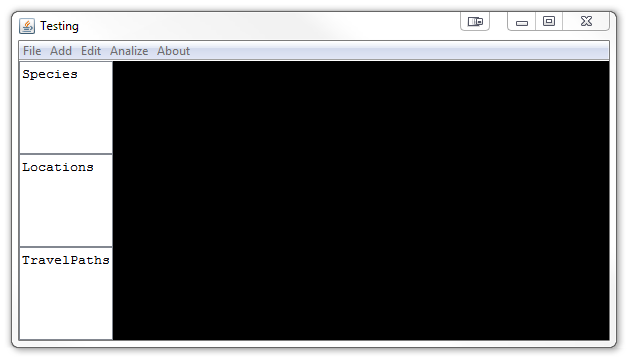
这是一个过于简化的示例,用于演示上面描述的基本概念.
import java.awt.BorderLayout;
import java.awt.Dimension;
import java.awt.EventQueue;
import java.awt.GridLayout;
import javax.swing.JDesktopPane;
import javax.swing.JFrame;
import javax.swing.JMenu;
import javax.swing.JMenuBar;
import javax.swing.JPanel;
import javax.swing.JScrollPane;
import javax.swing.JTextArea;
import javax.swing.UIManager;
import javax.swing.UnsupportedLookAndFeelException;

public class SimpleLayout {

    public static void main(String[] args) {
        new SimpleLayout();
    }

    public SimpleLayout() {
        EventQueue.invokeLater(new Runnable() {
            @Override
            public void run() {
                try {
                    UIManager.setLookAndFeel(UIManager.getSystemLookAndFeelClassName());
                } catch (ClassNotFoundException | InstantiationException | IllegalAccessException | UnsupportedLookAndFeelException ex) {
                }

                JMenuBar mb = new JMenuBar();
                mb.add(new JMenu("File"));
                mb.add(new JMenu("Add"));
                mb.add(new JMenu("Edit"));
                mb.add(new JMenu("Analize"));
                mb.add(new JMenu("About"));

                JFrame frame = new JFrame("Testing");
                frame.setJMenuBar(mb);
                frame.setDefaultCloseOperation(JFrame.EXIT_ON_CLOSE);
                frame.setLayout(new BorderLayout());
                frame.add(new BasePane());
                frame.pack();
                frame.setLocationRelativeTo(null);
                frame.setVisible(true);
            }
        });
    }

    public class BasePane extends JPanel {

        private JTextArea species;
        private JTextArea locations;
        private JTextArea travelPaths;

        private JDesktopPane desktopPane;

        public BasePane() {
            setLayout(new BorderLayout());

            desktopPane = new JDesktopPane();

            species = new JTextArea("Species");
            locations = new JTextArea("Locations");
            travelPaths = new JTextArea("TravelPaths");

            JPanel controls = new JPanel(new GridLayout(3, 0));
            controls.add(new JScrollPane(species));
            controls.add(new JScrollPane(locations));
            controls.add(new JScrollPane(travelPaths));

            add(controls, BorderLayout.WEST);
            add(desktopPane);

        }

        @Override
        public Dimension getPreferredSize() {
            return new Dimension(200, 200);
        }
    }
}
您的需求可能略有不同,但基本概念应该会让您移动。
根据应用程序的结构,我可能也会尝试将Controls窗格分隔到一个单独的类中。
https://stackoverflow.com/questions/17266413
复制相似问题
腾讯云开发者

Copyright © 2013 - 2026 Tencent Cloud. All Rights Reserved. 腾讯云 版权所有
深圳市腾讯计算机系统有限公司 ICP备案/许可证号:粤B2-20090059  粤公网安备44030502008569号
腾讯云计算(北京)有限责任公司 京ICP证150476号 | 京ICP备11018762号