
touchSwipe干扰数据报警器
我有一个带有(这一个)的输入字段,在我的应用程序中,我还使用了touchSwipe (这)。出于某种原因,这两个人不一起工作。发生以下情况:当我第一次单击输入字段内时,datepicker将显示。
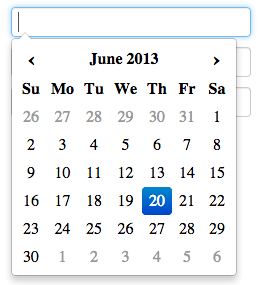
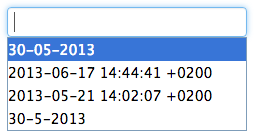
当我不选择日期(然后单击textfield之外的某个地方,数据报警器就消失了),当我第二次选择输入字段时就会出现一个选项字段。当我选择日期时,数据报警器不会显示第二次。
我使用以下JS:
// Enable touchSwipe
$(window).ready(function () {
    $('#form').swipe({
        swipeLeft: function(event, direction, distance, duration, fingerCount) {
            if($(window).width() < 751) {
            $('#daycalendar').animate({
                right: '0%'
            }, 250);
        } else {
            // absolutely nothing
        }
    },
    swipeRight: function(event, direction, distance, duration, fingerCount) {
        if($(window).width() < 751) {
            $('#daycalendar').animate({
                right: '-80%'
            }, 250);
        } else {
            // absolutely nothing
        }
    },
    threshold: 0
});
});
// Call datepicker
$('#date').datepicker();
当我从上面的代码(除了最后两行)中删除touchSwipe JS导入脚本或所有东西时,数据报警器就能工作了。
当我第一次选择一个不同的输入字段,然后再次单击日期输入字段时,数据报警器也能工作。
我已经翻阅过datepicker和touchSwipe JS文件,但是我找不到与数据报警器相混淆的元素。
有人能帮忙吗?
编辑这里是一个实时版本。它只针对移动设备进行优化,因此您可能希望缩小浏览器的范围(宽度)。http://paulvandendool.nl/lab/test/
回答 1
Stack Overflow用户
发布于 2013-06-20 12:10:16
我注意到输入字段是如何保持焦点的,尽管我点击了它的外部。将以下代码添加到swipe函数中是有效的:
swipeStatus:function(event, phase, direction, distance, fingerCount) {
    if ( phase == "move" || phase == "start" ) {
        var $target = event.target.nodeName;
        if( $target.toLowerCase() === 'input' ) {
            return false;
        } else {
            $('input').blur();
        }
    }
},
https://github.com/mattbryson/TouchSwipe-Jquery-Plugin/issues/29
https://stackoverflow.com/questions/17211377
复制相似问题
腾讯云开发者

Copyright © 2013 - 2026 Tencent Cloud. All Rights Reserved. 腾讯云 版权所有
深圳市腾讯计算机系统有限公司 ICP备案/许可证号:粤B2-20090059  粤公网安备44030502008569号
腾讯云计算(北京)有限责任公司 京ICP证150476号 | 京ICP备11018762号