
绘制放置在Cursor.Current左下角的工具提示。
绘制放置在Cursor.Current左下角的工具提示。
提问于 2013-06-04 14:19:17
我正试图在光标左下角画一个工具提示。我使用下面的代码来计算de游标的最低点:
    private void PaintTooltip()
    {
       ...
       Point target = this.PointToClient(GetCursorPoint()));
       ...
       // paint the tooltip at point target
    }

    private Point GetCursorPoint()
    {
        return new Point(
            Cursor.Position.X,
            Cursor.Position.Y + Cursor.Current.Size.Height - Cursor.Current.HotSpot.Y);
}Tip:Cursor.Current.Hostpot通常有0值。
使用这段代码,我会得到一些像素:
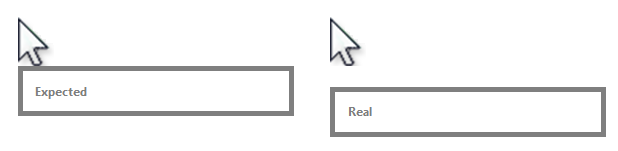
我为什么要明白这一点?
回答 1
Stack Overflow用户
回答已采纳
发布于 2013-06-04 15:09:00
因为光标的标准大小是32x32像素,但大多数像素是透明的,所以您必须通过检查光标本身来确定“实际”高度。
例如,我将默认光标绘制到如下位图:
        Bitmap bmp = new Bitmap(Cursor.Current.Size.Width, Cursor.Current.Size.Height);
        using (Graphics g = Graphics.FromImage(bmp))
        {
            g.Clear(Color.Red);
            Cursor.Current.Draw(g, new Rectangle(new Point(0, 0), bmp.Size));
        }
        pictureBox1.Image = bmp;
因此,您可以清楚地看到光标相对于其实际大小而言有多大:

编辑:下面的示例根据光标的“实际”大小绘制当前光标位置下的矩形:
    private void button1_Click(object sender, EventArgs e)
    {
        Rectangle bounds = CursorBounds();
        Point pt = new Point(Cursor.Position.X + bounds.Left, Cursor.Position.Y + bounds.Bottom);
        ControlPaint.DrawReversibleFrame(new Rectangle(pt, new Size(100, 30)), this.BackColor, FrameStyle.Dashed);
    }

    private Rectangle CursorBounds()
    {
        using (Bitmap bmp = new Bitmap(Cursor.Current.Size.Width, Cursor.Current.Size.Height))
        {
            using (Graphics g = Graphics.FromImage(bmp))
            {
                g.Clear(Color.Transparent);
                Cursor.Current.Draw(g, new Rectangle(new Point(0, 0), bmp.Size));

                int xMin = bmp.Width;
                int xMax = -1;
                int yMin = bmp.Height;
                int yMax = -1;

                for (int x = 0; x < bmp.Width; x++)
                {
                    for (int y = 0; y < bmp.Height; y++)
                    {
                        if (bmp.GetPixel(x, y).A > 0)
                        {
                            xMin = Math.Min(xMin, x);
                            xMax = Math.Max(xMax, x);
                            yMin = Math.Min(yMin, y);
                            yMax = Math.Max(yMax, y);
                        }
                    }
                }
                return new Rectangle(new Point(xMin, yMin), new Size((xMax - xMin) + 1, (yMax - yMin) + 1));
            }
        }
    }
我真的不确定是否有更好的方法.=\
页面原文内容由Stack Overflow提供。腾讯云小微IT领域专用引擎提供翻译支持
原文链接:
https://stackoverflow.com/questions/16920263
复制相关文章
相似问题
腾讯云开发者

Copyright © 2013 - 2026 Tencent Cloud. All Rights Reserved. 腾讯云 版权所有
深圳市腾讯计算机系统有限公司 ICP备案/许可证号:粤B2-20090059  粤公网安备44030502008569号
腾讯云计算(北京)有限责任公司 京ICP证150476号 | 京ICP备11018762号