
如何利用PrintForm在c#中提高打印质量
如何利用PrintForm在c#中提高打印质量
提问于 2013-06-01 07:10:55
我想打印窗口表单,然后我用了两种方法,
1.使用visual basic power pack工具调用"PrintForm"。
 private void btnPriint_Click(object sender, EventArgs e)
        {
            printForm1.Print();
}2.使用gdi32.dll和BitBlt函数。
但这两种方法的打印质量都很低,就像一幅波纹图一样。
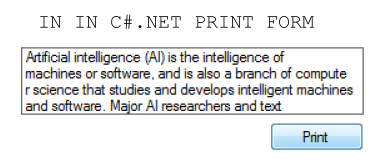
但问题是,我会做的,VB6,它将正确地打印与清晰的打印
Private Sub Command1_Click()
  Me.PrintForm
End Sub
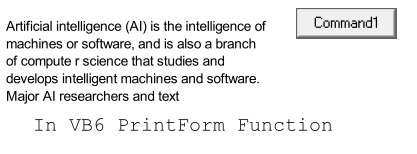
如何提高印刷品的质量?(我使用的是带有windows 7终极版的visual 2008 SP1 )
回答 1
Stack Overflow用户
发布于 2013-06-01 07:21:14
您可以创建位图图像来呈现窗体中的像素:
// Assuming this code is within the form code-behind,
// so this is instance of Form class.
using (var bmp = new System.Drawing.Bitmap(this.Width, this.Height))
{
   this.DrawToBitmap(bmp, new Rectangle(0, 0, this.Width, this.Height));
   bmp.Save("formScreenshot.bmp"); //or change another format.
}
为了保持这种清洁,您可以创建扩展方法。例如:
public static class FormExtentions
{
    public static System.Drawing.Bitmap TakeScreenshot(this Form form)
    {
        if (form == null)
           throw new ArgumentNullException("form");

        form.DrawToBitmap(bmp, new Rectangle(0, 0, form.Width, form.Height));

        return bmp;
    }

    public static void SaveScreenshot(this Form form, string filename, System.Drawing.Imaging.ImageFormat format)
    {
        if (form == null)
           throw new ArgumentNullException("form");
        if (filename == null)
           throw new ArgumentNullException("filename");
        if (format == null)
           throw new ArgumentNullException("format");

        using (var bmp = form.TakeScreenshot())
        {
            bmp.Save(filename, format);
        }
    }
}
窗体代码隐藏中的用法:
this.SaveScreenshot("formScreenshot.png",
                    System.Drawing.Imaging.ImageFormat.Png); //or other formats
备注: DrawToBitmap只绘制屏幕上的内容。
编辑:,而OP中的图像是png,您可以使用:bmp.Save("formScreenshot.png", System.Drawing.Imaging.ImageFormat.Png);
页面原文内容由Stack Overflow提供。腾讯云小微IT领域专用引擎提供翻译支持
原文链接:
https://stackoverflow.com/questions/16870107
复制相关文章
相似问题
腾讯云开发者

Copyright © 2013 - 2026 Tencent Cloud. All Rights Reserved. 腾讯云 版权所有
深圳市腾讯计算机系统有限公司 ICP备案/许可证号:粤B2-20090059  粤公网安备44030502008569号
腾讯云计算(北京)有限责任公司 京ICP证150476号 | 京ICP备11018762号