
如何安排两个HTML列,其中一个有固定的部分,以便他们可以堆栈?
如何安排两个HTML列,其中一个有固定的部分,以便他们可以堆栈?
提问于 2013-05-25 01:55:24
对不起,我真的找不到这个问题的好题目。
情况就是这样。我有以下布局:
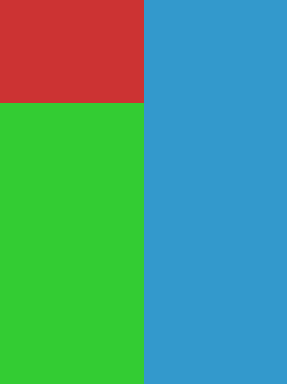
每个矩形都是一个<div>。在红色矩形中,我有三个按钮来选择蓝色和绿色矩形的内容。
我当前的HTML布局是这样组织的:
<div class="container">
  <div class="left">
    contents of red rectangle here
    <div id="info-1">contents of green rectangle</div>
    <div id="info-2">contents of green rectangle</div>
    <div id="info-3">contents of green rectangle</div>
  </div>
  <div class="right">
    <div id="steps-1">contents of blue rectangle</div>
    <div id="steps-2">contents of blue rectangle</div>
    <div id="steps-3">contents of blue rectangle</div>
  </div>
</div>一次只显示一个#info-*。#steps-*也是如此。div.left是左浮动的,div.right是右浮动的。
所以这很好用。,但,现在我想在使用移动设备查看页面时,将它们与媒体查询很好地堆叠在一起。我想要的是下面的堆栈:
- 红色矩形的内容
info-1steps-1info-2steps-2info-3steps-3
有什么方法可以在没有JavaScript的情况下实现这个堆栈,并且仍然能够创建上面的桌面布局?
谢谢!
回答 1
Stack Overflow用户
回答已采纳
发布于 2013-06-01 02:11:24
见小提琴在此:
我刚做好了你想要的手机,然后和花车混在一起。我仍然不确定你想要什么,但我得到的div与绝对定位叠加,并重新排序与z索引。从这里开始,我假设您将使用一些脚本来显示必要的信息等等。当然有一些神奇的数字,主要是高度的“固定”红色导航。如果是真正的响应,您将需要设置一个侦听器,以找到当前高度的div,并将其添加到绿色栏的顶部或边缘顶部声明- bla -希望它有帮助!
HTML
    <div class="top">
        <ul>
            <li>See green01</li>
            <li>See green02</li>
            <li>See green03</li>
            <li>See blue01</li>
            <li>See blue02</li>
            <li>See blue03</li>
        </ul>
    </div>

    <div class="block green z-01">green01</div>
    <div class="block blue z-01">blue01</div>
    <div class="block green z-02">green01</div>
    <div class="block blue z-02">blue02</div>
    <div class="block green z-03">green03</div>
    <div class="block blue z-03">blue03</div>

</div> <!-- .wrapper -->
CSS
* {
    -moz-box-sizing: border-box;
    -webkit-box-sizing: border-box;
    box-sizing: border-box;
}

html, body {
/*     height: 100%; */
    margin: 0;
}

.wrapper {
    position: relative;
}

.top {
    width: 100%;
    float: left;
    background-color: red;
    height: 30%;
}

.block {
    width: 100%;
    float: left;
    min-height: 7em;
}

.green {
    background-color: lime;
}

.blue {
    background-color: lightblue;
}


@media (min-width: 30em) {

    .top {
        width: 50%;
        float: left;
        background-color: red;
        height: 15em;
    }

    .block {
        width: 50%;
    }

    .green {
        float: left;
        clear: left;

    }

    .blue {
        position: relative;
        top: -15em;
        float: right;
        clear: right;
    }

    .blue {
        position: absolute;
        top: 0;
        right: 0
    }

    .green {
        position: absolute;
        top: 15em;
        left: 0
    }

    .z-01 {
        z-index: 3;
    }

    .z-02 {
        z-index: 2;
    }

    .z-03 {
        z-index: 1;
    }

} /* =================== */页面原文内容由Stack Overflow提供。腾讯云小微IT领域专用引擎提供翻译支持
原文链接:
https://stackoverflow.com/questions/16745691
复制相关文章
相似问题
腾讯云开发者

Copyright © 2013 - 2026 Tencent Cloud. All Rights Reserved. 腾讯云 版权所有
深圳市腾讯计算机系统有限公司 ICP备案/许可证号:粤B2-20090059  粤公网安备44030502008569号
腾讯云计算(北京)有限责任公司 京ICP证150476号 | 京ICP备11018762号