
CSS两列布局问题
CSS两列布局问题
提问于 2013-05-21 11:20:29
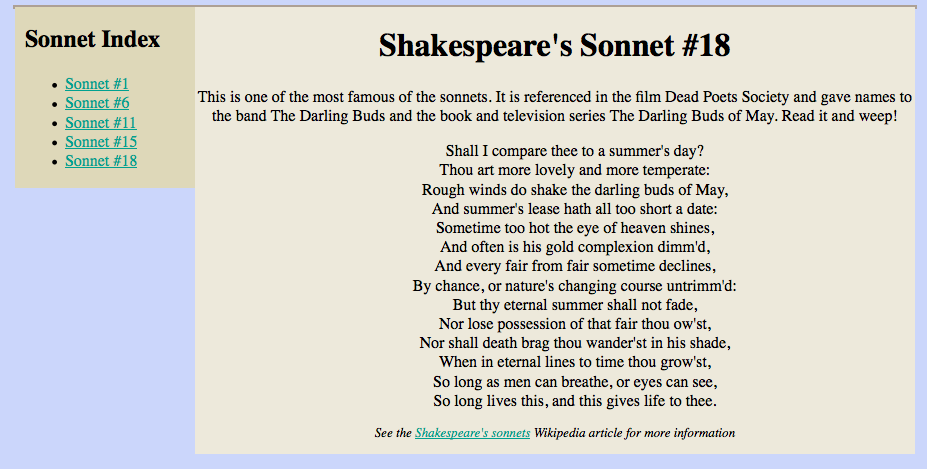
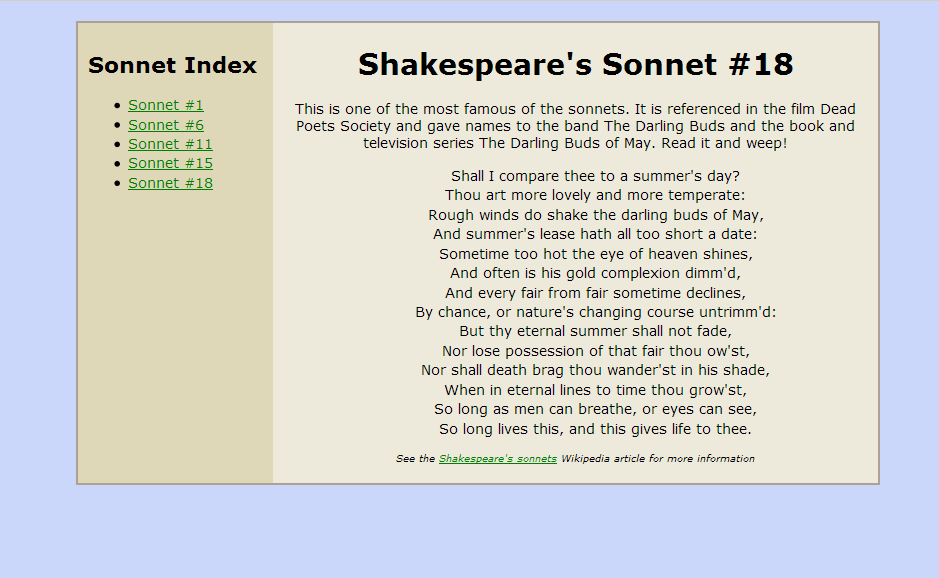
我试着写一个CSS两列布局。在我的代码中有三个<div>标记。第一个<div>标记包含另外两个<div>标记。一个用于导航,另一个用于内容。我把这些标签做成浮动标签。这些标签没有问题。问题是,父<div>标记有一个2px边框,但是它不会在屏幕周围呈现这个边框。
CSS代码:
#wrap{
    margin: 0 auto;
    width: 900px;
    border: 2px solid #ADA095;
}

#nav{
    background-color: #DED8B9;
    float: left;
    width: 20%;
}

#content{
    background-color: #EDE9DB;
    float: right;
    width: 80%;
}
HTML代码:
<div id="wrap">
      <div id="nav">
        <h2>Sonnet Index</h2>
        <ul>
          <li><a href="#">Sonnet #1</a></li>
          <li><a href="#">Sonnet #6</a></li>
          <li><a href="#">Sonnet #11</a></li>
          <li><a href="#">Sonnet #15</a></li>
          <li><a href="#">Sonnet #18</a></li>
        </ul>
      </div>
      <div id="content">
        <h1>Shakespeare's Sonnet #18</h1>
        <p>This is one of the most famous of the sonnets. It is referenced
           in the film Dead Poets Society and gave names to the band The
           Darling Buds and the book and television series The Darling Buds
           of May. Read it and weep!</p>
        <ul>
          <li>Shall I compare thee to a summer's day?</li>
          <li>Thou art more lovely and more temperate:</li>
          <li>Rough winds do shake the darling buds of May,</li>
        </ul>

        <p class="copyright">See the
        <a href="http://en.wikipedia.org/wiki/Shakespeare%27s_Sonnets">
        Shakespeare's sonnets</a> Wikipedia article for more information
        </p>
      </div>
    </div>
这是我的代码的输出。
但是,应该是这样--
谢谢,提前。
回答 3
Stack Overflow用户
回答已采纳
发布于 2013-05-21 11:23:10
将overflow:auto;添加到<div id="wrap">
这是解决方案。
HTML:
<div id="wrap">
      <div id="nav">
        <h2>Sonnet Index</h2>
        <ul>
          <li><a href="#">Sonnet #1</a></li>
          <li><a href="#">Sonnet #6</a></li>
          <li><a href="#">Sonnet #11</a></li>
          <li><a href="#">Sonnet #15</a></li>
          <li><a href="#">Sonnet #18</a></li>
        </ul>
      </div>
      <div id="content">
        <h1>Shakespeare's Sonnet #18</h1>
        <p>This is one of the most famous of the sonnets. It is referenced
           in the film Dead Poets Society and gave names to the band The
           Darling Buds and the book and television series The Darling Buds
           of May. Read it and weep!</p>
        <ul>
          <li>Shall I compare thee to a summer's day?</li>
          <li>Thou art more lovely and more temperate:</li>
          <li>Rough winds do shake the darling buds of May,</li>
        </ul>

        <p class="copyright">See the
        <a href="http://en.wikipedia.org/wiki/Shakespeare%27s_Sonnets">
        Shakespeare's sonnets</a> Wikipedia article for more information
        </p>
      </div>
    </div>
CSS:
#wrap{
    margin: 0 auto;
    width: 900px;
    border: 2px solid #ADA095;
    overflow:auto;
    background:#DED8B9;
}

#nav{
    background-color: #DED8B9;
    float: left;
    width: 20%;
}

#content{
    background-color: #EDE9DB;
    float: right;
    width: 80%;
}
希望这能有所帮助。
Stack Overflow用户
发布于 2013-05-21 11:23:55
你需要清除你的浮标。
基于浮点数的布局的一个常见问题是,浮点数的容器不想拉伸以容纳浮点数。如果你想在所有浮标周围加一个边框(例如。(容器周围的边框)您将不得不命令浏览器以某种方式扩展容器。
因此,您可以将overflow: hidden;添加到容器中,然后设置浮动内容的高度,例如。
在Web中还有一些更多的信息,您可以找到使用的- CSS布局模型:边框、框、边距和填充。
Stack Overflow用户
发布于 2013-05-21 11:28:48
#wrap{
    margin: 0 auto;
    width: 900px;
    border: 2px solid #ADA095;
    overflow:hidden;
    height:100%;
}

#nav{
    background-color: #DED8B9;
    float: left;
    width: 20%;
    height:100%;
}

#content{
    background-color: #EDE9DB;
    float: right;
    width: 80%;
    height:100%;
}

"Overflow:auto" and "overflow:hidden" both are working. also add "height:100%" to all three divs.页面原文内容由Stack Overflow提供。腾讯云小微IT领域专用引擎提供翻译支持
原文链接:
https://stackoverflow.com/questions/16668732
复制相关文章
相似问题
腾讯云开发者

Copyright © 2013 - 2026 Tencent Cloud. All Rights Reserved. 腾讯云 版权所有
深圳市腾讯计算机系统有限公司 ICP备案/许可证号:粤B2-20090059  粤公网安备44030502008569号
腾讯云计算(北京)有限责任公司 京ICP证150476号 | 京ICP备11018762号