
InitializeComponent - AccessViolationException
我正在开发一个Windows应用程序,我遇到了一个问题。
我把电脑留给了一个功能齐全的程序,没有任何错误。离开电脑几天后,我启动了它,并试图运行我的程序。它立即崩溃,并声明:"AccessViolationException未被处理。试图读取或写入受保护的内存。这通常表明其他内存已损坏。“在InitializeComponent。
但是,我可以将我的App.Xaml.cs文件StartPage更改为OnLaunched方法中的主页,它可以正常工作。但是我没有登录页面。而且我不能从主页重定向到LoginPage,否则它就会崩溃。
我的CallStack外部代码
EmployeeAssistant.exe!EmployeeAssistant.PagesWithSnappedViews.LoginPage.LoginPage()第49 + 0x8字节C#外部代码C# args)行58 + 0x42字节C#外部代码
我的本地人
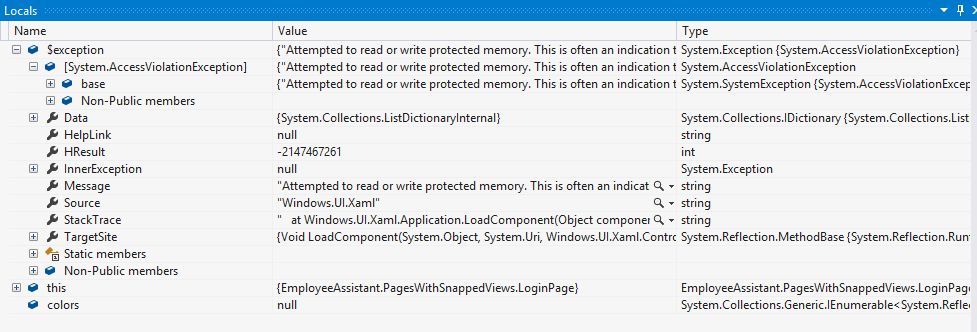
-“编辑”-“编辑”
    private readonly ObservableCollection<PropertyInfo> _colorSource = new ObservableCollection<PropertyInfo>();
    private string _selectedColorName;

    public ObservableCollection<PropertyInfo> ColorSource
    {
        get { return _colorSource; }
    }
    public string SelectedColorName
    {
        get { return _selectedColorName; }
        set
        {
            _selectedColorName = value;
            OnPropertyChanged();
        }
    }

    public LoginPage()
    {

            InitializeComponent();

            var colors = typeof(Colors).GetTypeInfo().DeclaredProperties;

            foreach (var item in colors)
            {
                ColorSource.Add(item);
            }

    }
App.OnLaunched:
    /// <summary>
    /// Invoked when the application is launched normally by the end user.  Other entry points
    /// will be used when the application is launched to open a specific file, to display
    /// search results, and so forth.
    /// </summary>
    /// <param name="args">Details about the launch request and process.</param>
    protected override void OnLaunched(LaunchActivatedEventArgs args)
    {
        Frame rootFrame = Window.Current.Content as Frame;

        // Do not repeat app initialization when the Window already has content,
        // just ensure that the window is active
        if (rootFrame == null)
        {
            // Create a Frame to act as the navigation context and navigate to the first page
            rootFrame = new Frame();

            if (args.PreviousExecutionState == ApplicationExecutionState.Terminated)
            {
                //TODO: Load state from previously suspended application
            }

            // Place the frame in the current Window
            Window.Current.Content = rootFrame;
        }

        if (rootFrame.Content == null)
        {
            // When the navigation stack isn't restored navigate to the first page,
            // configuring the new page by passing required information as a navigation
            // parameter
            if (!rootFrame.Navigate(typeof(LoginPage), args.Arguments))
            {
                throw new Exception("Failed to create initial page");
            }
        }
        // Ensure the current window is active
        Window.Current.Activate();
    }
如果我试图调试,看看正在发生什么,它所做的就是从LayoutAwarePage和此行加载代码:私有只读ObservableCollection _colorSource =新的ObservableCollection();然后它将转到InitializeComponent并得到AccessViolationException。
有没有人知道发生了什么事,或者是如何解决这个问题?
尼可拉斯
回答 2
Stack Overflow用户
发布于 2013-05-14 06:24:55
我所做的就是创建一个基本的页面并重新创建我的页面。现在它运转得很好。不过,不知道问题出在哪里。但这就是我解决问题的方法。
Stack Overflow用户
发布于 2017-01-04 12:37:13
我也有同样的问题。创建一个新的页面然后重做我有同样的问题..。因此,我注释掉了一些XAML,直到我确定了根本原因是:
<Style TargetType="TextBox" x:Key="printableTextBox">
    <Setter Property="BorderThickness" Value="{Binding IsPrinting, Converter={StaticResource printInputBoolToThicknessConverter}}"/>
</Style>Setter.Value。实际上,在VS的Setter有一个蓝色的工具提示“灾难性的失败”!我觉得有点危言耸听..。
因此,我希望这能帮助其他人--在这种情况下,AccessViolationException是完全没有帮助的。
https://stackoverflow.com/questions/16521610
复制相似问题
腾讯云开发者

Copyright © 2013 - 2026 Tencent Cloud. All Rights Reserved. 腾讯云 版权所有
深圳市腾讯计算机系统有限公司 ICP备案/许可证号:粤B2-20090059  粤公网安备44030502008569号
腾讯云计算(北京)有限责任公司 京ICP证150476号 | 京ICP备11018762号