
Windows .bat文件,%~$PATH:1引号问题
我在Windows 7上有一个which.bat,
@echo off
REM This bat searches a file in PATH list to see whether a file can be found.
REM If found, it shows the file's full path.
REM     which.bat gcc.exe
REM shows
REM     gcc.exe is found: D:\GMU\MinGW2\bin\gcc.exe
REM
REM Note: Filename extension is significant in the search. E.g. If you run
REM     which.bat gcc
REM gcc.exe will not be matched.

IF "%1" == "" goto END

IF "%~$PATH:1" == "" (
      echo %1 is not found in any directories from PATH env-var.
    ) ELSE (
      echo %1 is found: %~$PATH:1
    )

:END
直到我今天发现一种奇怪的行为,这只蝙蝠才能正常工作。
有一个文件O:\temp\pfiles (x86)\mystuff.txt,PATH有内容:
PATH=O:\temp\pfiles (x86);D:\CmdUtils运行which mystuff.txt时,我得到了非常奇怪的输出:
\mystuff.txt was unexpected at this time.
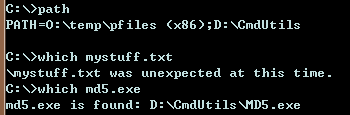
在浏览了一下之后,我发现目录名中的(x86)导致了这个问题。为了解决这个问题,我必须向echo添加引号,如下所示:
echo %1 is found: "%~$PATH:1"这种调整的缺点是显而易见的:引号是打印到屏幕上的,这在程序员看来并不总是理想的。
有人能帮我解释一下这种奇怪的行为吗?
我发现这个问题是因为在我真正的env中,我有一些路径,比如路径中的C:\Program Files (x86)\Common Files\NetSarang,它们表现出完全相同的症状。

回答 3
Stack Overflow用户
发布于 2013-05-13 09:49:24
Dos女士是非常简单的shell实现,正如我已经发现的那样,对一个DOS命令行的解释分为两个阶段:
- 当前线路变量的评价
- 被评估命令行的解释
在这种情况下,命令行:
IF "%~$PATH:1" == "" (
      echo %1 is not found in any directories from PATH env-var.
    ) ELSE (
      echo %1 is found: %~$PATH:1
    )
将被解释为:
IF "O:\temp\pfiles (x86)\mystuff.txt" == "" (
      echo mystuff is not found in any directories from PATH env-var.
    ) ELSE (
      echo mystuff.txt is found: O:\temp\pfiles (x86)\mystuff.txt
)现在我们可以注意到(x86)中的问题,即解释器以某种方式看到了这样的情况--首先)关闭了else语句:
) ELSE (
      echo mystuff.txt is found: O:\temp\pfiles (x86
)\mystuff.txt
)
解决方案:将"“放在所有可能有问题的变量周围。
我通常将引号放在整个echo命令内容周围,例如:
echo "%1 is found: %~$PATH:1"Stack Overflow用户
发布于 2013-05-13 10:13:54
由于问题现在很清楚(来自Michael和Robert ),我试图给出一个解决方案。
你需要引号,但你不想显示它们。
由于延迟扩展,结束括号是无害的。
setlocal EnableDelayedExpansion
IF "%~$PATH:1" == "" (
      echo %1 is not found in any directories from PATH env-var.
    ) ELSE (
      set "found=%~$PATH:1"
      echo %1 is found: !found!
    )
或者只是一句消失的名言
IF "%~$PATH:1" == "" (
      echo %1 is not found in any directories from PATH env-var.
    ) ELSE (
      for %%^" in ("") do (
        echo %1 is found: %%~"%~$PATH:1
      )
)Stack Overflow用户
发布于 2013-05-13 09:49:32
我可以猜到一种解释(虽然不是一个有用的解释):cmd.exe的解析器不是很聪明--它被%~$PATH:1中的父类搞混了--当它展开变量并看到)字符时,它假设它是) ELSE (行的closig。(我认为它对展开中的(字符没有任何作用,因为这些字符只有在命令开始时才有意义)。
您可以通过确保可以包含')‘的扩展不是在(...)命令组中,或者它是引用的(如您所发现的)来解决这个问题。由于您不需要这些引号,其他解决方法可能如下所示:
@echo off
REM This bat searches a file in PATH list to see whether a file can be found.
REM If found, it shows the file's full path.
REM     which.bat gcc.exe
REM shows
REM     gcc.exe is found: D:\GMU\MinGW2\bin\gcc.exe
REM
REM Note: Filename extension is significant in the search. E.g. If you run
REM     which.bat gcc
REM gcc.exe will not be matched.

IF "%1" == "" goto END

IF "%~$PATH:1" == "" (
      echo %1 is not found in any directories from PATH env-var.
    ) ELSE (
      call :printfound %1
    )

goto END

:printfound
echo %1 is found: %~$PATH:1
goto :eof

:END
这很难看,但这正是cmd.exe脚本所必须做的事情。
https://stackoverflow.com/questions/16518297
复制相似问题
腾讯云开发者

Copyright © 2013 - 2026 Tencent Cloud. All Rights Reserved. 腾讯云 版权所有
深圳市腾讯计算机系统有限公司 ICP备案/许可证号:粤B2-20090059  粤公网安备44030502008569号
腾讯云计算(北京)有限责任公司 京ICP证150476号 | 京ICP备11018762号