
Android图像动画-在轨道上移动
Android图像动画-在轨道上移动
提问于 2013-05-10 11:42:38
我想在我的活动中有一个动画图像:一个白色的圆圈在轨道上移动(黑线)。
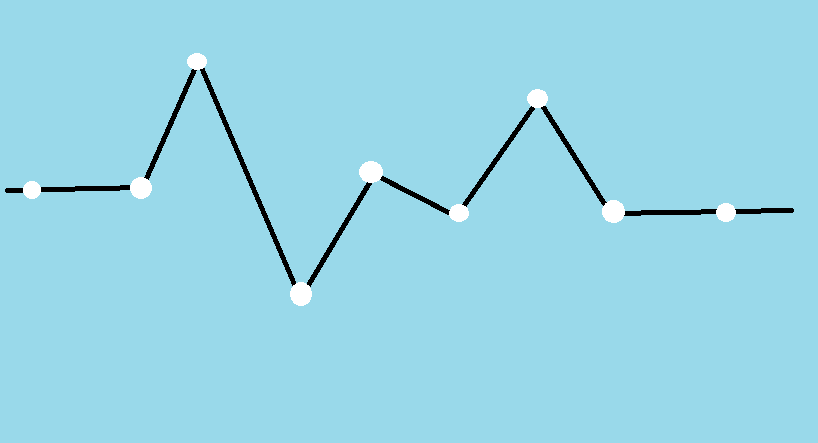
做这件事最好的方法是什么?
- 翻译动画
- FrameAnimation
- 画布
执行工作可以是:
- 白色圆圈是一个背景透明的小ImageView。它被放置在另一个ImageView (黑色曲线)的顶部。
- FrameAnimation:圆圈的每个位置都有一个单独的png图像,这是一个动画的框架。
- 对于白点的每一个移动都使用drawCircle()和restoreBackgroundImage()。
到目前为止,我尝试了一个FrameAnimation,但是我只需要10帧就可以得到outOfMemoryError。
回答 1
Stack Overflow用户
发布于 2015-08-05 05:30:41
下面的代码实现了Canvas方式。效率高,没有OOM。您只需将您的轨迹更改为Path对象即可。
public class TestView extends View {
    private Path path;
    private Paint pathPaint;
    private Paint dotPaint;
    private long beginTime;
    private long duration = 3000;
    private float dotRadius = 3;
    private PathMeasure pm;

    public TestView(Context context) {
        super(context);
        init();
    }

    public TestView(Context context, AttributeSet attrs) {
        super(context, attrs);
        init();
    }

    public TestView(Context context, AttributeSet attrs, int defStyleAttr) {
        super(context, attrs, defStyleAttr);
        init();
    }

    private void init() {
        path = new Path();
        path.moveTo(0, 100);
        path.lineTo(100, 200);
        path.lineTo(200, 50);
        //TODO: Put your path here

        pm = new PathMeasure(path, false);
        pathPaint = new Paint();
        pathPaint.setARGB(255, 0, 0, 0);
        pathPaint.setStrokeWidth(2);
        pathPaint.setStyle(Paint.Style.STROKE);
        dotPaint = new Paint();
        dotPaint.setARGB(255, 255, 255, 255);
        dotPaint.setStyle(Paint.Style.FILL);
        beginTime = 0;
    }

    @Override
    protected void onDraw(Canvas canvas) {
        canvas.drawARGB(0, 0, 0, 0);
        canvas.drawPath(path, pathPaint);

        long currentTime = System.currentTimeMillis();
        float currentDistance;

        if (beginTime == 0) {
            beginTime = currentTime;
            currentDistance = 0;
        } else if (beginTime > 0 && currentTime - beginTime < duration) {
            currentDistance = (float) (currentTime - beginTime) / (float) duration * pm.getLength();
        } else {
            beginTime = -1;
            return;
        }

        float pos[] = new float[2];
        pm.getPosTan(currentDistance, pos, null);
        canvas.drawCircle(pos[0], pos[1], dotRadius, dotPaint);
        invalidate();
    }
}页面原文内容由Stack Overflow提供。腾讯云小微IT领域专用引擎提供翻译支持
原文链接:
https://stackoverflow.com/questions/16481458
复制相关文章
相似问题
腾讯云开发者

Copyright © 2013 - 2026 Tencent Cloud. All Rights Reserved. 腾讯云 版权所有
深圳市腾讯计算机系统有限公司 ICP备案/许可证号:粤B2-20090059  粤公网安备44030502008569号
腾讯云计算(北京)有限责任公司 京ICP证150476号 | 京ICP备11018762号