
HTML5背景视频调整小故障
HTML5背景视频调整小故障
提问于 2013-05-06 16:14:03
注:这是Html5 video set to browser full screen - same as noborder for flash movie的后续问题。
我已经将接受的答案的代码包装在一个事件侦听器中,结果如下:
<!DOCTYPE html>
<html>
    <head>
        <style type="text/css">
            body, html {
                width: 100%;
                height: 100%;

                margin: 0;
                padding: 0;
            }

            #container {
                position: absolute;
                width: 100%;
                height: 100%;
                overflow: hidden;
            }

            #player {
                position: absolute;
            }
        </style>

        <script type="text/javascript" src="http://code.jquery.com/jquery-1.8.2.min.js"></script>

        <script type="text/javascript">
            $(window).load(function () {
                adjust = function () {
                    var $player = $('#player');
                    var $window = $(window);

                    $player[0].height = $window.height();

                    $player.css('left', (($window.width() - $player.width()) / 2) + "px");
                };

                adjust();

                $(window).resize(function () {
                    adjust();
                });
            });
        </script>
    </head>
    <body>
        <div id="container">
              <video id="player" autoplay loop>
                    <source src="background.mp4" type="video/mp4" />
                    <source src="background.ogv" type="video/ogg" />
              </video>
        </div>
    </body>
</html>
当我垂直调整窗口的尺寸时,我会得到空位。
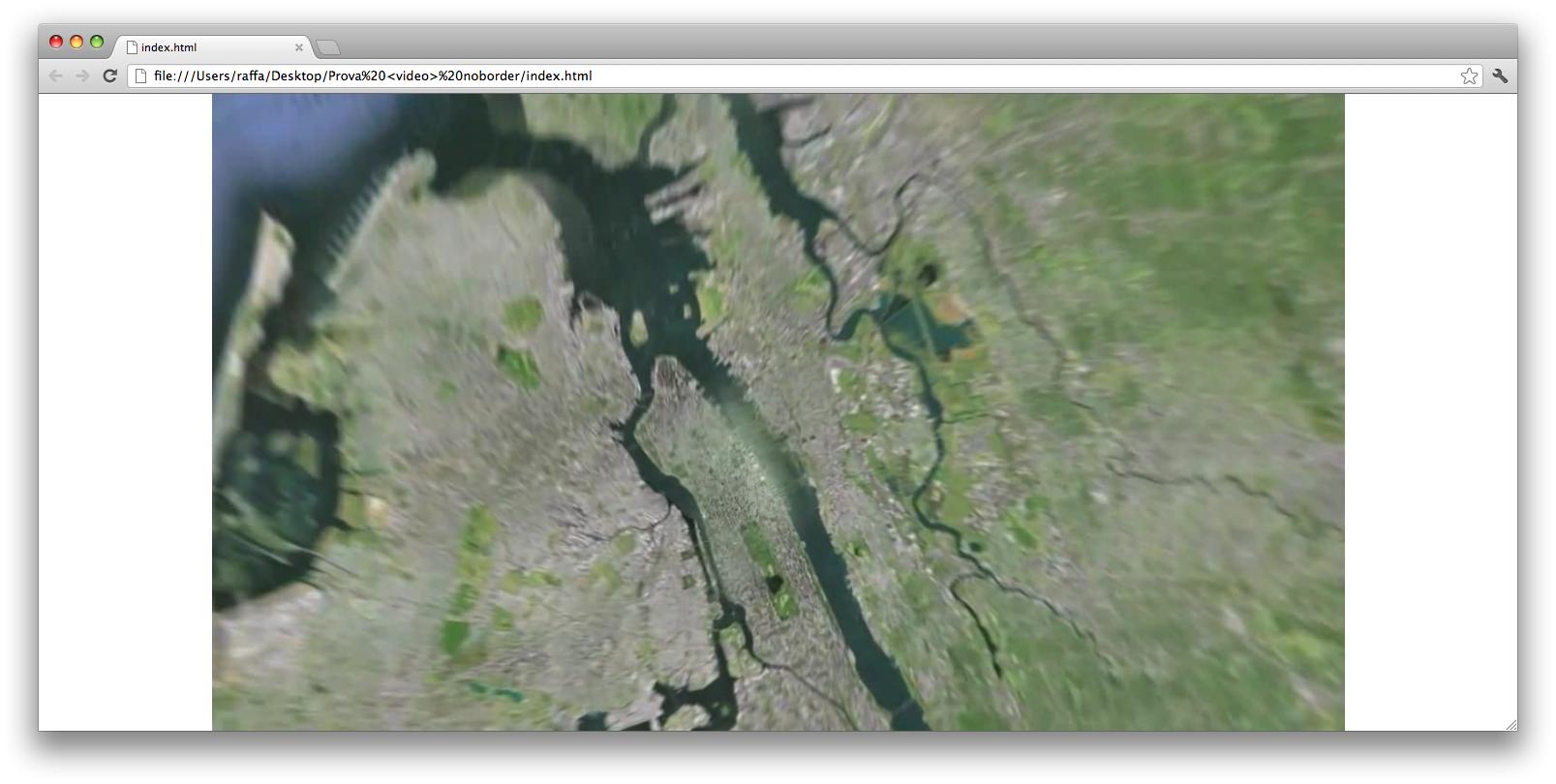
有什么办法解决这个问题吗?
回答 2
Stack Overflow用户
发布于 2013-05-07 14:33:03
视口的纵横比
如果您总是将视频的高度设置为视口的高度,那么任何时候视口都是非常宽和非常短的(如上面的截图所示),那么左右将有未使用的空间。
相反,如果您总是将视频的宽度设置为视口的宽度,那么任何时候视口都非常窄且非常高(与上面截图相反),则顶部或底部将有未使用的空间。
要使视频始终完全填满视口,诀窍是在任何给定的时间,知道使用宽度还是高度更好。这取决于视频的纵横比和视口的纵横比。
- 如果视口按比例比视频宽,请使用宽度。
- 如果视口按比例比视频高,请使用高度。
jQuery
// Set this variable when the page first loads
var videoAspectRatio;

function adjust() {
    var viewportWidth = $(window).width();
    var viewportHeight = $(window).height();
    var viewportAspectRatio = viewportWidth / viewportHeight;

    if (viewportAspectRatio > videoAspectRatio) {

        // Very-wide viewport, so use the width
        $player.css({width: viewportWidth + 'px', height: 'auto'});

        // Position the video as needed
        // ...
    }
    else {
        // Very-tall viewport, so use the height
        $player.css({width: 'auto', height: viewportHeight + 'px'});

        // Position the video as needed
        // ...
    }
}

$(document).ready(function(){
    // Get the aspect ratio of the video
    videoAspectRatio = $player.width() / $player.height();
    adjust();
});

$(window).resize(function(){ adjust(); });Stack Overflow用户
发布于 2013-05-07 13:01:26
试着把你的宽度和高度放到自动,并添加最小宽度/高度。
编辑:不介意。你不应该给你的#容器造型。相反,把你的视频样式化。
#player {
      min-width: 100%;
      min-height: 100%;
      width: auto;
      height: auto;
      position: absolute;
      overflow: hidden;
}
确保您的#容器是您希望您的视频产卵的大小。
页面原文内容由Stack Overflow提供。腾讯云小微IT领域专用引擎提供翻译支持
原文链接:
https://stackoverflow.com/questions/16402768
复制相关文章
相似问题
腾讯云开发者

Copyright © 2013 - 2026 Tencent Cloud. All Rights Reserved. 腾讯云 版权所有
深圳市腾讯计算机系统有限公司 ICP备案/许可证号:粤B2-20090059  粤公网安备44030502008569号
腾讯云计算(北京)有限责任公司 京ICP证150476号 | 京ICP备11018762号