
在ckeditor中显示html标记
在ckeditor中显示html标记
提问于 2013-04-23 03:28:56
我打开下面的内容作为默认内容的核心用户。
<textarea id="editor1" name="editor1" rows="30" cols="120"><p>We can use <strong>prettify </strong>to auto-format the Computer programming code at web page.</p>
<p><strong>How to use?</strong></p>
<p>Just add below line;</p>
<p><code class="prettyprint"><span style="line-height: 1.6em;"><script src="https://google-code-prettify.googlecode.com/svn/loader/run_prettify.js"></script></span></code</p>
<p><span style="line-height: 1.6em;">Then, put the code line in below tab;</span></p>
<p><code class="prettyprint"><code class="prettyprint">...</code></code></p>
<p><span style="color: rgb(0, 0, 0); font-family: monospace; font-size: medium; line-height: normal;">or,</span></p>
<p>Download the complete code files from <a href="https://code.google.com/p/google-code-prettify/">https://code.google.com/p/google-code-prettify/</a>(even can learn more about prettify) to your server and change above script tag line like below;</p>
<p><code class="prettyprint"><script src="path/to/directory/run_prettify.js"></script></code><br /> </p>
</textarea>
<script>CKEDITOR.replace( "editor1");</script>但是,在输出中缺少HTML标记代码。产出低于(项目下);
我们可以使用漂亮软件自动格式化网页上的计算机编程代码.
如何使用?
只需添加以下一行;
然后,将代码行放在下面的选项卡中;
..。
或,
下载完整的代码文件从https://code.google.com/p/google-code-prettify/(even到您的服务器,并改变上面的脚本标签行如下;
预期产出:
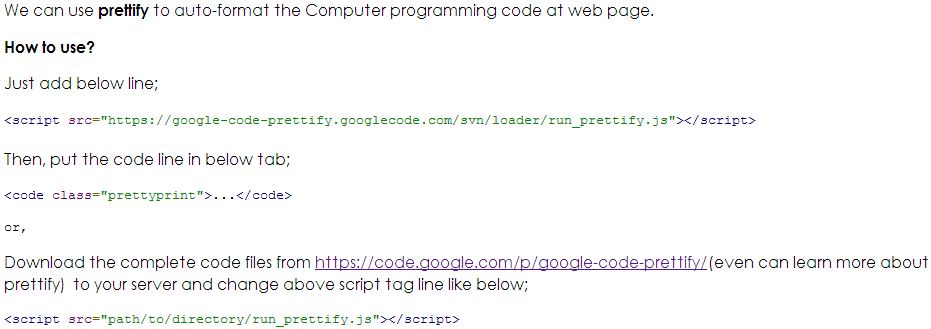
请帮帮我,在我失踪的地方。
回答 1
Stack Overflow用户
回答已采纳
发布于 2013-04-23 06:39:48
这看起来像这个问题中的另一个类似的问题:How to prevent CKEditor from stripping < and > (greater-than/less-than)
解决方法是使用setData设置值。下面是我在4.1个样本中所做的测试。
<textarea id="editor1">
<p>foo</p>
</textarea>
<script>
var txt = '<p>We can use <strong>prettify </strong>to auto-format the Computer programming code at web page.</p><p><strong>How to use?</strong></p><p>Just add below line;</p><p><code class="prettyprint"><span style="line-height: 1.6em;"><script src="https://google-code-prettify.googlecode.com/svn/loader/run_prettify.js"></script></span></code</p><p><span style="line-height: 1.6em;">Then, put the code line in below tab;</span></p><p><code class="prettyprint"><code class="prettyprint">...</code></code></p><p><span style="color: rgb(0, 0, 0); font-family: monospace; font-size: medium; line-height: normal;">or,</span></p><p>Download the complete code files from <a href="https://code.google.com/p/google-code-prettify/">https://code.google.com/p/google-code-prettify/</a>(even can learn more about prettify) to your server and change above script tag line like below;</p><p><code class="prettyprint"><script src="path/to/directory/run_prettify.js"></script></code><br /> </p>'
CKEDITOR.on('instanceReady', function(ev) {
ev.editor.setData(txt);
});
CKEDITOR.replace( 'editor1', { allowedContent: 'p' } );
</script>页面原文内容由Stack Overflow提供。腾讯云小微IT领域专用引擎提供翻译支持
原文链接:
https://stackoverflow.com/questions/16160408
复制相关文章
相似问题
腾讯云开发者

Copyright © 2013 - 2026 Tencent Cloud. All Rights Reserved. 腾讯云 版权所有
深圳市腾讯计算机系统有限公司 ICP备案/许可证号:粤B2-20090059  粤公网安备44030502008569号
腾讯云计算(北京)有限责任公司 京ICP证150476号 | 京ICP备11018762号