
jQuery,如何克隆保存的元素?
jQuery,如何克隆保存的元素?
提问于 2013-04-22 12:52:52
要演示,请查看我的html:
<html>
<head>
<script src="http://code.jquery.com/jquery-1.9.1.js"></script>
</head>
See it:
<pre>
print "Say hello"
</pre>
<p><b>==SEP==</b></p>
<pre>
class Voila {
public:
  // Voila
  static const string VOILA = "Voila";

  // will not interfere with embedded <a href="#voila1">tags</a>.
}
</pre>
</html>
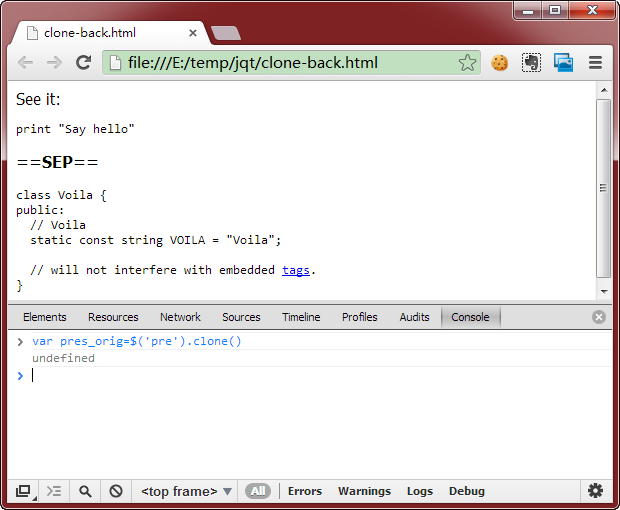
在Chrome v26控制台中,我执行:
var pres_orig=$('pre').clone()
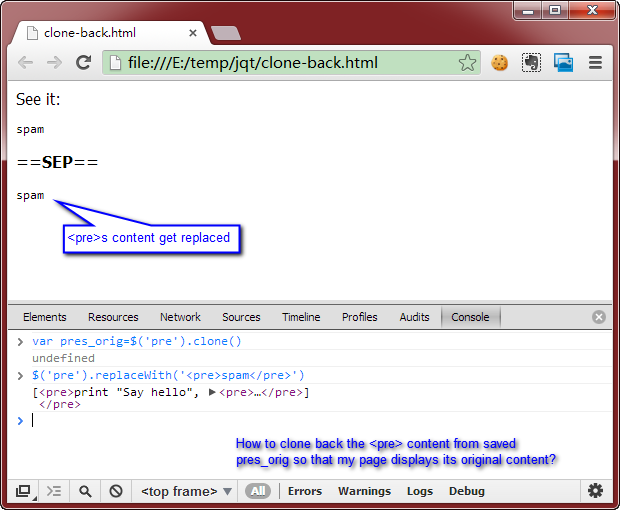
$('pre').replaceWith('<pre>spam</pre>')然后我的问题是:如何从保存的<pre> 中克隆内容,以便我的页面显示原始内容?
我尝试过以下不起作用的方法:
$('pre').replaceWith(pres_orig)
回答 3
Stack Overflow用户
回答已采纳
发布于 2013-04-23 02:14:57
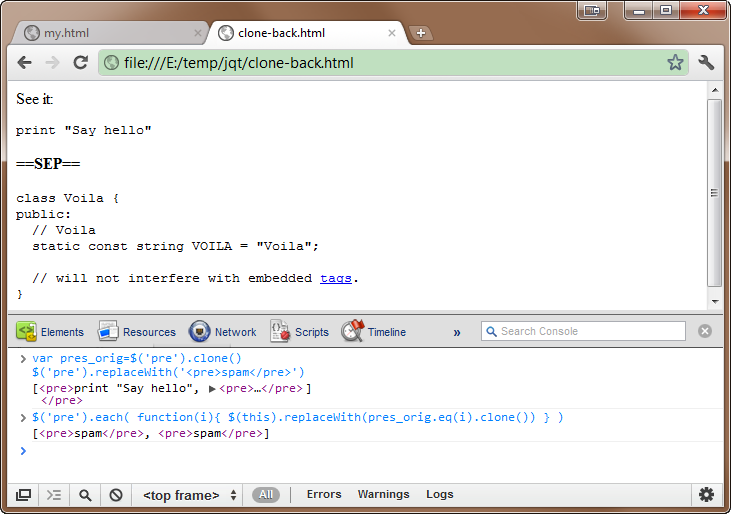
我想我找到了到目前为止最好的解决办法,只有一种说法:
for(var i=0; i<pres_orig.length; i++)
    $('pre').eq(i).replaceWith(pres_orig.eq(i).clone());
或
$('pre').each( function(i){
    $(this).replaceWith(pres_orig.eq(i).clone())
});注意:使用pres_orig ()可以使它保持独立的副本,这样我们就可以随时复制它。
Stack Overflow用户
发布于 2013-04-22 14:00:18
因为您有多个没有标识值的pre元素。可以采用的一种方法是循环所有元素并将内部html存储在数组中。然后,当您需要再次加载它们时,可以循环它们并使用索引提取数组html。
就像这样:
//store all the data on load
var storage = [];
$("pre").each(function(){
   storage.push($(this).html());
});

//set the new html to "spam"
$("pre").html("spam");

//reload the original data
$("pre").each(function(index){
    $(this).html(storage[index]);
});
下面是一个有用的例子
Stack Overflow用户
发布于 2013-04-22 13:03:42
别克隆。保存内部(或外部) HTML。将内部HTML插入pre。使用.html()获取内部HTML,使用.html(内容)替换内部HTML。
<html>
  <head>
    <script src="http://code.jquery.com/jquery-1.9.1.js"></script>
    <script>
      $(function() {
        var pres = [];
        // this is how you store it:
        $('pre').each(function(i) {
          pres[i] = $(this).html();
        });
        // this is how you restore it:
        $('pre').each(function(i) {
          $(this).html(pres[i] + "SPAM ;)");
        });
      });
    </script>
  </head>
  <body>
    See it:
    <pre>
      print "Say hello"
    </pre>
    <p><b>==SEP==</b></p>
    <pre>
      class Voila {
      public:
        // Voila
        static const string VOILA = "Voila";

        // will not interfere with embedded <a href="#voila1">tags</a>.
      }
    </pre>
  </body>
</html>因此,如果要将此数组保存到文件或cookie中,请使用JSON3对其进行序列化。
页面原文内容由Stack Overflow提供。腾讯云小微IT领域专用引擎提供翻译支持
原文链接:
https://stackoverflow.com/questions/16147598
复制相关文章
相似问题
腾讯云开发者

Copyright © 2013 - 2026 Tencent Cloud. All Rights Reserved. 腾讯云 版权所有
深圳市腾讯计算机系统有限公司 ICP备案/许可证号:粤B2-20090059  粤公网安备44030502008569号
腾讯云计算(北京)有限责任公司 京ICP证150476号 | 京ICP备11018762号