
多处理和GUI更新- Qprocess还是多处理?
在阅读了关于QProcesses和python的多处理模块的文献之后,在后台正在进行大型进程的过程中,我仍然很难创建一个工作和响应良好的GUI。到目前为止,我已经提出了我的应用程序的这个简化版本,它仍然显示出与许多人所描述的相似的问题。
from PyQt4 import QtCore, QtGui
import multiprocessing as mp
import numpy as np
import sys
class Spectra:
    def __init__(self, spectra_name, X, Y):
        self.spectra_name = spectra_name
        self.X = X
        self.Y = Y
        self.iteration = 0

    def complex_processing_on_spectra(self, pipe_conn):
        self.iteration += 1
        pipe_conn.send(self.iteration)

class Spectra_Tab(QtGui.QTabWidget):
    def __init__(self, parent, spectra):
        self.parent = parent
        self.spectra = spectra
        QtGui.QTabWidget.__init__(self, parent)

        self.treeWidget = QtGui.QTreeWidget(self)
        self.properties = QtGui.QTreeWidgetItem(self.treeWidget, ["Properties"])
        self.step = QtGui.QTreeWidgetItem(self.properties, ["Iteration #"])

        self.consumer, self.producer = mp.Pipe()
        # Make process associated with tab
        self.process = mp.Process(target=self.spectra.complex_processing_on_spectra, args=(self.producer,))

    def update_GUI(self, iteration):
        self.step.setText(1, str(iteration))

    def start_computation(self):
        self.process.start()
        while(True):
            message = self.consumer.recv()
            if message == 'done':
                break
            self.update_GUI(message)
        self.process.join()
        return

class MainWindow(QtGui.QMainWindow):
    def __init__(self, parent = None):
        QtGui.QMainWindow.__init__(self)

        self.setTabShape(QtGui.QTabWidget.Rounded)
        self.centralwidget = QtGui.QWidget(self)
        self.top_level_layout = QtGui.QGridLayout(self.centralwidget)

        self.tabWidget = QtGui.QTabWidget(self.centralwidget)
        self.top_level_layout.addWidget(self.tabWidget, 1, 0, 25, 25)

        process_button = QtGui.QPushButton("Process")
        self.top_level_layout.addWidget(process_button, 0, 1)
        QtCore.QObject.connect(process_button, QtCore.SIGNAL("clicked()"), self.process)

        self.setCentralWidget(self.centralwidget)
        self.centralwidget.setLayout(self.top_level_layout)

        # Open several files in loop from button - simplifed to one here
        X = np.arange(0.1200,.2)
        Y = np.arange(0.1200,.2)
        self.spectra = Spectra('name', X, Y)
        self.spectra_tab = Spectra_Tab(self.tabWidget, self.spectra)
        self.tabWidget.addTab(self.spectra_tab, 'name')

    def process(self):
        self.spectra_tab.start_computation()
        return

if __name__ == "__main__":
    app = QtGui.QApplication([])
    win = MainWindow()
    win.show()
sys.exit(app.exec_())如果您有依赖项,这应该完全能够执行。目前,我的程序有一个QThreaded版本,它可以处理信号和插槽;我认为,拥有使用所有计算机处理器的能力是很重要的,因为大多数用户都有8个可用的内核。因此,我想将这个信号/插槽线程方法扩展到使用multiprocessing或QProcesses的多处理版本。
是否有人对是否使用QProcess或multiprocessing有建议?虽然它们对我来说都很复杂,但是QProcess似乎减少了使用pyQt的人的论坛,所以我选择了多重处理。使用QProcess是否更简单,因为我已经有处理线程的信号/插槽了?
编辑:应该像建议的那样添加这样的类吗?
class My_Process(QtCore.QProcess):
    def __init__(self, spectra):
        QtCore.QProcess.__init__(self)
        self.spectra = spectra

    def worker(self):
        QtConcurrent.run(self.spectra, self.spectra.complex_processing_on_spectra)

    def run(self):
QtCore.QObject.connect(self, QtCore.SIGNAL(QTimer.timeout()), self.worker)回答 2
Stack Overflow用户
发布于 2013-03-28 08:15:42
QProcess用于读取和写入管道(shell/cmd)。用这个。
- 创建一个带有worker函数的类,并通过
QtConcurrent.run(object, method, args)作为线程运行它 - 将
QTimer.timeout()与您的工作人员函数连接。
Stack Overflow用户
发布于 2014-11-20 09:39:22
尽管这个问题很老,而且已经得到了回答,但我想补充一些澄清:
- AFAIK
QtConcurrent在PyQt中不可用。 - 具有C++的Qt中的线程与PyQt或python线程不同。后者在运行时需要获取python的
GIL(全局解释器锁),这实际上意味着python/pyqt线程之间没有真正的并发性。
Python线程可以保持gui响应,但是您不会看到cpu绑定任务的性能改进。我建议在处理与子进程通信的主进程上使用multiprocessing和QThread。您可以在主(gui)和通信线程之间使用信号和插槽。
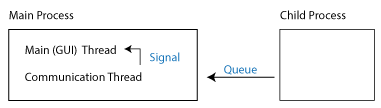
编辑:我只是遇到了同样的问题,做了一些类似的事情:
from multiprocessing import Process, Queue
from PyQt4 import QtCore
from MyJob import job_function


# Runner lives on the runner thread

class Runner(QtCore.QObject):
    """
    Runs a job in a separate process and forwards messages from the job to the
    main thread through a pyqtSignal.

    """

    msg_from_job = QtCore.pyqtSignal(object)

    def __init__(self, start_signal):
        """
        :param start_signal: the pyqtSignal that starts the job

        """
        super(Runner, self).__init__()
        self.job_input = None
        start_signal.connect(self._run)

    def _run(self):
        queue = Queue()
        p = Process(target=job_function, args=(queue, self.job_input))
        p.start()
        while True:
            msg = queue.get()
            self.msg_from_job.emit(msg)
            if msg == 'done':
                break


# Things below live on the main thread

def run_job(input):
    """ Call this to start a new job """
    runner.job_input = input
    runner_thread.start()


def handle_msg(msg):
    print(msg)
    if msg == 'done':
        runner_thread.quit()
        runner_thread.wait()


# Setup the OQ listener thread and move the OQ runner object to it
runner_thread = QtCore.QThread()
runner = Runner(start_signal=runner_thread.started)
runner.msg_from_job.connect(handle_msg)
runner.moveToThread(runner_thread)https://stackoverflow.com/questions/15675043
复制相似问题
腾讯云开发者

Copyright © 2013 - 2026 Tencent Cloud. All Rights Reserved. 腾讯云 版权所有
深圳市腾讯计算机系统有限公司 ICP备案/许可证号:粤B2-20090059  粤公网安备44030502008569号
腾讯云计算(北京)有限责任公司 京ICP证150476号 | 京ICP备11018762号