
使用drawImage / putImageData绘制意外结果/行为
在试图获得画布的绘图并将其重绘到相同的画布上时,稍后会产生意想不到的行为。例如,请参见小提琴手。
逻辑相当直截了当:
- 给出画布上的图像,并将其转换到中心(我使用一个矩形来演示)。
- 剪出图像的一个部分。我只是在复制示例中的整个“图像”。
- 可能是操纵。
- 清除后再粘贴到同一画布上。其要点是在给定的点处剪裁一段具有宽度/高度的原始图像,并在修改后粘贴它。
var c=document.getElementById("cvs1"),
    ctx = c.getContext("2d"),
    bufferCvs = document.createElement('canvas'),
    bufferCtx = bufferCvs.getContext('2d');


bufferCvs.width = c.width;
bufferCvs.height = c.height;

ctx.translate( c.width/2, c.height/2 );
ctx.fillStyle="#FF0000";
ctx.fillRect( -75, -50 ,150,100);

//Image data experiment
//Set the buffer width / height same size as rectangle
bufferCvs.width = 150;
bufferCvs.height = 100;
//Draw the "image" from the first context to the buffer by clipping the first, and pasting to 0,0 width the same "image" dimensions.
bufferCtx.drawImage( c, -75, -50, 150, 100, 0, 0, 150, 100 );
//clear out old canvas drawing
ctx.save()
ctx.setTransform(1,0,0,1,0,0,1,0,0);
ctx.clearRect(0, 0, c.width, c.height);
ctx.restore();

ctx.drawImage( bufferCvs, -75, -50, 150, 100 );由于我保持完全相同的坐标/维度,预期的输出将是画布上最初的内容。然而,只有部分左上角是画(见小提琴)。我将drawImage用于效率原因,但我使用了get/putImageData,其结果与此相同。宽度和高度都定义为修复其他奇怪行为.。
您将如何确保存储在缓冲区画布中的所有内容都是绘制的,而不仅仅是顶部的角?
编辑:为了帮助我的问题和我认为是什么行为,我会张贴一些屏幕。
步骤1:将上下文1转换为中心,并绘制一个矩形来表示图像。
ctx.translate( c.width/2, c.height/2 );
ctx.fillStyle="#FF0000";
ctx.fillRect( -75, -50 ,150,100);
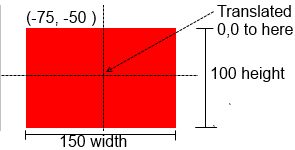
第二步:使用drawImage“剪辑”从-75,-50点,并削减仅使用宽度150,100矩形。这应该被绘制到画布缓冲区上,但它不是。
bufferCvs.width = 150;
bufferCvs.height = 100;
//Draw the "image" from the first context to the buffer by clipping the first at -75, -50 (the start of the image), and pasting to 0,0 width the same "image" dimensions.
bufferCtx.drawImage( c, -75, -50, 150, 100, 0, 0, 150, 100 );
我希望缓冲区画布看起来像这样(不是这样):
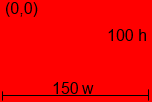
但是,如果我将drawImage更改为
bufferCtx.drawImage( c, 0, 0, 150, 100, 0, 0, 150, 100 );我在缓冲区上获得了预期的空白(最后一次drawImage返回上下文,没有问题)
第三步:从第一个上下文中清除旧的“图像”。这不应该改变翻译,因为我在执行清除之后恢复上下文状态。(如预期那样起作用)
ctx.save()
ctx.setTransform(1,0,0,1,0,0,1,0,0);
ctx.clearRect(0, 0, c.width, c.height);
ctx.restore();
步骤4:只需将缓冲区画布中的内容绘制到它开始返回的原始上下文中:
其想法是更多地“剪辑”原来的一个区域,清除旧的图像,并粘贴新的剪裁区域中心回到原来的上下文。我看过MDN示例,但是drawImage的剪辑部分并没有像我预期的那样执行。
回答 1
Stack Overflow用户
发布于 2013-03-23 09:12:02
主要问题是,在bufferCvs上绘制的第一个画布不是在您期望的位置上绘制的。证明这一点的最简单方法是将bufferCvs添加到DOM树:http://jsfiddle.net/CdWn6/4/
我想这就是你要找的:http://jsfiddle.net/CdWn6/6/
var c=document.getElementById("cvs1"),
    c2 = document.getElementById("cvs2"),
    bufferCvs = document.createElement('canvas'),
    bufferCtx = bufferCvs.getContext('2d'),
    ctx = c.getContext("2d"),
    ctx2 = c2.getContext("2d");

bufferCvs.width = c.width;
bufferCvs.height = c.height;

ctx.translate( c.width/2, c.height/2 );
ctx.fillStyle="#FF0000";
ctx2.translate( c.width/2, c.height/2 );
ctx2.fillStyle="#FF0000";

bufferCtx.translate( c.width/2, c.height/2 );

ctx.fillRect( -75, -50 ,150,100);
ctx2.fillRect( -75, -50 ,150,100);

//Image data experiment
bufferCtx.drawImage( c, -135, -110, 270, 220);

ctx.save()
ctx.setTransform(1,0,0,1,0,0,1,0,0);
ctx.clearRect(0, 0, c.width, c.height);
ctx.restore();

//Draw background to demonstrate coordinates still work
ctx.fillStyle="#00FF00";
//ctx.fillRect( -75, -50 ,150,100);

ctx.drawImage( bufferCvs, -75, -50, 150, 100 );https://stackoverflow.com/questions/15584897
复制相似问题
腾讯云开发者

Copyright © 2013 - 2026 Tencent Cloud. All Rights Reserved. 腾讯云 版权所有
深圳市腾讯计算机系统有限公司 ICP备案/许可证号:粤B2-20090059  粤公网安备44030502008569号
腾讯云计算(北京)有限责任公司 京ICP证150476号 | 京ICP备11018762号