
绑定到DataGridColumnHeader.Command
我需要使用Command on DataGridColumnHeader对我的数据进行排序。标准的DataGrid排序功能对我来说是不够的,因为DataGrid中没有显示所有的数据。我的VM中甚至没有所有的数据。(不可能.太多了)我只是从服务器请求具体的数据页。现在,我还想从已排序的数据中获得具体的页面。
所以我做了这个:
 <DataGrid ItemsSource="{Binding Path=Entities, Mode=OneWay}" CanUserSortColumns="False" SelectionMode="Single" SelectedItem="{Binding Path=SelectedEntity}">
      <DataGrid.ColumnHeaderStyle>
           <Style TargetType="{x:Type DataGridColumnHeader}">
               <Setter Property="Command" Value="{Binding Path=MyCommand}"/>
               <Setter Property="CommandParameter" Value="{Binding Path=Content, RelativeSource={RelativeSource Self}}"/>
           </Style>
      </DataGrid.ColumnHeaderStyle>
      <DataGrid.Columns>
           <DataGridTemplateColumn >
                <DataGridTemplateColumn.Header>
                     <DataGridColumnHeader Content="Column1" />
                 </DataGridTemplateColumn.Header>
                 <DataGridTemplateColumn.CellTemplate>
                      <DataTemplate>
                          <TextBox Text="{Binding Path=Property1}"/>
                      </DataTemplate>
                 </DataGridTemplateColumn.CellTemplate>
           </DataGridTemplateColumn>
      </DataGrid.Columns>
</DataGrid>效果很好。现在我只想要AutoGenerateColumns="True",不幸的是,它不再起作用了。有谁可以解释为什么不适用于自动生成的列,并为我提供一些解决方案?提前谢谢你!
编辑
这可能与跟随也不起作用这一事实有关。
<DataGrid ItemsSource="{Binding Path=Entities, Mode=OneWay}" CanUserSortColumns="False" SelectionMode="Single" SelectedItem="{Binding Path=SelectedEntity}">
  <DataGrid.ColumnHeaderStyle>
       <Style TargetType="{x:Type DataGridColumnHeader}">
           <Setter Property="Command" Value="{Binding Path=MyCommand}"/>
           <Setter Property="CommandParameter" Value="{Binding Path=Content, RelativeSource={RelativeSource Self}}"/>
       </Style>
  </DataGrid.ColumnHeaderStyle>
  <DataGrid.Columns>
       <DataGridTemplateColumn>
            <!-- HERE IS THE CHANGE -->
            <DataGridTemplateColumn.Header>Column1</DataGridTemplateColumn.Header>
             <DataGridTemplateColumn.CellTemplate>
                  <DataTemplate>
                      <TextBox Text="{Binding Path=Property1}"/>
                  </DataTemplate>
             </DataGridTemplateColumn.CellTemplate>
       </DataGridTemplateColumn>
  </DataGrid.Columns>
但风格是适用的。我知道这是因为我试过:
<Style TargetType="{x:Type DataGridColumnHeader}">
   <Setter Property="Background" Value="Tomato"/> <!-- beautiful tomato background -->
   <Setter Property="Command" Value="{Binding Path=MyCommand}"/>
   <Setter Property="CommandParameter" Value="{Binding Path=Content, RelativeSource={RelativeSource Self}}"/>
</Style>
列标题有番茄背景,但命令不起作用。
EDIT2
以下是解决办法。显然,DataGridColumnHeaders没有继承DataContext,因为当我更改命令绑定时,一切都会再次工作。
<Setter Property="Command" Value="{Binding RelativeSource={RelativeSource AncestorType={x:Type DataGrid}},
                                Path=DataContext.MyCommand}"/>
但我还是不太明白为什么。所以给出详细的解释就能得到赏金了。
回答 2
Stack Overflow用户
发布于 2013-04-01 11:11:03
正如您的发现所示,自动生成的列将具有一个DataGridColumn.Header,其DataContext设置为string对象。
如果您不使用自动生成的列,而是指定一个DataGridTemplateColumn和DataGridTemplateColumn.Header,那么DataContext的标准继承仍然适用,这就是为什么它第一次对您起作用。
编辑:快速搜索并没有提供描述这种行为的即时结果。然而,核实这一事实并不太困难:
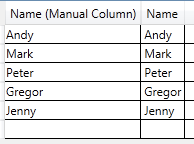
Xaml:
<DataGrid ItemsSource="{Binding MyClasses}" AutoGenerateColumns="True" MouseRightButtonUp="DataGrid_MouseRightButtonUp_1" >
    <DataGrid.Columns>
        <DataGridTemplateColumn>
            <DataGridTemplateColumn.Header>
                <DataGridColumnHeader Content="Name (Manual Column)" />
            </DataGridTemplateColumn.Header>
            <DataGridTemplateColumn.CellTemplate>
                <DataTemplate>
                    <TextBlock Text="{Binding Path=Name}"/>
                </DataTemplate>
            </DataGridTemplateColumn.CellTemplate>
        </DataGridTemplateColumn>
    </DataGrid.Columns>
</DataGrid>
ViewModel:
public class ViewModel : INotifyPropertyChanged
{
    public event PropertyChangedEventHandler PropertyChanged;
    private void OnPropertyChanged(string propertyName)
    {
        if (this.PropertyChanged != null)
            PropertyChanged(this, new PropertyChangedEventArgs(propertyName));
    }

    private ObservableCollection<Class1> _myClasses;
    public ObservableCollection<Class1> MyClasses { get { return _myClasses; } set { _myClasses = value; OnPropertyChanged("MyClasses"); } }

    public ViewModel()
    {
        MyClasses = new ObservableCollection<Class1>()
        {
            new Class1() { Name = "Andy" },
            new Class1() { Name = "Mark" },
            new Class1() { Name = "Peter" },
            new Class1() { Name = "Gregor" },
            new Class1() { Name = "Jenny" }
        };
    }
}
后面的代码(仅用于说明目的):
private void DataGrid_MouseRightButtonUp_1(object sender, MouseButtonEventArgs e)
{
    if (e.OriginalSource is Microsoft.Windows.Themes.DataGridHeaderBorder)
    {
        object dataContext = ((Microsoft.Windows.Themes.DataGridHeaderBorder)e.OriginalSource).DataContext;
    }
}
右键单击手动列标题(textblock外)将生成以下dataContext:

右键单击自动生成的列标题:

Stack Overflow用户
发布于 2013-03-25 13:34:30
DataGridColumnHeader是DataGridColumn.Header的容器项,例如,ListBoxItem是ListBox's ItemsSource中每个项目的容器项。
由于ListBoxItem的DataContext将被设置为ListBox的ItemsSource中的一个项,所以DataGridColumnHeader的DataContext将被设置为DataGridColumn.Header对象是很自然的。
https://stackoverflow.com/questions/15572666
复制相似问题
腾讯云开发者

Copyright © 2013 - 2026 Tencent Cloud. All Rights Reserved. 腾讯云 版权所有
深圳市腾讯计算机系统有限公司 ICP备案/许可证号:粤B2-20090059  粤公网安备44030502008569号
腾讯云计算(北京)有限责任公司 京ICP证150476号 | 京ICP备11018762号