
拖放Bug
拖放Bug
提问于 2013-03-15 12:30:33
更新:找到这张关于bug http://bugs.jqueryui.com/ticket/5718的票证。我尝试这个位置:绝对,但它破坏了html上的数据。
我已经实现了拖拽在我的应用程序排序数据。当拖动数据时,必须与其他数据对齐。但在下面的图片里。
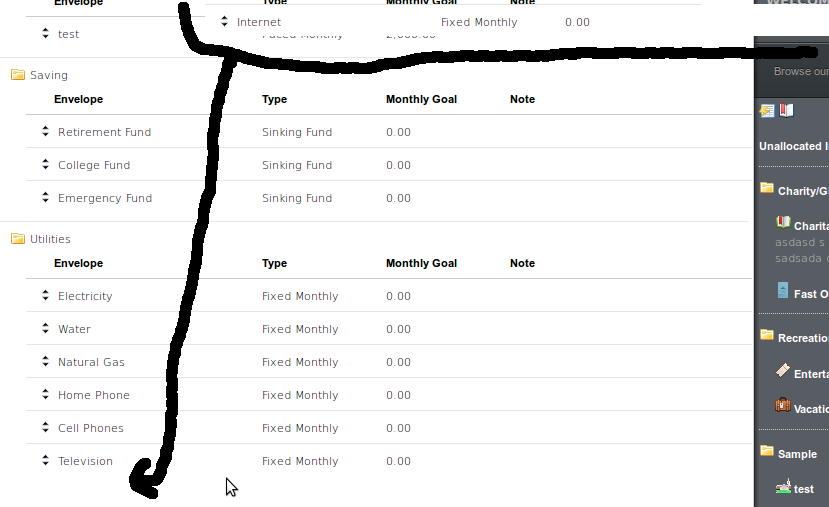
注意,当我拖动互联网的时候,它就在上面。
在拖动时,必须与其他人保持一致。怎么解决这个问题?是否有一种方式,数据必须在光标中,而不是在顶部时拖动?
这里是拖放代码:
 <script>
    var addPositions = function() {
        $('.dropenv, .dropcat').each(function() {
            var position = 0;
            $(this).children().each(function() {
                $(this).data('position', position);
                position++;
            });
        });
    };

    $(document).ready(function() {
        addPositions();

        $(".dropenv").sortable({
            connectWith: "tbody.env-data",
            dropOnEmpty: true,
            handle: '.env-handle',
            start: function(event, ui) {
                parentID = ui.item.parent().siblings('tr').attr('id');
            },
            stop: function(event, ui) {
                datas = new Array();
                var i = 0;

                ui.item.closest('tbody').children('tr').each(function() {
                    datas[i] = $(this).attr('id');
                    i++;
                });

                $.ajax({
                    type: "POST",
                    data: {
                        'cat_id': parentID,
                        'env[]': datas,
                        'csrfmiddlewaretoken': '{{ csrf_token }}'
                    },
                    url:"/envelopes/sort/",
                    contentType: "application/json;charset=utf-8",
                    dataType: "json",
                    success: function(data) {
                        notify('', data, { autoClose: true, delay: 1000 });
                    },
                    error: function(ts) {
                        notify('', ts.responseText, { autoClose: true, delay: 1000 });
                    }
                });
            }
        });

        $( ".dropcat").sortable({
            connectWith: "tbody.cat-data",
            dropOnEmpty: true,
            handle: '.cat-handle',
            update: function(){
                datas = new Array();
                var i = 0;

                $('.dropcat tr.masterList').each(function() {
                    datas[i] = $(this).attr('id');
                    i++;
                });

                $.ajax({
                    type: "POST",
                    data: {
                        'cat[]': datas,
                        'csrfmiddlewaretoken': '{{ csrf_token }}'
                    },
                    url:"/envelopes/categories/sort/",
                    contentType: "application/json;charset=utf-8",
                    dataType: "json",
                    success: function(data) {
                        notify('', data, { autoClose: true, delay: 1000 });
                    },
                    error: function(ts) {
                        notify('', ts.responseText, { autoClose: true, delay: 1000 });
                    }
                });
            }
        });
    });
</script>回答 1
Stack Overflow用户
发布于 2013-03-15 13:46:47
找到答案:overflow:auto
<table class="simple-table responsive-table" style="overflow:auto">页面原文内容由Stack Overflow提供。腾讯云小微IT领域专用引擎提供翻译支持
原文链接:
https://stackoverflow.com/questions/15432538
复制相关文章
相似问题
腾讯云开发者

Copyright © 2013 - 2026 Tencent Cloud. All Rights Reserved. 腾讯云 版权所有
深圳市腾讯计算机系统有限公司 ICP备案/许可证号:粤B2-20090059  粤公网安备44030502008569号
腾讯云计算(北京)有限责任公司 京ICP证150476号 | 京ICP备11018762号