
JASidepanels不显示导航按钮
我正在尝试使用JASidePanels在我的项目中实现storyboard。你可以在这里看到我的故事板。
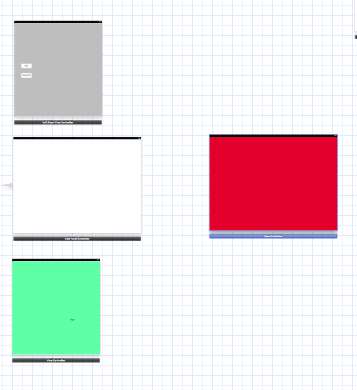
问题是,我没有看到显示左侧面板的导航栏中的按钮。在我的RootViewController中,我有一个代码。
-(void) awakeFromNib
{
    [self setLeftPanel:[self.storyboard instantiateViewControllerWithIdentifier:@"leftViewController"]];
    [self setCenterPanel:[self.storyboard instantiateViewControllerWithIdentifier:@"centerViewController"]];
    [self setRightPanel:[self.storyboard instantiateViewControllerWithIdentifier:@"rightViewController"]];
        self.shouldResizeLeftPanel = YES;
    self.shouldResizeRightPanel = YES;
    [self setRightFixedWidth:300.0f];
    [self setLeftFixedWidth:300.0f];

}我遵循了他们在github页面上说的步骤。同样,当我试图将RootviewController嵌入到navigationController中时。它显示的是navigationBar,而不是barbutton item。
在这方面有什么帮助吗?
回答 2
Stack Overflow用户
发布于 2013-03-26 13:55:23
例如,将中心UIViewController嵌入到storyBoard中的UINavigationController中:
- 选择UIViewController on StoryBoard
- 选择Xcode菜单项编辑器-嵌入导航控制器
- 选择新的UINavigationController的身份检查器(Alt-Command-3)
- 给StoryBoard ID指定唯一的名称,例如myCenterController
- 使用该名称创建中心面板 [self setCenterPanel:self.storyboard setCenterPanel:self.storyboard
因此,您实际上并没有将viewController设置为centerPanel,而是设置了一个包含viewController的导航控制器。
Stack Overflow用户
发布于 2016-06-07 19:32:43
嗯,我使用的是斯威夫特2.2,我也看不见导航按钮。
我正在使用故事板,所以我创建了:
- MainViewController ->,这将是主要的容器
- LeftMenuViewController ->这是左边的菜单
- ProductsViewController ->这将在MainViewController里面
因此,在MainViewController中,我将我的VC设置为:
self.leftPanel = self.storyboard?.instantiateViewControllerWithIdentifier("LeftMenuViewController") //for left menu and

self.centerPanel = UINavigationController.init(rootViewController: (self.storyboard?.instantiateViewControllerWithIdentifier("ProductsViewController"))!)添加UINavigationController.init将解决问题,您将在中心面板中看到导航按钮。
https://stackoverflow.com/questions/15379588
复制相似问题
腾讯云开发者

Copyright © 2013 - 2026 Tencent Cloud. All Rights Reserved. 腾讯云 版权所有
深圳市腾讯计算机系统有限公司 ICP备案/许可证号:粤B2-20090059  粤公网安备44030502008569号
腾讯云计算(北京)有限责任公司 京ICP证150476号 | 京ICP备11018762号