
WPF RelativeSource行为
WPF RelativeSource行为
提问于 2013-03-06 00:53:47
我在理解RelativeSource绑定行为方面有一些问题。下面是正确地将Label内容绑定到StackPanel标记的代码:
<Window x:Class="Binding_RelativeSource.MainWindow" Tag="Window Tag">
    <Grid Tag="Grid Tag">
        <StackPanel Tag="StackPanel Tag" Height="100" HorizontalAlignment="Left" Margin="156,97,0,0" Name="stackPanel1" VerticalAlignment="Top" Width="200">
            <Label Content="{Binding Path=Tag,RelativeSource={RelativeSource Mode=FindAncestor,AncestorLevel=1,AncestorType=StackPanel},FallbackValue=BindingFailed}" Height="28" Name="label1" />
        </StackPanel>
    </Grid>
</Window>以上代码不绑定Grid标记,如果我更改了AncestorType=Grid和AncestorLevel=2。我有两个问题:
- 我认为我应该将AncestorLevel改为2,以绑定到网格。但它适用于
AncestorLevel=1。为什么? - 我也不能将标签绑定到窗口tag.Please建议。
回答 2
Stack Overflow用户
回答已采纳
发布于 2013-03-06 03:07:48
我最后得出的结论是: VS2010设计器的问题在于它没有更新窗口标记的RelativeSource绑定。它在designer中更新其他控件的绑定(我与Grid &StackPanel检查过),但对于Winodw,它在运行时得到更新。微软已经在VS2012中解决了这一问题。
Stack Overflow用户
发布于 2013-03-06 01:35:56
AncestorLevel用于查找要绑定到的正确祖先,这是因为可能有多个该类型的祖先。
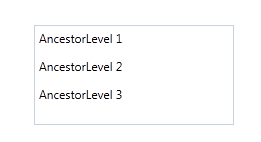
这里有一个场景显示了以下内容:
<Grid Tag="AncestorLevel 3">
    <Grid Tag="AncestorLevel 2">
        <Grid Tag="AncestorLevel 1">
            <StackPanel Tag="StackPanel Tag" Height="100" HorizontalAlignment="Left" Margin="156,97,0,0" Name="stackPanel1" VerticalAlignment="Top" Width="200">
                <Label Content="{Binding Path=Tag,RelativeSource={RelativeSource Mode=FindAncestor,AncestorLevel=1,AncestorType=Grid},FallbackValue=BindingFailed}" Height="28"  />
                <Label Content="{Binding Path=Tag,RelativeSource={RelativeSource Mode=FindAncestor,AncestorLevel=2,AncestorType=Grid},FallbackValue=BindingFailed}" Height="28"  />
                <Label Content="{Binding Path=Tag,RelativeSource={RelativeSource Mode=FindAncestor,AncestorLevel=3,AncestorType=Grid},FallbackValue=BindingFailed}" Height="28"  />
            </StackPanel>
        </Grid>
    </Grid>
</Grid>
结果:
替代法
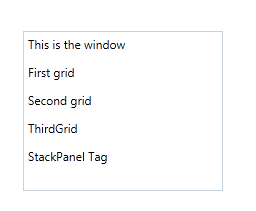
但是您可以通过使用ElementName绑定简化代码,这使用元素的Name
示例:
<Window x:Class="WpfApplication9.MainWindow"
        xmlns="http://schemas.microsoft.com/winfx/2006/xaml/presentation"
        xmlns:x="http://schemas.microsoft.com/winfx/2006/xaml"
        Title="MainWindow" Height="350" Width="525" Name="MyWindow" Tag="This is the window">
    <Grid Name="Grid1" Tag="First grid">
        <Grid Name="Grid2" Tag="Second grid">
            <Grid Name="Grid3" Tag="ThirdGrid">
                <StackPanel Name="stackPanel1" Tag="StackPanel Tag" Height="160" HorizontalAlignment="Left" Margin="156,97,0,0" VerticalAlignment="Top" Width="200">
                    <Label Content="{Binding ElementName=MyWindow, Path=Tag}" Height="28"  />
                    <Label Content="{Binding ElementName=Grid1, Path=Tag}" Height="28"  />
                    <Label Content="{Binding ElementName=Grid2, Path=Tag}" Height="28"  />
                    <Label Content="{Binding ElementName=Grid3, Path=Tag}" Height="28"  />
                    <Label Content="{Binding ElementName=stackPanel1, Path=Tag}" Height="28"  />
                </StackPanel>
            </Grid>
        </Grid>
    </Grid>
</Window>
结果:
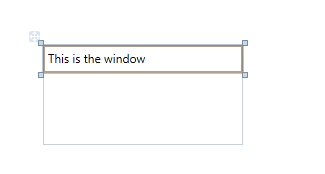
如果您想要绑定回Window,仍然可以使用FindAncestor
<Window x:Class="WpfApplication9.MainWindow"
        xmlns="http://schemas.microsoft.com/winfx/2006/xaml/presentation"
        xmlns:x="http://schemas.microsoft.com/winfx/2006/xaml"
        Title="MainWindow" Height="350" Width="525" Tag="This is the window">
    <Grid>
        <StackPanel Height="100" HorizontalAlignment="Left" Margin="156,97,0,0" Name="stackPanel1" VerticalAlignment="Top" Width="200">
            <Label Content="{Binding Path=Tag,RelativeSource={RelativeSource Mode=FindAncestor,AncestorType=Window},FallbackValue=BindingFailed}" Height="28"  />
        </StackPanel>
    </Grid>
结果:
页面原文内容由Stack Overflow提供。腾讯云小微IT领域专用引擎提供翻译支持
原文链接:
https://stackoverflow.com/questions/15237037
复制相关文章
相似问题
腾讯云开发者

Copyright © 2013 - 2026 Tencent Cloud. All Rights Reserved. 腾讯云 版权所有
深圳市腾讯计算机系统有限公司 ICP备案/许可证号:粤B2-20090059  粤公网安备44030502008569号
腾讯云计算(北京)有限责任公司 京ICP证150476号 | 京ICP备11018762号