
只有JColorChooser (Java 7)
我正在尝试创建一个JFrame,包括一个只包含选择RGB颜色所需内容的JPanel。我一直在玩弄JColorChooser、AbstractColorChooserPanel和ColorModel,阅读甲骨文教程,但我没有理解如何开发我想要的东西。我甚至下载了OpenJDK源代码来获取这些类的源代码,但仍然没有。我想得到的是:
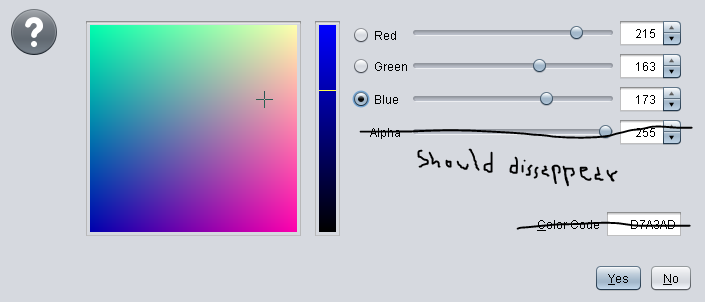
Alpha内容应该消失,颜色代码字段应该设置为不可见,但是继续工作,这样我就可以在单击"Yes“按钮时检索代码(我猜是在actionPerformed方法中)。此外,重写paintComponent方法也是一个很好的补充。
提前谢谢。
编辑:--这就是我现在拥有的东西(上面的照片,没有“画图”-编辑):
for (final AbstractColorChooserPanel accp : panels) {
  if (accp.getDisplayName().equals("RGB")) {
    JOptionPane.showOptionDialog(Main.frame, accp,
    "Color selection tool", JOptionPane.OK_OPTION,
    JOptionPane.QUESTION_MESSAGE, null, null, 0);
  }
}EDIT2:到目前为止,我已经能够删除alpha内容,但是我还无法“找到”显示颜色代码的标签和字段,因此它们会继续显示,另外,由于无法访问字段,所以无法访问颜色代码:
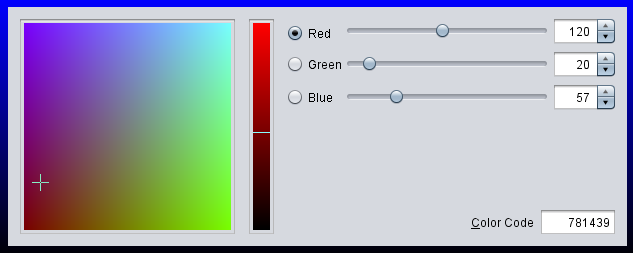
这与以下代码有关:
package edu.utils;

import java.awt.BorderLayout;
import java.awt.Color;
import java.awt.Dimension;
import java.awt.GradientPaint;
import java.awt.Graphics;
import java.awt.Graphics2D;
import java.awt.RenderingHints;
import java.awt.Toolkit;
import java.awt.event.ActionEvent;
import java.awt.event.ActionListener;
import java.lang.reflect.Array;
import java.lang.reflect.Field;

import javax.swing.JColorChooser;
import javax.swing.JDialog;
import javax.swing.JLabel;
import javax.swing.JPanel;
import javax.swing.JSlider;
import javax.swing.JSpinner;
import javax.swing.WindowConstants;
import javax.swing.colorchooser.AbstractColorChooserPanel;

import edu.io.local.Log;

public final class RGBColorChooserPanel extends JDialog implements ActionListener {

private final JColorChooser jCC;
private final JPanel        panel;
private String              colorCode;

public RGBColorChooserPanel(final String title) {
super(edu.Main.frame);
this.setTitle(title);
this.jCC = new JColorChooser();
this.modifyJColorChooser();
this.panel = new JPanel() {
    @Override
    protected void paintComponent(final Graphics g) {
    final Graphics2D g2d = (Graphics2D) g;
    g2d.setRenderingHint(RenderingHints.KEY_ANTIALIASING,
            RenderingHints.VALUE_ANTIALIAS_ON);

    final GradientPaint gp = new GradientPaint(0, 0, Color.BLUE, 0, this.getHeight(),
            Color.BLACK);

    g2d.setPaint(gp);
    g2d.fillRect(0, 0, this.getWidth(), this.getHeight());

    super.paintComponent(g);
    }
};
this.panel.add(this.jCC);
this.panel.setOpaque(false);
this.jCC.setOpaque(false);
this.jCC.setPreviewPanel(new JPanel());
this.jCC.setColor(120, 20, 57);
this.add(this.panel, BorderLayout.CENTER);
this.setDefaultCloseOperation(WindowConstants.HIDE_ON_CLOSE);
this.pack();

final Dimension screenSize = Toolkit.getDefaultToolkit().getScreenSize();
this.setLocation((screenSize.width - this.getWidth()) / 2,
        (screenSize.height - this.getHeight()) / 2);
this.setResizable(false);
this.setVisible(true);
}

@Override
public void actionPerformed(final ActionEvent e) {
// TODO Auto-generated method stub

}

private void modifyJColorChooser() {
final AbstractColorChooserPanel[] panels = this.jCC.getChooserPanels();
for (final AbstractColorChooserPanel accp : panels) {
    if (!accp.getDisplayName().equals("RGB")) {
    this.jCC.removeChooserPanel(accp);
    }
}

final AbstractColorChooserPanel[] colorPanels = this.jCC.getChooserPanels();
final AbstractColorChooserPanel cp = colorPanels[0];

Field f = null;
try {
    f = cp.getClass().getDeclaredField("panel");
} catch (NoSuchFieldException | SecurityException e) {
    Log.log(e);
}
f.setAccessible(true);

Object colorPanel = null;
try {
    colorPanel = f.get(cp);
} catch (IllegalArgumentException | IllegalAccessException e) {
    Log.log(e);
}

Field f2 = null;
try {
    f2 = colorPanel.getClass().getDeclaredField("spinners");
} catch (NoSuchFieldException | SecurityException e4) {
    Log.log(e4);
}
f2.setAccessible(true);
Object rows = null;
try {
    rows = f2.get(colorPanel);
} catch (IllegalArgumentException | IllegalAccessException e3) {
    Log.log(e3);
}

final Object transpSlispinner = Array.get(rows, 3);
Field f3 = null;
try {
    f3 = transpSlispinner.getClass().getDeclaredField("slider");
} catch (NoSuchFieldException | SecurityException e) {
    Log.log(e);
}
f3.setAccessible(true);
JSlider slider = null;
try {
    slider = (JSlider) f3.get(transpSlispinner);
} catch (IllegalArgumentException | IllegalAccessException e2) {
    Log.log(e2);
}
slider.setVisible(false);
Field f4 = null;
try {
    f4 = transpSlispinner.getClass().getDeclaredField("spinner");
} catch (NoSuchFieldException | SecurityException e1) {
    Log.log(e1);
}
f4.setAccessible(true);
JSpinner spinner = null;
try {
    spinner = (JSpinner) f4.get(transpSlispinner);
} catch (IllegalArgumentException | IllegalAccessException e) {
    Log.log(e);
}
spinner.setVisible(false);
Field f5 = null;
try {
    f5 = transpSlispinner.getClass().getDeclaredField("label");
} catch (NoSuchFieldException | SecurityException e1) {
    Log.log(e1);
}
f5.setAccessible(true);
JLabel label = null;
try {
    label = (JLabel) f5.get(transpSlispinner);
} catch (IllegalArgumentException | IllegalAccessException e) {
    Log.log(e);
}
label.setVisible(false);

Field f6 = null;
try {
    f6 = transpSlispinner.getClass().getDeclaredField("value");
} catch (NoSuchFieldException | SecurityException e1) {
    Log.log(e1);
}
f6.setAccessible(true);
float value = 0;
try {
    value = (float) f6.get(transpSlispinner);
} catch (IllegalArgumentException | IllegalAccessException e) {
    Log.log(e);
}
}
}
PS:我知道异常处理的奇怪之处,但我需要在每条语句中管理异常,所以请不要抱怨。
回答 1
Stack Overflow用户
发布于 2013-03-05 22:18:14
最好的选择是通过扩展http://docs.oracle.com/javase/tutorial/uiswing/components/colorchooser.html#chooserpanel来扩展AbstractColorChooserPanel。教程示例虽然基本,但对于安装和使用来说是一个有用的指南。草图的完整实现超出了SO的范围;但是在许多现存的示例中,这一个和这一个似乎值得更仔细地研究。与此相关的问与答也可能提供一些见解。
https://stackoverflow.com/questions/15227644
复制相似问题
腾讯云开发者

Copyright © 2013 - 2026 Tencent Cloud. All Rights Reserved. 腾讯云 版权所有
深圳市腾讯计算机系统有限公司 ICP备案/许可证号:粤B2-20090059  粤公网安备44030502008569号
腾讯云计算(北京)有限责任公司 京ICP证150476号 | 京ICP备11018762号